DCIM2SD
Contient des annonces
1K+
Téléchargements

Tout public
info

À propos de l'application
This is a simple tools.
Only do one thing.
Move or copy the files (usually photos and videos) in your DCIM directory to another DCIM directory of the SD card / OTG hard drive / internal storage space.
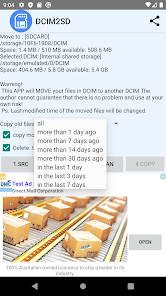
And you can set the filter to move the files a few days ago or within a few days.
Delete .thumbnails when you copy/move.
How to use:
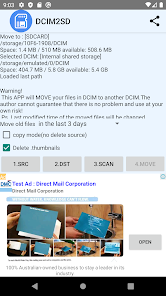
Only four buttons 1.2.3.4 can be pressed in order
1. Select the source DCIM directory (must be the DCIM directory, the root directory will not work)
2. Select the destination DCIM directory (if the destination does not have a DCIM directory, you can first select the root directory APP will help you create a DCIM directory,But you still have to choose the DCIM directory again)
3. Start scanning and analyzing files
4. Confirm if you want to start copying / moving
After the copy/move is successful, the path will be recorded, Only need to perform steps 3 and 4 the next time.
Using Google ’s new SAF API.
So it can only support Android 8 or above.
Test available on Android 10.
If some machines do not display the DCIM directory when selecting DCIM, first click the three dots icon in the upper right corner, then select show the internal storage space, and then select the internal storage space in the three bars icon in the upper left corner, and you can select the DCIM directory.
To select the DCIM directory of the OTG or SD card is also selected in the three bars icon.
This is the system UI. Each phone may be slightly different.
I wrote this app because I often move the camera photos from the SD card to the mobile phone using OTG.
I originally used file management to deal with it, I wanted to be lazy, so I wrote this app.
Or if you want to clear the phone space and move the phone photos to the SD card / OTG hard drive, you can also use this APP.
Only do one thing.
Move or copy the files (usually photos and videos) in your DCIM directory to another DCIM directory of the SD card / OTG hard drive / internal storage space.
And you can set the filter to move the files a few days ago or within a few days.
Delete .thumbnails when you copy/move.
How to use:
Only four buttons 1.2.3.4 can be pressed in order
1. Select the source DCIM directory (must be the DCIM directory, the root directory will not work)
2. Select the destination DCIM directory (if the destination does not have a DCIM directory, you can first select the root directory APP will help you create a DCIM directory,But you still have to choose the DCIM directory again)
3. Start scanning and analyzing files
4. Confirm if you want to start copying / moving
After the copy/move is successful, the path will be recorded, Only need to perform steps 3 and 4 the next time.
Using Google ’s new SAF API.
So it can only support Android 8 or above.
Test available on Android 10.
If some machines do not display the DCIM directory when selecting DCIM, first click the three dots icon in the upper right corner, then select show the internal storage space, and then select the internal storage space in the three bars icon in the upper left corner, and you can select the DCIM directory.
To select the DCIM directory of the OTG or SD card is also selected in the three bars icon.
This is the system UI. Each phone may be slightly different.
I wrote this app because I often move the camera photos from the SD card to the mobile phone using OTG.
I originally used file management to deal with it, I wanted to be lazy, so I wrote this app.
Or if you want to clear the phone space and move the phone photos to the SD card / OTG hard drive, you can also use this APP.
Date de mise à jour
La sécurité, c'est d'abord comprendre comment les développeurs collectent et partagent vos données. Les pratiques concernant leur confidentialité et leur protection peuvent varier selon votre utilisation, votre région et votre âge. Le développeur a fourni ces informations et peut les modifier ultérieurement.

Aucune donnée partagée avec des tiers
En savoir plus sur la manière dont les développeurs déclarent le partage

Aucune donnée collectée
En savoir plus sur la manière dont les développeurs déclarent la collecte
Nouveautés
Easily move/copy your DCIM
Assistance de l'appli
À propos du développeur
蘇伯元
yuandroid.mail@gmail.com
仁德鄉成功村21鄰保生路65巷15號
仁德區
台南市, Taiwan 71751


