
TV remote control for Roku
ປະກອບມີໂຄສະນາການຊື້ຢູ່ໃນແອັບ

2,7star
4,39 ພັນ ຄຳຕິຊົມ

ໄວຮຸ່ນ
info
1 ລ້ານ+
ດາວໂຫຼດ

ກ່ຽວກັບແອັບນີ້
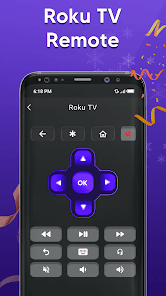
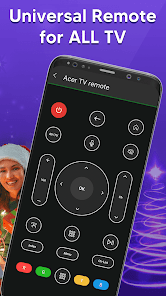
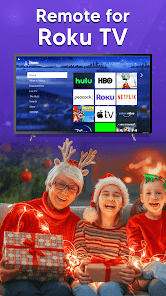
The Number-1 TV remote control for Roku and Universal TV Remote Control (Wifi and IR Remotes) in All countries.
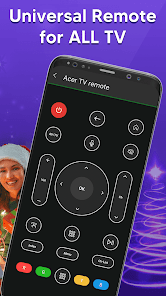
Want a TV remote that supports WIFI and IR? Then Universal Remote Control For TV is for you.
Remote control for roku and all TV is one of the best apps to support all your smart TVs. Using universal TV Remote Control you can access your tv with WIFI and IR functionalities. This universal tv the provides all functionalities that you need to control your TV. One of the best TV Remote app that supports almost all TV brands. Now monitor your smart television using the smart TV remote app
The main setting required to connect your mobile with your TV is, your mobile has IR or you have a WIFI network. Your Mobile and TV will be connected to the same network. Also If there is IR functionality in your mobile then you can easily connect with the TV through universal remote control for all tv. With the infrared (IR) feature, your phone sends signals to the TV so your device works like a common remote TV.
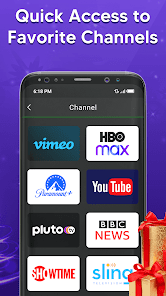
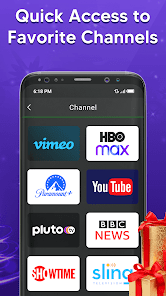
So don’t worry, if your original remote is missing or not working properly. Now you can control smart TV from your smartphone. This universal TV remote control for any TV supports all TV brands in every country. You can watch your favourite channels and controls volume and other functionalities through this Universal remote Control.
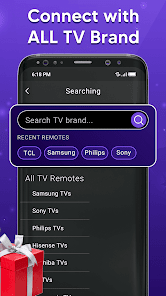
Main TV Brands Supported by Universal Remote control for all TV:
✔️ Smart TV remote for Samsung TV
✔️ Remote for Sony TV
✔️ TV remote for LG TV
✔️ Universal TV remote for Philips TV
✔️ TV Remote for TCL TV
✔️ Smart TV remote for Gree TV
✔️ Universal TV remote for Kenwood
✔️ TV remote for Panasonic
✔️ smart tv remote for Tcl Roku tv
✔️ Remote for Haier Tv
✔️ TV remote for Xiaomi TV
✔️ Remote control for EcoStar TV
✔️ TV remote for Toshiba
✔️ Smart TV remote for Orient TV and many more.
How to Use Universal Smart TV Remote Control App:
Install TV remote control app.
Select WIFI or IR Mode
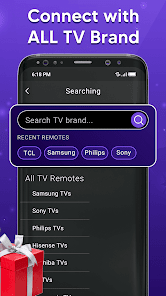
After that, search for your smart tv.
Select the TV brand from the available list.
Select remote for your required device.
Code appears on tv, put it on your phone
Tap on pair, your remote is ready to use
Feature of Universal Remote control for any TV:
• Universal TV remote control supports all TV brands.
• Easily control your smart TV through WIFI and IR
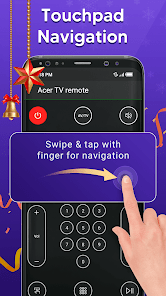
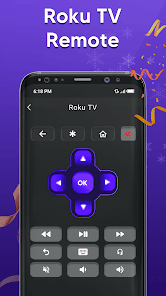
• Up / Down / Left / Right Navigation.
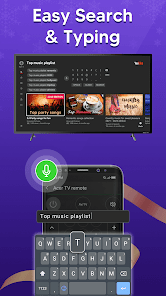
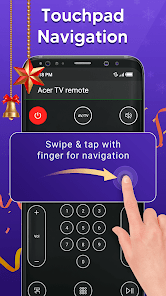
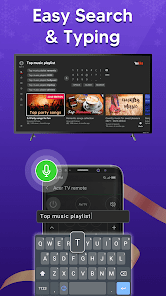
• Touchpad and keyboard functionality
• Easily control Volume and channels of all TV
• Both IR and Wi-Fi functionalities supported
• Button for muting and unmute
• Each and every remote control function in this app
• Beautiful design with simple UI.
It is always good and easy to use a single Universal remote control for tv to control all your smart TVs. Now a day’s mobile phone has become a major gadget that people always carry with them, it becomes a part of our life, so having a remote application installed on your mobile device that works as a smart remote control for tv will make your life easier.
Important Notice with smart TV Remote:
Your smartphone requires an IR feature or WIFI connection. If your mobile does not have an IR sensor it works with a WIFI network. Make sure your smartphone and TV must be connected to the same WIFI network. Also, if your TV brand is not listed or the universal TV remote control app is not working with your television, please email us at imfotogenic@gmail.com your TV brand and remote model. We will work to make this application compatible with your TV brand. Enjoy the Universal TV Remote For all Tv.
Want a TV remote that supports WIFI and IR? Then Universal Remote Control For TV is for you.
Remote control for roku and all TV is one of the best apps to support all your smart TVs. Using universal TV Remote Control you can access your tv with WIFI and IR functionalities. This universal tv the provides all functionalities that you need to control your TV. One of the best TV Remote app that supports almost all TV brands. Now monitor your smart television using the smart TV remote app
The main setting required to connect your mobile with your TV is, your mobile has IR or you have a WIFI network. Your Mobile and TV will be connected to the same network. Also If there is IR functionality in your mobile then you can easily connect with the TV through universal remote control for all tv. With the infrared (IR) feature, your phone sends signals to the TV so your device works like a common remote TV.
So don’t worry, if your original remote is missing or not working properly. Now you can control smart TV from your smartphone. This universal TV remote control for any TV supports all TV brands in every country. You can watch your favourite channels and controls volume and other functionalities through this Universal remote Control.
Main TV Brands Supported by Universal Remote control for all TV:
✔️ Smart TV remote for Samsung TV
✔️ Remote for Sony TV
✔️ TV remote for LG TV
✔️ Universal TV remote for Philips TV
✔️ TV Remote for TCL TV
✔️ Smart TV remote for Gree TV
✔️ Universal TV remote for Kenwood
✔️ TV remote for Panasonic
✔️ smart tv remote for Tcl Roku tv
✔️ Remote for Haier Tv
✔️ TV remote for Xiaomi TV
✔️ Remote control for EcoStar TV
✔️ TV remote for Toshiba
✔️ Smart TV remote for Orient TV and many more.
How to Use Universal Smart TV Remote Control App:
Install TV remote control app.
Select WIFI or IR Mode
After that, search for your smart tv.
Select the TV brand from the available list.
Select remote for your required device.
Code appears on tv, put it on your phone
Tap on pair, your remote is ready to use
Feature of Universal Remote control for any TV:
• Universal TV remote control supports all TV brands.
• Easily control your smart TV through WIFI and IR
• Up / Down / Left / Right Navigation.
• Touchpad and keyboard functionality
• Easily control Volume and channels of all TV
• Both IR and Wi-Fi functionalities supported
• Button for muting and unmute
• Each and every remote control function in this app
• Beautiful design with simple UI.
It is always good and easy to use a single Universal remote control for tv to control all your smart TVs. Now a day’s mobile phone has become a major gadget that people always carry with them, it becomes a part of our life, so having a remote application installed on your mobile device that works as a smart remote control for tv will make your life easier.
Important Notice with smart TV Remote:
Your smartphone requires an IR feature or WIFI connection. If your mobile does not have an IR sensor it works with a WIFI network. Make sure your smartphone and TV must be connected to the same WIFI network. Also, if your TV brand is not listed or the universal TV remote control app is not working with your television, please email us at imfotogenic@gmail.com your TV brand and remote model. We will work to make this application compatible with your TV brand. Enjoy the Universal TV Remote For all Tv.
ອັບເດດແລ້ວເມື່ອ
ຄວາມປອດໄພເລີ່ມດ້ວຍການເຂົ້າໃຈວ່ານັກພັດທະນາເກັບກຳ ແລະ ແບ່ງປັນຂໍ້ມູນຂອງທ່ານແນວໃດ. ວິທີປະຕິບັດກ່ຽວກັບຄວາມເປັນສ່ວນຕົວ ແລະ ຄວາມປອດໄພຂອງຂໍ້ມູນອາດຈະແຕກຕ່າງກັນອີງຕາມການນຳໃຊ້, ພາກພື້ນ ແລະ ອາຍຸຂອງທ່ານ. ນັກພັດທະນາໃຫ້ຂໍ້ມູນນີ້ ແລະ ອາດຈະອັບເດດມັນເມື່ອເວລາຜ່ານໄປ.

ບໍ່ໄດ້ໄດ້ແບ່ງປັນຂໍ້ມູນກັບພາກສ່ວນທີສາມ
ສຶກສາເພີ່ມເຕີມ ກ່ຽວກັບວ່ານັກພັດທະນາປະກາດການແບ່ງປັນຂໍ້ມູນແນວໃດ

ແອັບນີ້ອາດຈະເກັບກຳປະເພດຂໍ້ມູນເຫຼົ່ານີ້
ການເຄື່ອນໄຫວແອັບ, ຂໍ້ມູນແອັບ ແລະ ປະສິດທິພາບ, ID ອຸປະກອນ ຫຼື ID ອື່ນໆ

ລະບົບຈະເຂົ້າລະຫັດຂໍ້ມູນໃນຂະນະສົ່ງ

ລຶບຂໍ້ມູນບໍ່ໄດ້
ການຈັດອັນດັບ ແລະ ຄຳຕິຊົມ
2,6
4,32 ພັນ ຄຳຕິຊົມ
ຝ່າຍຊ່ວຍເຫຼືອຂອງແອັບ
ກ່ຽວກັບນັກພັດທະນາແອັບ
Mehboob UR Rahman
imfotogenic@gmail.com
Mohala Ghani Khyal mian Khan Mardan
Mardaan, 23200
Pakistan


