
Helicon Remote
In-app aankopen

3,1star
4,53K reviews
500K+
Downloads

Iedereen
info



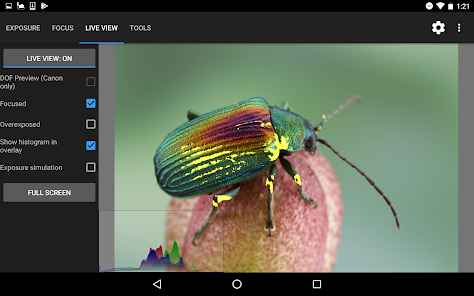
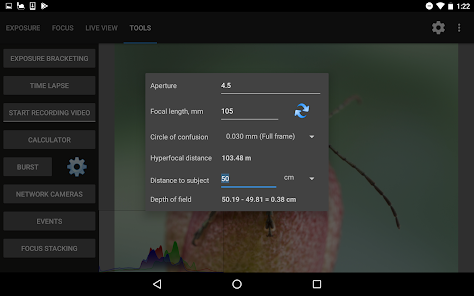

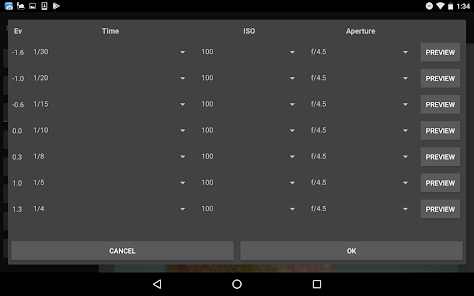


Over deze app
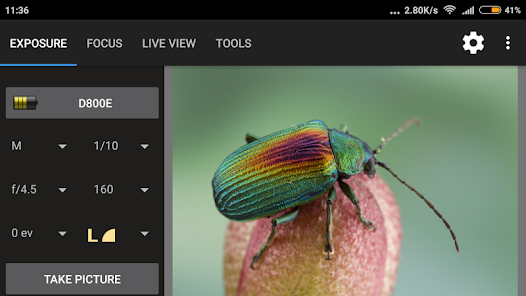
Helicon Remote is een hulpprogramma voor het maken van opnamen via tethering en een camera-afstandsbediening die compatibel is met alle recente Nikon en Canon DSLR-camera's (behalve D3000 / D3100 / D3200 / D3300 / D3400 - deze worden NIET ONDERSTEUND. Volledige lijst met ondersteunde camera's hieronder). Elk ander cameramerk wordt NIET ONDERSTEUND.
De app kan alleen worden gebruikt op apparaten met ondersteuning voor USB OTG (hostmodus). USB OTG-adapter is vereist als uw apparaat geen USB-aansluiting van volledige grootte heeft!
Belangrijkste kenmerken:
- Wi-Fi-ondersteuning (voor ondersteunde camera's met ingebouwde Wi-Fi; Nikon WT- en Wu-1-modules; en Canon WFT-modules)
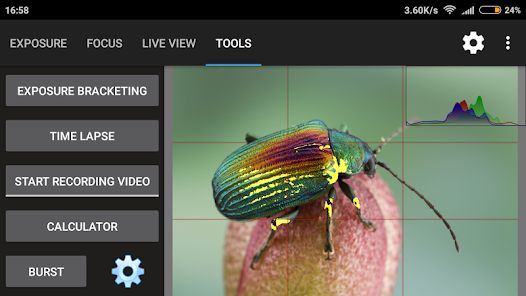
- Geautomatiseerde focus-bracketing (focus-bracketing, belichtingsbracketing en time-lapse-opnamen kunnen op elke mogelijke manier worden gecombineerd)
- Voorbeeld van focusstapelresultaat
- Extra lange belichtingstijden (BULB-modus) - tot 32 minuten (alle Canon-camera's, alle Nikons BEHALVE D90, D300 (s), D700, D5000, D5100, D7000, D3, D3S, D3X)
- Geavanceerde belichtingsbracketing
- Beoordeling van afbeeldingen
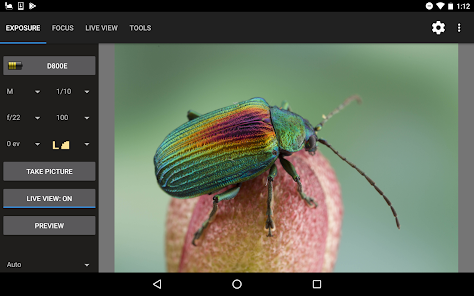
- Liveweergave op volledig scherm
- Focusgebieden markeren
- Live View ruismiddeling
- Time-lapse-opnamen
- Video-opname
- Burst-opnamen (continu)
- Hyperbrandpuntsafstand en DOF-calculator
- Live histogram (grijswaarden / RGB)
Zie http://www.heliconsoft.com/heliconsoft-products/helicon-remote/ voor meer informatie Helicon Remote, de functies en versies voor andere besturingssystemen (Windows, Mac, iOS).
Apparaatvereisten:
- Android 4.4+
- Ondersteuning voor USB-host (ook wel USB OTG genoemd). Een USB OTG-adapter is vereist, tenzij uw apparaat een USB-aansluiting van volledige grootte heeft. Merk op dat sommige Android-apparaten beperkte USB-ondersteuning hebben. Die detecteren geen camera's, zelfs niet als ze andere apparaten zoals USB-sticks of muizen met succes detecteren. U kunt deze app gebruiken om erachter te komen of uw apparaat volledige USB OTG-ondersteuning heeft: https://play.google.com/store/apps/details?id=org.tauruslabs.usbhostcheck
- Touch screen
Camera compatibiliteit
Canon:
- 1D Mark III, 1D X Mark III, 1Ds Mark III, 1D Mark IV, 1D C, 1D X, 1D X Mark II;
- 5D Mark II, 5D Mark III, 5D Mark IV, 5DS, 5DS R (5DSR);
- 6D, 6D Mark II;
- 7D, 7D Mark II;
- 40D, 50D, 60D, 70D, 77D / 9000D, 80D, 90D;
- 100D / SL1 / Kiss X7, 200D / SL2 / Kiss X8, 250D;
- 450D / Rebel XSi / Kiss X2, 500D / Rebel T1i / Kiss X3, 550D / Rebel T2i / Kiss X4, 600D / Rebel T3i / Kiss X5, 650D / Rebel T4i / Kiss X6, 700D / T5i / Kiss X7i, 750D / Rebel T6i / Kiss x8i, 760D / Rebel T6s / EOS 8000D, 800D / Rebel T7i / Kiss X9i, 1000D / Rebel XS / Kiss F, 1100D / Rebel T3 / Kiss X50, 1200D / T5 / Kiss X70, 1300D / Rebel T6 / Kiss X80;
- 2000D / Kiss X90 / T7 / 1500D;
- 4000D / 3000D.
Nikon: D3, D3s, D3x, D4, D4s, D5, Df, D90, D300 / D300s, D500, D600, D610, D700, D750, D780, D800 / D800e, D810, D810A, D850, D5000, D5100, D5200, D5300, D5500, D5600, D7000, D7100, D7200, D7500. (D3000 - D3500 worden niet ondersteund).
Video-opname:
- alle Nikon-camera's BEHALVE D90, D300 (s), D700, D3, D3S, D3X, D5000, Df;
- alle Canon-camera's.
Beperkingen: de gratis (niet-geregistreerde) versie staat niet fotograferen in onbewerkt formaat toe. Een licentie kan worden gekocht via http://heliconsoft.com of via de menu / Registreer-knop vanuit Helicon Remote.
De app kan alleen worden gebruikt op apparaten met ondersteuning voor USB OTG (hostmodus). USB OTG-adapter is vereist als uw apparaat geen USB-aansluiting van volledige grootte heeft!
Belangrijkste kenmerken:
- Wi-Fi-ondersteuning (voor ondersteunde camera's met ingebouwde Wi-Fi; Nikon WT- en Wu-1-modules; en Canon WFT-modules)
- Geautomatiseerde focus-bracketing (focus-bracketing, belichtingsbracketing en time-lapse-opnamen kunnen op elke mogelijke manier worden gecombineerd)
- Voorbeeld van focusstapelresultaat
- Extra lange belichtingstijden (BULB-modus) - tot 32 minuten (alle Canon-camera's, alle Nikons BEHALVE D90, D300 (s), D700, D5000, D5100, D7000, D3, D3S, D3X)
- Geavanceerde belichtingsbracketing
- Beoordeling van afbeeldingen
- Liveweergave op volledig scherm
- Focusgebieden markeren
- Live View ruismiddeling
- Time-lapse-opnamen
- Video-opname
- Burst-opnamen (continu)
- Hyperbrandpuntsafstand en DOF-calculator
- Live histogram (grijswaarden / RGB)
Zie http://www.heliconsoft.com/heliconsoft-products/helicon-remote/ voor meer informatie Helicon Remote, de functies en versies voor andere besturingssystemen (Windows, Mac, iOS).
Apparaatvereisten:
- Android 4.4+
- Ondersteuning voor USB-host (ook wel USB OTG genoemd). Een USB OTG-adapter is vereist, tenzij uw apparaat een USB-aansluiting van volledige grootte heeft. Merk op dat sommige Android-apparaten beperkte USB-ondersteuning hebben. Die detecteren geen camera's, zelfs niet als ze andere apparaten zoals USB-sticks of muizen met succes detecteren. U kunt deze app gebruiken om erachter te komen of uw apparaat volledige USB OTG-ondersteuning heeft: https://play.google.com/store/apps/details?id=org.tauruslabs.usbhostcheck
- Touch screen
Camera compatibiliteit
Canon:
- 1D Mark III, 1D X Mark III, 1Ds Mark III, 1D Mark IV, 1D C, 1D X, 1D X Mark II;
- 5D Mark II, 5D Mark III, 5D Mark IV, 5DS, 5DS R (5DSR);
- 6D, 6D Mark II;
- 7D, 7D Mark II;
- 40D, 50D, 60D, 70D, 77D / 9000D, 80D, 90D;
- 100D / SL1 / Kiss X7, 200D / SL2 / Kiss X8, 250D;
- 450D / Rebel XSi / Kiss X2, 500D / Rebel T1i / Kiss X3, 550D / Rebel T2i / Kiss X4, 600D / Rebel T3i / Kiss X5, 650D / Rebel T4i / Kiss X6, 700D / T5i / Kiss X7i, 750D / Rebel T6i / Kiss x8i, 760D / Rebel T6s / EOS 8000D, 800D / Rebel T7i / Kiss X9i, 1000D / Rebel XS / Kiss F, 1100D / Rebel T3 / Kiss X50, 1200D / T5 / Kiss X70, 1300D / Rebel T6 / Kiss X80;
- 2000D / Kiss X90 / T7 / 1500D;
- 4000D / 3000D.
Nikon: D3, D3s, D3x, D4, D4s, D5, Df, D90, D300 / D300s, D500, D600, D610, D700, D750, D780, D800 / D800e, D810, D810A, D850, D5000, D5100, D5200, D5300, D5500, D5600, D7000, D7100, D7200, D7500. (D3000 - D3500 worden niet ondersteund).
Video-opname:
- alle Nikon-camera's BEHALVE D90, D300 (s), D700, D3, D3S, D3X, D5000, Df;
- alle Canon-camera's.
Beperkingen: de gratis (niet-geregistreerde) versie staat niet fotograferen in onbewerkt formaat toe. Een licentie kan worden gekocht via http://heliconsoft.com of via de menu / Registreer-knop vanuit Helicon Remote.
Geüpdatet op
Veiligheid van gegevens begint met inzicht in de manier waarop ontwikkelaars je gegevens verzamelen en delen. Procedures voor gegevensprivacy en beveiliging kunnen variëren op basis van je gebruik, regio en leeftijd. De ontwikkelaar heeft deze informatie aangeleverd en kan die in de loop van de tijd updaten.

Geen gegevens gedeeld met derden
Meer informatie over hoe ontwikkelaars aangeven welke gegevens ze delen

Deze app kan deze typen gegevens verzamelen
Persoonlijke informatie en App-gegevens en -prestaties

Gegevens worden tijdens de overdracht versleuteld

Gegevens kunnen niet worden verwijderd
Beoordelingen en reviews
3,1
3,67K reviews

J R
- Markeren als ongepast
10 januari 2024
It worked on my 600d. That's great. Unfortunately did not seem to bring what I wanted in an easy manner. Wanted to see live view, make a manual exposure, view result, adjust focus and repeat. Ok, too bad will settle with the small camera screen. Turns out i(t) changed a lot of settings on the camera. Live view was set to off. AutoFocus, singleshot, bunch of things. Not sure how I did that, but I did not expect that during my next imaging session and I lost a lot of time correcting them. My bad?
Helicon Soft Ltd.
12 januari 2024
Hello, what you said you wanted to do is exactly what Helicon Remote is for. What was it that didn't work? Can you reproduce the problem and send a bug report? As for the settings, we must change a couple of them in order to work, but not many. Shooting mode is set to single but restored after the shooting session. We don't touch focus mode.

Een Google-gebruiker
- Markeren als ongepast
27 mei 2017
D750 with WU2 WiFi. Tested and finally bought the app. Was pretty expensive $48 dollar, but after testing many others, this one really brought added value for professional use where others failed imo. I had to figure out the wifi camera connection but once running it works perfect with my D750. Foto's are also nicely stored on the camera SD card and preview was available on my Sony XZs w/o any problem. Focus, bracketing, f-stop, ISO with and w/o flash. The calculated EV differences between foto's are very helpful to have a nice idea what picture differences you might expect. It was a bit confusing in the beginning, but once understood it is very clear. GUI, overview, access to really needed parts, all is well done. Logical GUI w/o buttons on places where is stands in the way. (like many other apps did). Customization actions are also nice ordered. All perfect enough for me to decide to buy the full version now with Raw option. Most close alternative was qDSLRDasboard. Much cheaper, but less intuitive GUI, and less stable Wifi connection. For professional use, it became on the edge of usability where for which I decided to go for Helicon .
5 mensen vonden deze review nuttig
Een Google-gebruiker
- Markeren als ongepast
26 januari 2017
After some problems of the working of the program i made contact Alex of Helicon. He helped me very well to find out what was going wrong. The program did not work properly in combination with my tablet. I conected my camera with my windows desktop and everything was working fine. So the problem where te coneections between de OTG USB , an extension USB cable and my Canon cable. I left out the extension cable and it works fine.
2 mensen vonden deze review nuttig
Helicon Soft Ltd.
25 januari 2017
Camera detection issues are not the app's fault. Please see: https://goo.gl/hkBIXF
As for AF: it won't be practical to have and maintain a list of MF lenses just so that we know to skip this message. On the other hand, most people use the app for focus stacking with AF lenses and the message may save a lot of trouble ("why doesn't my lens move")?
Wat is er nieuw
Nikon Z6 III, Z7 III, Z50 II supported; Sony A1 Mark II; fixed the app not able to start on some rare devices.
App-support
phone
Telefoonnummer
+380675795244
Over de ontwikkelaar
Helicon Soft s.r.o.
heliconsoft@gmail.com
Špitálska 2203/53
811 08 Bratislava
Slovakia
+380 67 579 5244


