
DS Camera Scanner & Photo
Bevat advertentiesIn-app aankopen

star
168K reviews

Iedereen
info
10 mln.+
Downloads

Iedereen
Meer informatie


Over deze app
An all-in-one scanner app to scan documents, convert to pdf, extract text from image and edit your files. With DS Camera Scanner & Photo, you can turn your phone into a powerful, easy-to-use PDF converter and document scanner that meet your needs.
MAIN FEATURES OF DSCANNER: CAMERA SCANNER
📝 A Smart Document Scanner
DS Camera Scanner & Photo is a powerful tool to help you scan documents, or digitize all kinds of paper documents. Whether you want to scan PDF, text files, excel sheets, or images, our document scanner application makes it easy.
Simply scan your files with our camera scanner or upload your documents. The scan camera will automatically detect document edges, ensuring perfect alignment and clarity in every scan.
📘 Fast PDF reader and PDF Converter
In just one scan, our app will help you open and view your PDF documents. Feel free to scroll, zoom in and out your PDF scan.
On top of being a PDF viewer, our file scanner also helps you scan to PDF. Whenever you’re ready with your scanned documents, you can convert photo to PDF within seconds. This PDF creator is easy to use, time-saving and handy.
Let’s streamline your workflow and productivity on the go with the help of PD converter.
📜Image to Text Scanner
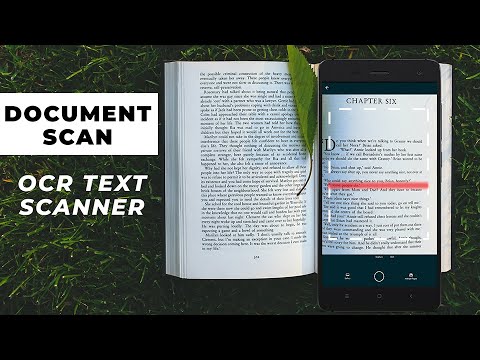
Leveraging advanced OCR technology and smart camera scanner, the scanner app allows you to effortlessly scan and convert PDF to text, photo to text or any type of documents into editable text.
It’s time to scan to text, turn your printed reports, handwritten notes, book pages into digital text with simple taps. This OCR PDF to text feature saves you time and ensures precision in converting your physical documents into editable digital files.
✏️Comprehensive Document Editor
After scanning your documents with this paper scanner, take advantage of the comprehensive editing tools our doc scanner offers.
Edit text for accuracy or change of content
Scan in color, grayscale, or black & white
Crop scanned images to focus on the essential parts
Rotate images to make sure documents are perfectly aligned
Draw, or import signature with just one click. Edit and sign PDF signature with ease. You can also rotate and scale your e-signature
Multiple levels of contrast for crisp monochrome texts
Thumbnail or list view, sort scans by date or title
Once you’ve perfected your document, DS Camera Scanner & Photo allows you to save and share your files easily. Keep your files organized and let’s share them via email or social media.
DS Camera Scanner & Photo is your all-in-one solution for efficient document management. Let’s streamline your workflow, save your time and become more precise and professional with this app.
If you have any questions or recommendations while using our app, feel free to reach out to us via contact emails. Have a nice day!
MAIN FEATURES OF DSCANNER: CAMERA SCANNER
📝 A Smart Document Scanner
DS Camera Scanner & Photo is a powerful tool to help you scan documents, or digitize all kinds of paper documents. Whether you want to scan PDF, text files, excel sheets, or images, our document scanner application makes it easy.
Simply scan your files with our camera scanner or upload your documents. The scan camera will automatically detect document edges, ensuring perfect alignment and clarity in every scan.
📘 Fast PDF reader and PDF Converter
In just one scan, our app will help you open and view your PDF documents. Feel free to scroll, zoom in and out your PDF scan.
On top of being a PDF viewer, our file scanner also helps you scan to PDF. Whenever you’re ready with your scanned documents, you can convert photo to PDF within seconds. This PDF creator is easy to use, time-saving and handy.
Let’s streamline your workflow and productivity on the go with the help of PD converter.
📜Image to Text Scanner
Leveraging advanced OCR technology and smart camera scanner, the scanner app allows you to effortlessly scan and convert PDF to text, photo to text or any type of documents into editable text.
It’s time to scan to text, turn your printed reports, handwritten notes, book pages into digital text with simple taps. This OCR PDF to text feature saves you time and ensures precision in converting your physical documents into editable digital files.
✏️Comprehensive Document Editor
After scanning your documents with this paper scanner, take advantage of the comprehensive editing tools our doc scanner offers.
Edit text for accuracy or change of content
Scan in color, grayscale, or black & white
Crop scanned images to focus on the essential parts
Rotate images to make sure documents are perfectly aligned
Draw, or import signature with just one click. Edit and sign PDF signature with ease. You can also rotate and scale your e-signature
Multiple levels of contrast for crisp monochrome texts
Thumbnail or list view, sort scans by date or title
Once you’ve perfected your document, DS Camera Scanner & Photo allows you to save and share your files easily. Keep your files organized and let’s share them via email or social media.
DS Camera Scanner & Photo is your all-in-one solution for efficient document management. Let’s streamline your workflow, save your time and become more precise and professional with this app.
If you have any questions or recommendations while using our app, feel free to reach out to us via contact emails. Have a nice day!
Scanner app to scan documents with precision &ease. Smart PDF scanner, converter
Bijgewerkt op
Aanbevolen onderwerpen

Veiligheid van gegevens begint met inzicht in de manier waarop ontwikkelaars je gegevens verzamelen en delen. Procedures voor gegevensprivacy en beveiliging kunnen variëren op basis van je gebruik, regio en leeftijd. De ontwikkelaar heeft deze informatie aangeleverd en kan die in de loop van de tijd updaten.
- Deze app kan deze typen gegevens delen met derdenBestanden en documenten en Apparaat- of andere ID's
- Geen gegevens verzameldMeer informatie over hoe ontwikkelaars aangeven welke gegevens ze verzamelen
- Gegevens worden tijdens de overdracht versleuteld
- Gegevens kunnen niet worden verwijderd


Beoordelingen en reviews
167K reviews

Martin Middag
- Markeren als ongepast
18 mei 2026
Super

Jozua
- Markeren als ongepast
7 januari 2026
not working at all

Mohammed Salam
- Markeren als ongepast
30 juli 2025
جميل
TrustedOffice
31 juli 2025
شكرًا لك محمد سلام على ملاحظاتك. نأسف لسماع أنك لم تكن راضيًا تمامًا عن تجربتك. نود معرفة المزيد حول ما يمكن تحسينه لتقديم تجربة أفضل في المستقبل.
Iedereen
Meer informatieApp-support
Over de ontwikkelaar
APERO TECHNOLOGIES GROUP PTE. LTD.
store@apero.global
C/O: GATEWAY OF ASIA PTE. LTD.
114 Lavender Street
Singapore 338729
+84 336 050 100


