
Network Switcher: 4G LTE 5G
ବିଜ୍ଞାପନ ଅନ୍ତର୍ଭୂକ୍ତ


ସମସ୍ତେ
info
1ହ+
ଡାଉନଲୋଡ

ସମସ୍ତେ
ଅଧିକ ଜାଣନ୍ତୁ


ଏହି ଆପ୍ ବିଷୟରେ
Open Android's network mode settings and understand your options with Network Switcher.
Looking for LTE only, NR/LTE or other preferred network modes? Network Switcher gives you a quick route to your phone's supported settings, plus a built-in guide that explains what the different modes mean. No root required.
QUICK ACCESS TO NETWORK SETTINGS
Open Android's Phone Info screen from the app. Review the preferred network types your device makes available, including 4G LTE and 5G modes where supported. If Phone Info is unavailable, the app offers a shortcut to system network settings.
UNDERSTAND LTE ONLY AND 5G OPTIONS
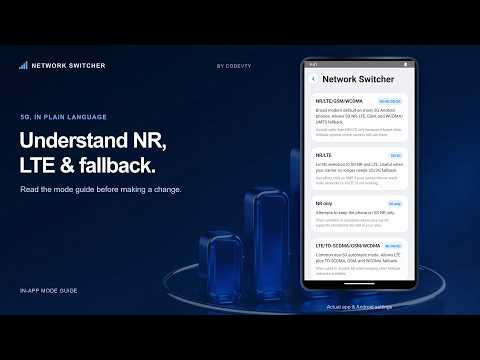
Read explanations for LTE only, NR only, NR/LTE, LTE/WCDMA and other network combinations. Learn which generations each mode allows and what to consider before changing it.
DECODE COMMON NETWORK TERMS
Use the quick reference for 5G NR, 4G LTE, 3G WCDMA and 2G GSM. Explore the full mode guide when you need more detail.
HELPFUL GUIDANCE BEFORE YOU SWITCH
Check the app's SIM-selection guidance and write down your original Preferred Network Type before making changes. On devices that expose both phone indexes, Phone 0 generally corresponds to SIM 1 and Phone 1 to SIM 2.
COMPATIBILITY AND CALLS
Available settings depend on your phone, Android version, SIM, carrier and local network. Some devices restrict Phone Info or particular network modes. LTE-only mode can affect voice calls when VoLTE is unavailable. NR-only mode requires suitable 5G support. Check calls, SMS and data after changing a mode, and restore your original setting if needed.
Network Switcher opens Android's built-in settings. It does not boost signal, increase your plan's speed, unlock network bands or bypass carrier restrictions.
The app contains ads. See the Data safety section and privacy policy for information about data practices, including advertising services.
Looking for LTE only, NR/LTE or other preferred network modes? Network Switcher gives you a quick route to your phone's supported settings, plus a built-in guide that explains what the different modes mean. No root required.
QUICK ACCESS TO NETWORK SETTINGS
Open Android's Phone Info screen from the app. Review the preferred network types your device makes available, including 4G LTE and 5G modes where supported. If Phone Info is unavailable, the app offers a shortcut to system network settings.
UNDERSTAND LTE ONLY AND 5G OPTIONS
Read explanations for LTE only, NR only, NR/LTE, LTE/WCDMA and other network combinations. Learn which generations each mode allows and what to consider before changing it.
DECODE COMMON NETWORK TERMS
Use the quick reference for 5G NR, 4G LTE, 3G WCDMA and 2G GSM. Explore the full mode guide when you need more detail.
HELPFUL GUIDANCE BEFORE YOU SWITCH
Check the app's SIM-selection guidance and write down your original Preferred Network Type before making changes. On devices that expose both phone indexes, Phone 0 generally corresponds to SIM 1 and Phone 1 to SIM 2.
COMPATIBILITY AND CALLS
Available settings depend on your phone, Android version, SIM, carrier and local network. Some devices restrict Phone Info or particular network modes. LTE-only mode can affect voice calls when VoLTE is unavailable. NR-only mode requires suitable 5G support. Check calls, SMS and data after changing a mode, and restore your original setting if needed.
Network Switcher opens Android's built-in settings. It does not boost signal, increase your plan's speed, unlock network bands or bypass carrier restrictions.
The app contains ads. See the Data safety section and privacy policy for information about data practices, including advertising services.
Open 4G LTE & 5G network settings and understand each mode. No root needed.
ଗତ ଅପଡେଟର ସମୟ
ଫିଚର କରାଯାଇଥିବା ଷ୍ଟୋରୀଗୁଡ଼ିକ

ଡେଭେଲପରମାନେ ଆପଣଙ୍କ ଡାଟାକୁ କିପରି ସଂଗ୍ରହ ଏବଂ ସେୟାର କରନ୍ତି ସେହି ଧାରଣା ସହିତ ସୁରକ୍ଷା ଆରମ୍ଭ ହୁଏ। ଆପଣଙ୍କ ବ୍ୟବହାର, ଅଞ୍ଚଳ ଏବଂ ବୟସ ଆଧାରରେ, ଡାଟା ଗୋପନୀୟତା ଓ ସୁରକ୍ଷା ପ୍ରାକ୍ଟିସ ଭିନ୍ନ ହୋଇପାରେ। ଡେଭେଲପର ଏହି ସୂଚନା ପ୍ରଦାନ କରିଛନ୍ତି ଏବଂ ସେ ସମୟାନୁସାରେ ଏହାକୁ ଅପଡେଟ କରିପାରନ୍ତି।


ନୂଆ କଣ ଅଛି
Improved app stability and compatibility.
Updated the app experience for smoother performance and better reliability.
Minor improvements and maintenance updates.
Updated the app experience for smoother performance and better reliability.
Minor improvements and maintenance updates.
ସମସ୍ତେ
ଅଧିକ ଜାଣନ୍ତୁଆପ ସପୋର୍ଟ
ଡେଭେଲପରଙ୍କ ବିଷୟରେ
Tayyab Fareed
to.tayyabfareed@gmail.com
747, F2 WAPDA TOWN PHASE 1, LAHORE
Lahore, 05426
Pakistan


