Maps Navigation
มีโฆษณา
3.9star
684 รีวิว

สำหรับทุกคน
info
100K+
ดาวน์โหลด

สำหรับทุกคน
ดูข้อมูลเพิ่มเติม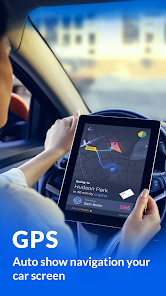
เกี่ยวกับแอปนี้
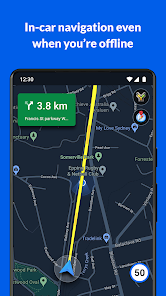
GPS Maps Navigation is a mobile application for the Android that uses an Internet connection to a GPS navigation system to provide turn-by-turn voice-guided instructions on how to arrive at a given destination.
The application requires a connection to Internet data (e.g. 3G, 4G, 5G, WiFi, etc.) and normally uses a GPS satellite connection to determine its location.
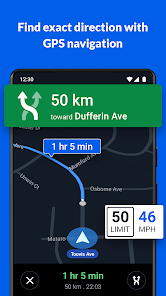
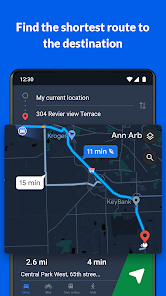
A user can enter a destination into the application, which will plot a path to it. The app displays the user's progress along the route and issues instructions for each turn.
Maps Navigation shows an aftercall, enabling you to identify incoming calls as they happen so you can quickly send text messages, add contacts, or schedule calendar dates immediately after the incoming call—even if the app is closed or inactive. This enables you to easily follow up on tasks right after calls.
Features
Get there faster with real-time updates
• Beat traffic with real-time ETAs and traffic conditions
• Catch your bus, train, or ride-share with real-time transit info
• Save time with automatic rerouting based on live traffic, incidents, and road closure
• Offline maps to search and navigate without an internet connection
• Street View and indoor imagery for restaurants, shops, museums and more
• Indoor maps to quickly find your way inside big places like airports, malls and stadiums
Know what’s open in your area and their latest business hours
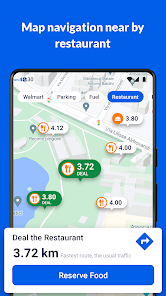
• Find local restaurants offering delivery and takeout
Find the best route with automatic rerouting based on live traffic, incidents, and road closure
• Create lists of your important places
Search
Instead of searching for an address or a street name, the application can also search by name, for example guide the user to a nearby restaurant by being given the name of the restaurant. The application can also take phrases such as “a place with burgers” and suggest nearby destinations that match the phrase.
The application can receive a voice input instead of typing the destination on the device.
Multiple views
Traffic: The application's traffic congestion map shows the route marks with different colours based on the current traffic along the route.
The traffic is measured by data from local road services such as highway cameras, as well as speed and location information from other Android devices that are accessing Maps for Mobile.
Satellite: The application displays a route from a bird’s eye view using satellite imagery.
Street: The Street View feature displays a route from first-person view as which automatically changes as the user travels along the route.
Car dock mode
Users can dock their Android device in a car using a special car dock for the device (which may or may not come with the device). Once docked, the device will enter this mode, enabling for easier access to the navigation features at an arm’s length.
Walking and transit
The application provides voice navigation for walking and previously for transit directions. In its current iteration navigation is not available for transit, only a list of directions is provided. The transit directions are available in 400 cities around the world.
Offline guidance
Once the user has searched for a destination, the map will cache along the intended route. It is also possible to download a map over a certain area and store it on the phone, which can be useful when there are high roaming charges or expected slow connection. The application requires an Internet connection to search for the route unless an offline map is downloaded, but once a route has been found the user no longer requires an Internet connection as the route is temporarily saved onto the device, unless an offline map has been downloaded to the device's local storage.
The application requires a connection to Internet data (e.g. 3G, 4G, 5G, WiFi, etc.) and normally uses a GPS satellite connection to determine its location.
A user can enter a destination into the application, which will plot a path to it. The app displays the user's progress along the route and issues instructions for each turn.
Maps Navigation shows an aftercall, enabling you to identify incoming calls as they happen so you can quickly send text messages, add contacts, or schedule calendar dates immediately after the incoming call—even if the app is closed or inactive. This enables you to easily follow up on tasks right after calls.
Features
Get there faster with real-time updates
• Beat traffic with real-time ETAs and traffic conditions
• Catch your bus, train, or ride-share with real-time transit info
• Save time with automatic rerouting based on live traffic, incidents, and road closure
• Offline maps to search and navigate without an internet connection
• Street View and indoor imagery for restaurants, shops, museums and more
• Indoor maps to quickly find your way inside big places like airports, malls and stadiums
Know what’s open in your area and their latest business hours
• Find local restaurants offering delivery and takeout
Find the best route with automatic rerouting based on live traffic, incidents, and road closure
• Create lists of your important places
Search
Instead of searching for an address or a street name, the application can also search by name, for example guide the user to a nearby restaurant by being given the name of the restaurant. The application can also take phrases such as “a place with burgers” and suggest nearby destinations that match the phrase.
The application can receive a voice input instead of typing the destination on the device.
Multiple views
Traffic: The application's traffic congestion map shows the route marks with different colours based on the current traffic along the route.
The traffic is measured by data from local road services such as highway cameras, as well as speed and location information from other Android devices that are accessing Maps for Mobile.
Satellite: The application displays a route from a bird’s eye view using satellite imagery.
Street: The Street View feature displays a route from first-person view as which automatically changes as the user travels along the route.
Car dock mode
Users can dock their Android device in a car using a special car dock for the device (which may or may not come with the device). Once docked, the device will enter this mode, enabling for easier access to the navigation features at an arm’s length.
Walking and transit
The application provides voice navigation for walking and previously for transit directions. In its current iteration navigation is not available for transit, only a list of directions is provided. The transit directions are available in 400 cities around the world.
Offline guidance
Once the user has searched for a destination, the map will cache along the intended route. It is also possible to download a map over a certain area and store it on the phone, which can be useful when there are high roaming charges or expected slow connection. The application requires an Internet connection to search for the route unless an offline map is downloaded, but once a route has been found the user no longer requires an Internet connection as the route is temporarily saved onto the device, unless an offline map has been downloaded to the device's local storage.
อัปเดตเมื่อ
ความปลอดภัยเริ่มต้นด้วยความเข้าใจเกี่ยวกับวิธีที่นักพัฒนาแอปรวบรวมและแชร์ข้อมูล แนวทางปฏิบัติด้านความเป็นส่วนตัวและความปลอดภัยของข้อมูลอาจแตกต่างกันไปตามการใช้งาน ภูมิภาค และอายุของคุณ นักพัฒนาแอปได้ให้ข้อมูลนี้ไว้และอาจอัปเดตข้อมูลในส่วนนี้เมื่อเวลาผ่านไป

แอปนี้อาจแชร์ข้อมูลประเภทต่างๆ เหล่านี้กับบุคคลที่สาม
ตำแหน่ง ข้อมูลและประสิทธิภาพของแอป และรหัสอุปกรณ์หรือรหัสอื่นๆ

ไม่มีข้อมูลที่รวบรวมไว้
ดูข้อมูลเพิ่มเติมเกี่ยวกับวิธีที่นักพัฒนาแอปประกาศเรื่องการรวบรวมข้อมูล

ระบบจะเข้ารหัสข้อมูลขณะส่ง

ลบข้อมูลไม่ได้
การให้คะแนนและรีวิว
4.0
679 รีวิว
สำหรับทุกคน
ดูข้อมูลเพิ่มเติมการสนับสนุนของแอป
เกี่ยวกับนักพัฒนาแอป
Vimalaben Jayantibhai Dhameliya
vimala.dham.63@gmail.com
8 KAILASHDHAM SOCIETY MINAXIWADI AMROLI ROAD KATARGAM OPP DAT KRUPA SOCIETY
surat/surat, Gujarat 395004
India


