
AirMusic TRIAL

3.4star
384 reviews
100K+
Downloads

Everyone
info


About this app
Stream all audio from almost any app to every receiver - with just 1 click!
Enjoy Youtube Music, Deezer, Amazon Music*, Apple Music* or Spotify* and most other audio on your SONOS, Apple TV, Chromecast, Fire TV, Smart TV, AV-receiver, Homepod, Samsung Multiroom, Denon HEOS, Roku, Raspberry Pi, Airport Express and many more devices.
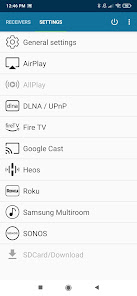
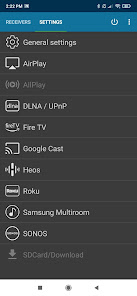
AirMusic supports all the latest streaming technologies and offers seamless compatibility with Apple AirPlay, SONOS, Google Cast, DLNA, Amazon Fire TV, Samsung Multiroom, Denon HEOS & Roku.
Trial
This is a TRIAL and some noise will be added to the audio after 10 minutes of playback.
You can start another session by restarting the app.
Enjoy your music everywhere!
AirMusic streams all audio from almost any app on your Android to all receivers in your home:
• Apple AirPlay: Apple TV, Homepod, Airport Express & most other AirPlay-enabled receivers like Bang & Olufsen or Bowers & Wilkins
• SONOS: Enjoy all music on your SONOS
• Google Cast: Chromecast & other Google Cast-enabled receivers
• DLNA: Smart TVs or AV-receivers like Samsung, Sony, LG, Pioneer, Yamaha, Denon, Bose or Onkyo
• Amazon Fire TV: Stream to all receivers supporting Amazon Fire TV, like Amazon Fire TV Cube & Fire TV Stick
• Samsung Multiroom: Enjoy all music on Samsung-WAM & more devices
• Denon HEOS: All HEOS-receivers are supported
• Roku Streaming Player: Stream any audio to your Roku
• Software receivers: Kodi, Volumio, Shairport, GMediaRender & more, e.g. on a Raspberry Pi
Amazing entertainment
AirMusic is the most powerful audio streamer for Android!
Its outstanding features guarantee easy & seamless streaming of all your music:
• AirMusic runs in the background and lets you stream with just 1 click
• AirMusic sends informations & artwork to your AirPlay- or Google Cast-receiver
• AirMusic supports Tasker & MacroDroid – create widgets or automate your music
Personal assistance in case of problems
If you have any problem with AirMusic, please contact us via e-mail at support@airmusic.app and we will try to help you.
Limitations
Most apps allow to get recorded by AirMusic without additional steps!
However, some apps have restrictions:
• Amazon Music works until/before version 24.16.3 (07-09-2024)
• Some apps like Apple Music or PowerAmp are affected by a bug in Android 10/11 and require Android 12+
• A few like Spotify, Pandora or SoundCloud disallow to get recorded by others and require additional steps
Trial
This is a TRIAL and some noise will be added to the audio after 10 minutes of playback.
You can start another session by restarting the app.
Enjoy Youtube Music, Deezer, Amazon Music*, Apple Music* or Spotify* and most other audio on your SONOS, Apple TV, Chromecast, Fire TV, Smart TV, AV-receiver, Homepod, Samsung Multiroom, Denon HEOS, Roku, Raspberry Pi, Airport Express and many more devices.
AirMusic supports all the latest streaming technologies and offers seamless compatibility with Apple AirPlay, SONOS, Google Cast, DLNA, Amazon Fire TV, Samsung Multiroom, Denon HEOS & Roku.
Trial
This is a TRIAL and some noise will be added to the audio after 10 minutes of playback.
You can start another session by restarting the app.
Enjoy your music everywhere!
AirMusic streams all audio from almost any app on your Android to all receivers in your home:
• Apple AirPlay: Apple TV, Homepod, Airport Express & most other AirPlay-enabled receivers like Bang & Olufsen or Bowers & Wilkins
• SONOS: Enjoy all music on your SONOS
• Google Cast: Chromecast & other Google Cast-enabled receivers
• DLNA: Smart TVs or AV-receivers like Samsung, Sony, LG, Pioneer, Yamaha, Denon, Bose or Onkyo
• Amazon Fire TV: Stream to all receivers supporting Amazon Fire TV, like Amazon Fire TV Cube & Fire TV Stick
• Samsung Multiroom: Enjoy all music on Samsung-WAM & more devices
• Denon HEOS: All HEOS-receivers are supported
• Roku Streaming Player: Stream any audio to your Roku
• Software receivers: Kodi, Volumio, Shairport, GMediaRender & more, e.g. on a Raspberry Pi
Amazing entertainment
AirMusic is the most powerful audio streamer for Android!
Its outstanding features guarantee easy & seamless streaming of all your music:
• AirMusic runs in the background and lets you stream with just 1 click
• AirMusic sends informations & artwork to your AirPlay- or Google Cast-receiver
• AirMusic supports Tasker & MacroDroid – create widgets or automate your music
Personal assistance in case of problems
If you have any problem with AirMusic, please contact us via e-mail at support@airmusic.app and we will try to help you.
Limitations
Most apps allow to get recorded by AirMusic without additional steps!
However, some apps have restrictions:
• Amazon Music works until/before version 24.16.3 (07-09-2024)
• Some apps like Apple Music or PowerAmp are affected by a bug in Android 10/11 and require Android 12+
• A few like Spotify, Pandora or SoundCloud disallow to get recorded by others and require additional steps
Trial
This is a TRIAL and some noise will be added to the audio after 10 minutes of playback.
You can start another session by restarting the app.
Updated on
Safety starts with understanding how developers collect and share your data. Data privacy and security practices may vary based on your use, region, and age. The developer provided this information and may update it over time.

No data shared with third parties
Learn more about how developers declare sharing

No data collected
Learn more about how developers declare collection
Ratings and reviews
3.4
356 reviews

Philip Pienaar
- Flag inappropriate
- Show review history
January 27, 2021
Edit - contacted by developer. Problem solved! Works perfectly with Airplay devices now. Yes, it connects to Airplay devices. But in Microphone mode as Android doesn't allow "rooted" whatever. So basically you play music over you phone speaker, the microphone picks this up (along with any other background noise or conversation) and pipes it over the airplay device. Nope from me.
15 people found this review helpful
AirMusic - stream all audio to everywhere
January 27, 2021
Hey Philip, I assume you are on Android 10+? If so please open AirMusic's settings and switch to 'native recording', then you can stream most apps in full quality. Please contact me via email for any help 🙂 kind regards from Germany.

will p.
- Flag inappropriate
June 5, 2021
First of congrats for finding a way for these devices to talk to each other. I have an airport expresses and wanted to stream music to them. Works on my a11 oneplus. However I think there is some distorion in the sound as if the gain is a bit high. Even at low volume. Maybe just the trial but other than that great for a connection!
7 people found this review helpful

shearmodulus
- Flag inappropriate
March 1, 2024
Works very well playing MP4s through VLC. My phone is not rooted and I'm running Android 14, so the "Native Recording" option works without root. The sound quality is surprisingly good. I appreciate the work that you've done with this app. Thank you for helping me use my HomePods after switching from iOS! Cheers!
3 people found this review helpful
What’s new
This is the official successor of AirAudio.
In case you own a license for AirAudio, please contact us via e-mail at support@airmusic.app.
Updates:
- Updates for Google Play and latest Android-versions
- Removed some obsolete stuff
In case you have any questions or issues, please contact us at support@airmusic.app.
In case you own a license for AirAudio, please contact us via e-mail at support@airmusic.app.
Updates:
- Updates for Google Play and latest Android-versions
- Removed some obsolete stuff
In case you have any questions or issues, please contact us at support@airmusic.app.
App support
About the developer
Martin Simon Lehmann
support@airmusic.app
Herrenalber Str. 32
76307 Karlsbad
Germany
undefined


