
BoTV – M3U Player & TV Guide


Everyone
info
100+
Downloads

Everyone
Learn more


About this app
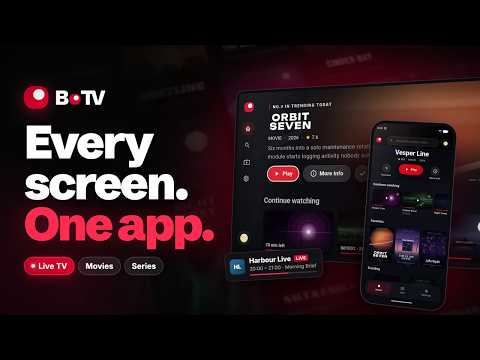
BoTV is a media player that turns your M3U playlists and Xtream Codes logins into real live TV with a full program guide, on your phone and on Android TV.
BoTV is a player only: it provides no channels, no content and no subscription. You bring your own sources.
▸ LIVE TV WITH A REAL PROGRAM GUIDE
• A full EPG grid: the whole evening at a glance, while the channel keeps playing
• What's on now and what's next on every channel
• Instant zapping, by channel number or from the channel list
• Channel groups, favorites, and one press back to the previous channel
• Program guide (EPG, XMLTV) fetched automatically, or several guides of your own merged into one
• On your phone, the video stays on top and every channel sits right below it, with what's on now
• Catch-up from the guide on Android TV, when your source offers it
▸ MADE FOR ANDROID TV
A player built for the remote: a cinematic home screen you drive with five buttons. Rows, detail pages and the guide are designed for the TV, not a phone layout stretched to fit. Works on Android TV, Google TV and Fire TV.
▸ ALL YOUR SOURCES IN ONE PLACE
• M3U and M3U8 playlists
• Xtream Codes logins
• Addons, added by URL
Everything lands in one library, with search across all your sources, artwork, synopses, seasons and episodes.
▸ A PLAYER THAT HOLDS UP
• H.264, HEVC, AV1, VP9 and MPEG-2, with hardware decoding
• HDR10 and HLG on Android TV
• AAC, AC-3, E-AC-3 and DTS, with optional surround passthrough
• HLS, MPEG-TS, DASH, MKV and MP4
• Audio track and subtitle selection, external subtitles
• Steady live playback: a large buffer and automatic reconnection
• Resume to the second, and the next episode starts on its own
▸ START ON ONE SCREEN, FINISH ON ANOTHER
Start an episode on the TV, finish it in bed on your phone. Progress, favorites, sources and settings follow your account to every device in real time, without restarting the TV. The home screen even offers to pick up what you were watching on another device.
▸ A PROFILE FOR EVERYONE
Each profile gets its own list, progress and settings. Protect any profile with a PIN.
▸ SIMKL, IF YOU USE IT
Scrobble what you watch and import your history. Optional, and off until you connect it.
▸ ON EVERY SCREEN
Android phones, Android TV, Google TV and Fire TV, plus Windows and macOS on botv.app. One account for all of them. No account needed to get started.
▸ NO ADS
No advertising, no banners, no sponsored content.
———
BoTV is a media player. It does not provide, host, sell or index any content, channel, playlist or subscription, and no source comes preinstalled. Connect sources you are entitled to use: the IPTV service included with your internet plan, a licensed provider you pay directly, a public broadcaster's playlist, or your own home server (TV tuner, TVHeadend). All titles and artwork in the screenshots are fictional.
BoTV is a player only: it provides no channels, no content and no subscription. You bring your own sources.
▸ LIVE TV WITH A REAL PROGRAM GUIDE
• A full EPG grid: the whole evening at a glance, while the channel keeps playing
• What's on now and what's next on every channel
• Instant zapping, by channel number or from the channel list
• Channel groups, favorites, and one press back to the previous channel
• Program guide (EPG, XMLTV) fetched automatically, or several guides of your own merged into one
• On your phone, the video stays on top and every channel sits right below it, with what's on now
• Catch-up from the guide on Android TV, when your source offers it
▸ MADE FOR ANDROID TV
A player built for the remote: a cinematic home screen you drive with five buttons. Rows, detail pages and the guide are designed for the TV, not a phone layout stretched to fit. Works on Android TV, Google TV and Fire TV.
▸ ALL YOUR SOURCES IN ONE PLACE
• M3U and M3U8 playlists
• Xtream Codes logins
• Addons, added by URL
Everything lands in one library, with search across all your sources, artwork, synopses, seasons and episodes.
▸ A PLAYER THAT HOLDS UP
• H.264, HEVC, AV1, VP9 and MPEG-2, with hardware decoding
• HDR10 and HLG on Android TV
• AAC, AC-3, E-AC-3 and DTS, with optional surround passthrough
• HLS, MPEG-TS, DASH, MKV and MP4
• Audio track and subtitle selection, external subtitles
• Steady live playback: a large buffer and automatic reconnection
• Resume to the second, and the next episode starts on its own
▸ START ON ONE SCREEN, FINISH ON ANOTHER
Start an episode on the TV, finish it in bed on your phone. Progress, favorites, sources and settings follow your account to every device in real time, without restarting the TV. The home screen even offers to pick up what you were watching on another device.
▸ A PROFILE FOR EVERYONE
Each profile gets its own list, progress and settings. Protect any profile with a PIN.
▸ SIMKL, IF YOU USE IT
Scrobble what you watch and import your history. Optional, and off until you connect it.
▸ ON EVERY SCREEN
Android phones, Android TV, Google TV and Fire TV, plus Windows and macOS on botv.app. One account for all of them. No account needed to get started.
▸ NO ADS
No advertising, no banners, no sponsored content.
———
BoTV is a media player. It does not provide, host, sell or index any content, channel, playlist or subscription, and no source comes preinstalled. Connect sources you are entitled to use: the IPTV service included with your internet plan, a licensed provider you pay directly, a public broadcaster's playlist, or your own home server (TV tuner, TVHeadend). All titles and artwork in the screenshots are fictional.
Live TV with a real guide (EPG) from your M3U & Xtream Codes sources.
Updated on
Featured stories

Safety starts with understanding how developers collect and share your data. Data privacy and security practices may vary based on your use, region, and age. The developer provided this information and may update it over time.
- No data shared with third partiesLearn more about how developers declare sharing
- No data collectedLearn more about how developers declare collection
- Data is encrypted in transit
- You can request that data be deleted


What’s new
Live sync across your devices: favorites, progress and settings.
Redesigned Android TV: home, details, live TV and guide, smooth on Fire TV.
New Live page on phones: the video on top, every channel right below.
The next episode starts on its own, without leaving the player.
More reliable player: HDR fixed, no more freezes, clearer error messages.
No account needed on phones. Account deletion in the app, parental control, and many fixes.
Redesigned Android TV: home, details, live TV and guide, smooth on Fire TV.
New Live page on phones: the video on top, every channel right below.
The next episode starts on its own, without leaving the player.
More reliable player: HDR fixed, no more freezes, clearer error messages.
No account needed on phones. Account deletion in the app, parental control, and many fixes.
Everyone
Learn moreApp support
About the developer
Nicolas Chandelier
contact@androne.dev
2 Rue du Dr Jean Bernardbeig
31100 Toulouse
France


