
Pix Launcher
Contains adsIn-app purchases

star
4.46K reviews

Everyone
info
1M+
Downloads

Everyone
Learn more


About this app
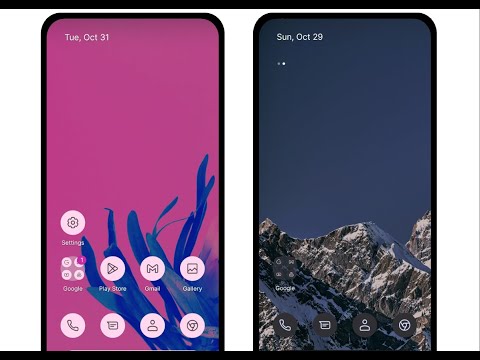
✨ Pix Launcher is a fast, clean, and highly customizable home screen replacement inspired by modern Stock Android design. Extensively developed and customized, Pix Launcher delivers a smooth, minimal, and personalized home screen experience for your smartphone.
If you enjoy a clean Stock Android interface but want more home screen customization, Pix Launcher provides a flexible and modern launcher experience.
🚀 PERFORMANCE OPTIMIZED
* ⚡ Designed for fast startup and smooth page transitions.
* 💾 Optimized memory usage for a responsive experience across supported devices.
* 🔋 Efficient background operation designed to minimize unnecessary battery usage.
* 🎞️ Fluid and responsive launcher animations.
🌟 ADVANCED HOME SCREEN CUSTOMIZATION
* 🎨 Dynamic Colors & Adaptive Icons: Enjoy colors that coordinate with your current wallpaper.
* 📦 Icon Pack Support: Apply compatible third*party icon packs (e.g., Arcticons) for a consistent look.
* 📐 Flexible Grid Layout: Precisely adjust grid size, icon sizes, and text labels in the App Drawer.
* 📱 Clean Dock Setup: Create a sleek bottom dock with customizable icons and layouts.
* 🗂️ Smart Folders: Organize your favorite apps with customizable folder styles.
* 🔔 Notification Dots: View notification indicators with customizable badge options.
* 🔤 Custom Fonts: Personalize the launcher interface with different typography options.
* 🔎 Integrated Search Bar: Quickly search the web using your preferred supported search provider.
* 👉 Gesture Controls: Configure gestures such as double tap and swipe for convenient navigation shortcuts.
🌙 SYSTEM INTEGRATION
* Dark Mode: Supports the Android system dark theme.
* Backup & Restore: Back up and restore your home screen configuration locally.
🔐 PRIVACY & ACCESSIBILITY
Pix Launcher uses the Android Accessibility Service only when enabled by the user to perform requested navigation shortcuts, such as Home, Back, and Recent Apps through custom gestures.
Data handling may vary depending on enabled features and integrated third-party services, including advertising and optional location-based functionality. Please review the Privacy Policy and Google Play Data safety section for complete and current information about how data is handled.
📺 Quick setup & gesture demo:
https://www.youtube.com/shorts/k6Yud387ths
⚠️ DISCLAIMER:
Pix Launcher is an independent third-party launcher. It is not affiliated with, associated with, authorized by, or endorsed by Google LLC.
🙏 Credits:
Open-source licenses and acknowledgements are available in the Acknowledgements section inside the app.
Additional visual resources may be provided by Pixabay and Unsplash under their applicable terms.
📩 Contact Support:
Email: phuctc.freelancer@gmail.com
If you enjoy a clean Stock Android interface but want more home screen customization, Pix Launcher provides a flexible and modern launcher experience.
🚀 PERFORMANCE OPTIMIZED
* ⚡ Designed for fast startup and smooth page transitions.
* 💾 Optimized memory usage for a responsive experience across supported devices.
* 🔋 Efficient background operation designed to minimize unnecessary battery usage.
* 🎞️ Fluid and responsive launcher animations.
🌟 ADVANCED HOME SCREEN CUSTOMIZATION
* 🎨 Dynamic Colors & Adaptive Icons: Enjoy colors that coordinate with your current wallpaper.
* 📦 Icon Pack Support: Apply compatible third*party icon packs (e.g., Arcticons) for a consistent look.
* 📐 Flexible Grid Layout: Precisely adjust grid size, icon sizes, and text labels in the App Drawer.
* 📱 Clean Dock Setup: Create a sleek bottom dock with customizable icons and layouts.
* 🗂️ Smart Folders: Organize your favorite apps with customizable folder styles.
* 🔔 Notification Dots: View notification indicators with customizable badge options.
* 🔤 Custom Fonts: Personalize the launcher interface with different typography options.
* 🔎 Integrated Search Bar: Quickly search the web using your preferred supported search provider.
* 👉 Gesture Controls: Configure gestures such as double tap and swipe for convenient navigation shortcuts.
🌙 SYSTEM INTEGRATION
* Dark Mode: Supports the Android system dark theme.
* Backup & Restore: Back up and restore your home screen configuration locally.
🔐 PRIVACY & ACCESSIBILITY
Pix Launcher uses the Android Accessibility Service only when enabled by the user to perform requested navigation shortcuts, such as Home, Back, and Recent Apps through custom gestures.
Data handling may vary depending on enabled features and integrated third-party services, including advertising and optional location-based functionality. Please review the Privacy Policy and Google Play Data safety section for complete and current information about how data is handled.
📺 Quick setup & gesture demo:
https://www.youtube.com/shorts/k6Yud387ths
⚠️ DISCLAIMER:
Pix Launcher is an independent third-party launcher. It is not affiliated with, associated with, authorized by, or endorsed by Google LLC.
🙏 Credits:
Open-source licenses and acknowledgements are available in the Acknowledgements section inside the app.
Additional visual resources may be provided by Pixabay and Unsplash under their applicable terms.
📩 Contact Support:
Email: phuctc.freelancer@gmail.com
Smooth, clean Stock Android launcher with themes and pixel perfect layout
Updated on
Safety starts with understanding how developers collect and share your data. Data privacy and security practices may vary based on your use, region, and age. The developer provided this information and may update it over time.
- No data shared with third partiesLearn more about how developers declare sharing
- This app may collect these data typesLocation
- Data is encrypted in transit
- Data can’t be deleted


Ratings and reviews
4.39K reviews

Michael Johnson
- Flag inappropriate
- Show review history
January 2, 2025
It's an even better option than stock Android. And while I don't mind having ads in lieu of paying, they are overly intrusive. Everytime you press something in the settings, you have to watch a 5 second ad. There's also a handful of bugs. Applying an icon pack to home screen and not app drawer doesn't work. The at a glance notifications also don't work. I also wish I could remove the space between the dock and the icons above it
27 people found this review helpful

Po' Smedley (Po)
- Flag inappropriate
- Show review history
February 15, 2025
I want to like this. It's very similar to another launcher but just not as intuitive. I can't find how to make folders in the app drawer among other issues. My phone (and no other app has ever made this happen) keeps telling me it's overheating the phone due to memory use? Not good. Using S 23 Ultra with Android 14.
5 people found this review helpful

Sebastian Hernandez
- Flag inappropriate
July 1, 2026
this is a good launcher! use it if you want to change your android look! but never use it in a Samsung Galaxy A10e. it crashes all the time. it is good at the beginning, then next, it is pure chaos!
3 people found this review helpful
What’s new
Recent changes:
- Expand premium gesture controls
- Support unlock app drawer themes and dock themes by leaf
- Fix bugs and improve performance
- Support quick edit icon styles
- Support mini preview and full screen preview in icons and dock
- fix: split home grid and dock bottom spacing
- stabilize hotseat spacing and dock layout
- Support icon pack foreground tinting
- Support free users to edit wallpapers and custom icon shapes
- Expand premium gesture controls
- Support unlock app drawer themes and dock themes by leaf
- Fix bugs and improve performance
- Support quick edit icon styles
- Support mini preview and full screen preview in icons and dock
- fix: split home grid and dock bottom spacing
- stabilize hotseat spacing and dock layout
- Support icon pack foreground tinting
- Support free users to edit wallpapers and custom icon shapes
Everyone
Learn moreApp support
About the developer
Trịnh Cảnh Phúc
phuctc.freelancer@gmail.com
Khu Phố 5, Tân Nghĩa, Hàm Tân, Bình Thuận
Hàm Tân
Bình Thuận 71000
Vietnam


