
Macquarie Mobile Banking
3.0star
1.14K reviews
500K+
Downloads

Everyone
info
About this app
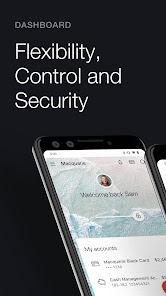
The Macquarie Mobile Banking app makes managing your money simple and convenient. Set budgets, upload receipts, search transactions and more, all from the palm of your hand.
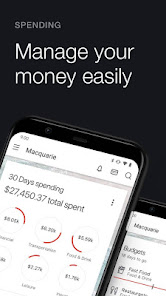
Manage your money easily
Complete your everyday banking such as making payments, transferring money and accessing statements
Safely check your account balances without logging in with Quick View
Set budgets in an instant, then see how you're tracking at a glance
Search transactions using everyday language by typing questions such as: "How much did I spend at Woolworths this year?”
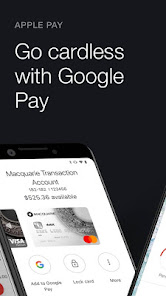
Activate your Macquarie cards and set PINs in just a few taps
Stay alert and in control
Set up real time notifications to receive alerts about your account activity
Customise your notifications so you’re receiving alerts that are important to you
If you’re travelling overseas or shopping from an international retailer, the alert will show the spend amount in both the local currency and Australian dollars, so you can be certain of how much you spent
For even greater control, set up actionable push notifications with Macquarie Authenticator to approve or deny online transactions and account activity before they’re processed
A more detailed transaction history
Each time you make a transaction, it’s automatically categorised into groups such as groceries, travel, leisure, or technology to help you better understand your spending
Not good at keeping receipts or warranties? Simply take a photo of them with your phone and upload them to your transaction history via the app for safe keeping
Added security
Once you’re up and running with our mobile banking app, we recommend downloading the Macquarie Authenticator app for our most secure way to authenticate
The app sends you actionable push notifications for you to approve or deny online transactions and account changes from the palm of your hand
It will also give you the option to use a rolling code to verify your transactions if you’re not connected to a cellular or Wi-Fi network
Travel safer
Notify us of your travel plans via the Macquarie Mobile Banking app to make sure your accounts stay secure while you’re on the move
When you log into your account overseas via the app, Travel Mode will automatically display your location, the local exchange rate and quick links to lock your card or report it stolen
Mobile banking for our business clients
Add your business banking profile to seamlessly switch between personal and business accounts in one place
Keep track of all your business accounts and their balances at a glance
Easily view and search your business transaction history
Need help? Visit Macquarie Help Centre to learn more about how to use the Macquarie Mobile Banking app.
BPAY is a registered trademark of BPAY Pty Ltd ABN 69 079 137 518.
This information is provided by Macquarie Bank AFSL and Australian Credit Licence 237502 and doesn’t take into account your objectives, financial situation or needs – please consider whether it is right for you.
Manage your money easily
Complete your everyday banking such as making payments, transferring money and accessing statements
Safely check your account balances without logging in with Quick View
Set budgets in an instant, then see how you're tracking at a glance
Search transactions using everyday language by typing questions such as: "How much did I spend at Woolworths this year?”
Activate your Macquarie cards and set PINs in just a few taps
Stay alert and in control
Set up real time notifications to receive alerts about your account activity
Customise your notifications so you’re receiving alerts that are important to you
If you’re travelling overseas or shopping from an international retailer, the alert will show the spend amount in both the local currency and Australian dollars, so you can be certain of how much you spent
For even greater control, set up actionable push notifications with Macquarie Authenticator to approve or deny online transactions and account activity before they’re processed
A more detailed transaction history
Each time you make a transaction, it’s automatically categorised into groups such as groceries, travel, leisure, or technology to help you better understand your spending
Not good at keeping receipts or warranties? Simply take a photo of them with your phone and upload them to your transaction history via the app for safe keeping
Added security
Once you’re up and running with our mobile banking app, we recommend downloading the Macquarie Authenticator app for our most secure way to authenticate
The app sends you actionable push notifications for you to approve or deny online transactions and account changes from the palm of your hand
It will also give you the option to use a rolling code to verify your transactions if you’re not connected to a cellular or Wi-Fi network
Travel safer
Notify us of your travel plans via the Macquarie Mobile Banking app to make sure your accounts stay secure while you’re on the move
When you log into your account overseas via the app, Travel Mode will automatically display your location, the local exchange rate and quick links to lock your card or report it stolen
Mobile banking for our business clients
Add your business banking profile to seamlessly switch between personal and business accounts in one place
Keep track of all your business accounts and their balances at a glance
Easily view and search your business transaction history
Need help? Visit Macquarie Help Centre to learn more about how to use the Macquarie Mobile Banking app.
BPAY is a registered trademark of BPAY Pty Ltd ABN 69 079 137 518.
This information is provided by Macquarie Bank AFSL and Australian Credit Licence 237502 and doesn’t take into account your objectives, financial situation or needs – please consider whether it is right for you.
Updated on
Safety starts with understanding how developers collect and share your data. Data privacy and security practices may vary based on your use, region, and age. The developer provided this information and may update it over time.


Ratings and reviews
3.0
1.11K reviews

Greg Fisher
- Flag inappropriate
- Show review history
July 4, 2025
My account number in the app is incorrect. It has 3 additional digits (000) added to the beginning of the number. If you copy/paste number and send to someone else in order for them to deposit to your account, the number copied/pasted is incorrect. This recently caused a delay in transfer of funds to my account, along with the confusion, head scratching, and additional correspondence back and forward with remitter to resolve.
8 people found this review helpful

Matthew Kelly
- Flag inappropriate
- Show review history
January 21, 2026
Looks nice, but just can't do the basic stuff right! 1) Why does it not display transactions in order of time? I receive money, then do a transfer - put the most recent one at the top, not in some completely random order 2) Transaction alerts frequently incorrect amount - google wallet is correct, Macquarie alert often is wrong (doesn't include the transaction fee for some reason?) Focus on getting the basics right before you start messing around with trying to AI!
14 people found this review helpful

John L
- Flag inappropriate
November 10, 2025
Not bad, but not good either. Doesn't look or feel as user friendly compared to the other main bank apps. My main gripe is not the app but the atm card limitations. It only supports Google and Apple wallets, and not Samsung's. As far as electronic wallets are concerned, any bank that isn't compatible with all 3 is lagging way behind. Also the fact I need to select credit when purchasing, opens me to eftpos credit card surcharges, unlike my other debit cards that allow the savings option.
7 people found this review helpful
What’s new
We have made some small improvements and bug fixes.
App support
About the developer
MACQUARIE BANK LIMITED
app-feedback@macquarie.com
L 1 1 Elizabeth St
Sydney NSW 2000
Australia
+61 2 8232 3333


