
PhotoMarker-Text,Image,Exif or
Contains ads
1K+
Downloads

Everyone
info



About this app
Try it for Free!
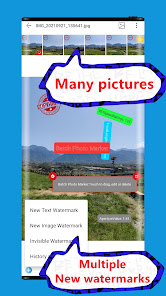
Add the same or different watermarks (visible and invisible watermark) to batch photos. Invisible watermark, visually visible watermark: text, picture, sticker, EXIF...; invisible watermark, visually invisible watermark.
Purpose: Use visible and invisible watermarks to protect the copyright of works; mark the shooting address, time of taking pictures...etc. for travel photos; share shooting parameters; add text to batches of pictures; add textures to batches of pictures; add digital watermarks to batches of photos; digital signatures for pictures ...
FEATURES:
[Batch processing]
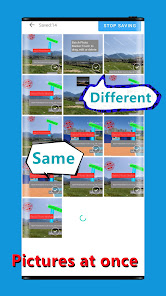
Add the same or different watermarks to thousands of photos at once.
[Create Watermark]
Create a new watermark (text, image, Exif data, hidden watermark); use historical watermark to create.
[Edit watermark]: preview, move, delete, transparency, angle, position, mode, content, font, bold, italic, size, color, background color, watermark width, watermark and background margin, single line and multiple Line and so on
[Exif watermark]
Shooting time, shooting location, exposure time, focal length... and other shooting parameters; automatic latitude and longitude to address.
[Invisible Watermark]
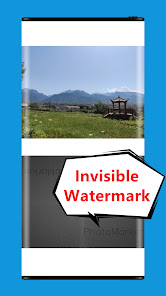
Add visually invisible watermarks through mathematical transformation of pictures, also called: blind watermarks, dark watermarks, digital watermarks...
[Batch selection of photos]
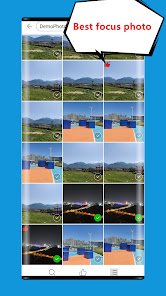
Compare photos and select the focused photos, image search function, image cropping according to proportion...
[New watermark image]
Save the original image, or compress it, support custom compression, support the retention of EXIF, support the inverse geocoding function...
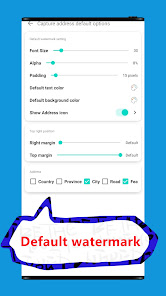
[Default watermark]
Customize the watermark added to the picture by default, you can choose to add or not add the default text watermark, shooting address, shooting time; there are various settings for the default watermark.
------------------------------------------------
Tips:
#Batch photos add watermark
You can set a unique watermark for each photo. During batch processing, the edited watermark will not be overwritten; for photos that have not been edited, you can use the currently previewed photo watermark and add exactly the same watermark to each photo. , Including position, color, size, transparency... or use the default watermark; Exif watermark processing, when batch photo processing, add the same Exif item to each photo as the preview photo, but each photo will be used Own exif value.
#Invisible watermark
When compressing, if the quality of the photo is reduced, the visibility of the decoded hidden watermark will be reduced.
#Tile mode watermark
The watermark in tiled mode cannot be selected by touching, but can be edited when viewing through all watermark layers, and there are hints in the application.
#Batch processing of photos of different sizes
When images of different sizes are processed together in batches, the watermark position may shift.
#MIUI Special Tips
On Android Q and above, MIUI may fail to obtain the new permission ACCESS_MEDIA_LOCATION to a certain extent, which may cause the function of the image Exif longitude and latitude conversion address to fail.
------------------------------------------------
Note: The upper limit of application watermarking is 10,000 pictures at a time. The actual number of pictures that can be processed at one time is also related to the size of the phone's memory.
Feedback or suggestions: zhfaddr@outlook.com
Add the same or different watermarks (visible and invisible watermark) to batch photos. Invisible watermark, visually visible watermark: text, picture, sticker, EXIF...; invisible watermark, visually invisible watermark.
Purpose: Use visible and invisible watermarks to protect the copyright of works; mark the shooting address, time of taking pictures...etc. for travel photos; share shooting parameters; add text to batches of pictures; add textures to batches of pictures; add digital watermarks to batches of photos; digital signatures for pictures ...
FEATURES:
[Batch processing]
Add the same or different watermarks to thousands of photos at once.
[Create Watermark]
Create a new watermark (text, image, Exif data, hidden watermark); use historical watermark to create.
[Edit watermark]: preview, move, delete, transparency, angle, position, mode, content, font, bold, italic, size, color, background color, watermark width, watermark and background margin, single line and multiple Line and so on
[Exif watermark]
Shooting time, shooting location, exposure time, focal length... and other shooting parameters; automatic latitude and longitude to address.
[Invisible Watermark]
Add visually invisible watermarks through mathematical transformation of pictures, also called: blind watermarks, dark watermarks, digital watermarks...
[Batch selection of photos]
Compare photos and select the focused photos, image search function, image cropping according to proportion...
[New watermark image]
Save the original image, or compress it, support custom compression, support the retention of EXIF, support the inverse geocoding function...
[Default watermark]
Customize the watermark added to the picture by default, you can choose to add or not add the default text watermark, shooting address, shooting time; there are various settings for the default watermark.
------------------------------------------------
Tips:
#Batch photos add watermark
You can set a unique watermark for each photo. During batch processing, the edited watermark will not be overwritten; for photos that have not been edited, you can use the currently previewed photo watermark and add exactly the same watermark to each photo. , Including position, color, size, transparency... or use the default watermark; Exif watermark processing, when batch photo processing, add the same Exif item to each photo as the preview photo, but each photo will be used Own exif value.
#Invisible watermark
When compressing, if the quality of the photo is reduced, the visibility of the decoded hidden watermark will be reduced.
#Tile mode watermark
The watermark in tiled mode cannot be selected by touching, but can be edited when viewing through all watermark layers, and there are hints in the application.
#Batch processing of photos of different sizes
When images of different sizes are processed together in batches, the watermark position may shift.
#MIUI Special Tips
On Android Q and above, MIUI may fail to obtain the new permission ACCESS_MEDIA_LOCATION to a certain extent, which may cause the function of the image Exif longitude and latitude conversion address to fail.
------------------------------------------------
Note: The upper limit of application watermarking is 10,000 pictures at a time. The actual number of pictures that can be processed at one time is also related to the size of the phone's memory.
Feedback or suggestions: zhfaddr@outlook.com
Updated on
Safety starts with understanding how developers collect and share your data. Data privacy and security practices may vary based on your use, region, and age. The developer provided this information and may update it over time.

No data shared with third parties
Learn more about how developers declare sharing

No data collected
Learn more about how developers declare collection
What’s new
1 Adapted to the international version.
2 Improved the watermark template feature, allowing previously used watermark combinations to be directly applied in the future.
3 Optimized the watermark application prompt when saving.
4 Enhanced the speed of batch saving.
5 Added a local font import feature, allowing users to change fonts when adding text to images.
6 Optimized the decoding speed of invisible watermarks.
2 Improved the watermark template feature, allowing previously used watermark combinations to be directly applied in the future.
3 Optimized the watermark application prompt when saving.
4 Enhanced the speed of batch saving.
5 Added a local font import feature, allowing users to change fonts when adding text to images.
6 Optimized the decoding speed of invisible watermarks.
App support
phone
Phone number
+8613379273782
About the developer
张峰
zhfaddr@outlook.com
引镇街道
龙渠村李家庄14号
长安区, 西安市, 陕西省
China
710103


