
WPS Office-PDF,Word,Sheet,PPT
Contains adsIn-app purchases
4.6star
5.16M reviews
500M+
Downloads

Everyone
info




About this app
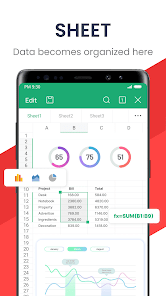
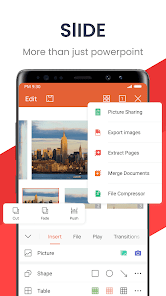
★WPS Office-Free Office suite for Word, PDF, Sheet, is an all-in-one office suite integrates Word docs, PDF, Sheet spreadsheets, PowerPoint slides, WPS AI, Forms, Cloud Storage, Online Editing, Template library and Sharing. Access various WPS Office functions through mobile devices, such as scan PDF files, edit slides, convert spreadsheets, or view documents anytime, anywhere. WPS AI revolutionizes your workflow by offering functions like AI-generated content, rewriting, ChatPDFs, AI-powered OCR and more.
「Features of WPS AI 」
1. WPS AI-generated content (AIGC)
• Get instant and high-quality content like meeting summaries, event planning, resumes, etc, all with a prompt!
2. AI-powered rewriting
• WPS AI is here to offer professional rewriting and polishing work.
• WPS AI is committed to be a powerful writing assistant and revolutionize the writing process.
3. ChatPDFs
• Free from tedious PDF-reading workload!
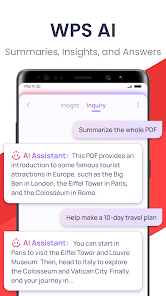
• WPS AI is able to effortlessly process long PDFs and provides summaries, outlines or translations as you like.
• Engage in conversations with WPS AI and get instant answers about the PDFs.
4. AI-powered OCR
• Revolutionized OCR technology helps to deal with the data entry work.
• Ready to provide insights for any scanned document.
★As a professional word processor, WPS Office is compatible with various office softwares in core functions, more intelligent and easier.
「 Typical Features of WPS Office 」
1. Powerful Office Suite on your Android device
• Using templates to start editing your budget, Word, Presentations, sheet, resumes, documents and other files.
•Using tools to convert and process Document, PDF and images.
•Easy to create, edit, share files and collaborated on with others in real-time.
2. Scan, view, edit, convert PDF on your Android device
• Free PDF reader that can open, view, share and comment on PDFs anywhere and on any device.
• Convert all Office documents (Word, Text, Sheet, PowerPoint, Docs, Images) to PDF.
• Scan paper documents to PDF.
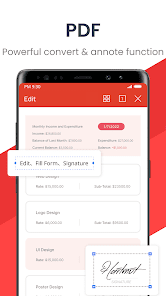
• Support PDF annotation, PDF signature, PDF extraction/split, PDF merge.
• Easily add and delete watermarks in PDF.
3. Powerful cloud storage function, you are not afraid of losing documents
• Use WPS Cloud to manage all documents, synchronize in real time on mobile phones and computers, and easily and directly access and edit office documents
• Save documents to third-party clouds: Dropbox, Google Drive, Box, Evernote and OneDrive.
4. Solutions for working remotely on Android devices
• 1G free cloud storage, support online editing and sharing of files, easy to build and join the cloud team.
• Easy to share office documents via WIFI, NFC, DLNA, email, instant messaging, WhatsApp, Telegram, Facebook and Twitter.
Now available PC and Mac for free , please visit the following link: https://www.wps.com/download/
Support page: https://www.wps.com/support/
「Features of WPS AI 」
1. WPS AI-generated content (AIGC)
• Get instant and high-quality content like meeting summaries, event planning, resumes, etc, all with a prompt!
2. AI-powered rewriting
• WPS AI is here to offer professional rewriting and polishing work.
• WPS AI is committed to be a powerful writing assistant and revolutionize the writing process.
3. ChatPDFs
• Free from tedious PDF-reading workload!
• WPS AI is able to effortlessly process long PDFs and provides summaries, outlines or translations as you like.
• Engage in conversations with WPS AI and get instant answers about the PDFs.
4. AI-powered OCR
• Revolutionized OCR technology helps to deal with the data entry work.
• Ready to provide insights for any scanned document.
★As a professional word processor, WPS Office is compatible with various office softwares in core functions, more intelligent and easier.
「 Typical Features of WPS Office 」
1. Powerful Office Suite on your Android device
• Using templates to start editing your budget, Word, Presentations, sheet, resumes, documents and other files.
•Using tools to convert and process Document, PDF and images.
•Easy to create, edit, share files and collaborated on with others in real-time.
2. Scan, view, edit, convert PDF on your Android device
• Free PDF reader that can open, view, share and comment on PDFs anywhere and on any device.
• Convert all Office documents (Word, Text, Sheet, PowerPoint, Docs, Images) to PDF.
• Scan paper documents to PDF.
• Support PDF annotation, PDF signature, PDF extraction/split, PDF merge.
• Easily add and delete watermarks in PDF.
3. Powerful cloud storage function, you are not afraid of losing documents
• Use WPS Cloud to manage all documents, synchronize in real time on mobile phones and computers, and easily and directly access and edit office documents
• Save documents to third-party clouds: Dropbox, Google Drive, Box, Evernote and OneDrive.
4. Solutions for working remotely on Android devices
• 1G free cloud storage, support online editing and sharing of files, easy to build and join the cloud team.
• Easy to share office documents via WIFI, NFC, DLNA, email, instant messaging, WhatsApp, Telegram, Facebook and Twitter.
Now available PC and Mac for free , please visit the following link: https://www.wps.com/download/
Support page: https://www.wps.com/support/
Updated on
Safety starts with understanding how developers collect and share your data. Data privacy and security practices may vary based on your use, region, and age. The developer provided this information and may update it over time.

No data shared with third parties
Learn more about how developers declare sharing

No data collected
Learn more about how developers declare collection

Data is encrypted in transit

You can request that data be deleted
Ratings and reviews
4.6
4.99M reviews

alan hollander
- Flag inappropriate
- Show review history
June 8, 2024
This is the only android app that I've found that does well for saving and editing notes on the fly once I name a file which does not take long. I have a lot of txt files and they get lost. Old files not in system. Very good for hand typed large files. Although 'I' fail & forget when ads interupt what I was thinking. Still☆☆☆☆☆! Good amount of free online, multiple divice backup. You need my password for me to email you! You are crazy
6,256 people found this review helpful

Matthew Hubbard
- Flag inappropriate
June 10, 2024
Ive used this app for years on multiple android phones and its been perfect. Until now, i use alot of tables and it used to be as simple as highlight the table, copy and paste. Now only the text is pasted without the table format. Looked for an update to no avail. Apparently people have been having this problem since 2018 and the devs havent fixed it yet. The fact that this has been a problem for six years is ridiculous. Time to look for a new word app on android.
185 people found this review helpful
WPS SOFTWARE PTE. LTD.
June 11, 2024
Hello, thank you for your feedback.
Can you send us a screen video or screenshot of the problem to feedback@wps.com to test this issue?
Our development colleagues will analyze the problem and help you solve the problem asap. Thanks for your cooperation.

Can See
- Flag inappropriate
February 24, 2024
Your documents will be held hostage. You can't move documents into folders or move them off the app without signing in and paying. You can delete is about it. I downloaded this as a multiview format to be able to open many types of documents. Not only you phone save some or most documents, but this app saves them too, causing huge storage use. On top of Google, Samsung, and Microsoft trying to claim your documents and pics.
30 people found this review helpful
What's new
1. Enhanced PDF signing: Added new Google Fonts compliant with Open Font License (OFL). Details at: https://scripts.sil.org/OFL.
2. Improved signing and form-filling: Varied date formats, easily modifiable signature styles, and smart form-adjustment for mobile use.
3. Advanced OCR features: PDF component now includes text and image extraction, accessible via OCR section in all tabs or by long-pressing content in PDF.
2. Improved signing and form-filling: Varied date formats, easily modifiable signature styles, and smart form-adjustment for mobile use.
3. Advanced OCR features: PDF component now includes text and image extraction, accessible via OCR section in all tabs or by long-pressing content in PDF.


