
Dashla: Dashboard for Tesla
Contains adsIn-app purchases

star
54 reviews

Everyone
info
1K+
Downloads

Everyone
Learn more


About this app
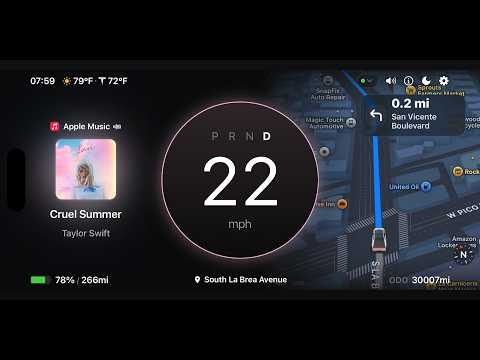
Dashla is a dashboard app for Tesla owners that brings essential driving information into one clean, focused display on your phone.
With Dashla, you can view vehicle status at a glance and keep important driving information in one place, including navigation, map, tire pressure, and other dashboard panels.
Key features:
• Core dashboard interface for speed, gear, battery level, and other vehicle status
• Navigation info including ETA, remaining distance, and estimated battery on arrival
• Built-in map view for a clearer driving overview
• Flexible panel layouts for map, navigation, music, tire pressure, and more
• No extra external transmitter required
Dashla is designed to give Tesla drivers a simpler and more readable dashboard experience on mobile.
Privacy policy: https://dashla.32tech.co/privacy-policy
Important notice:
Dashla is a third-party app and is not affiliated with, endorsed by, or officially connected to Tesla, Inc. or its affiliates. Compatibility and available features may vary depending on vehicle model, region, and software version.
With Dashla, you can view vehicle status at a glance and keep important driving information in one place, including navigation, map, tire pressure, and other dashboard panels.
Key features:
• Core dashboard interface for speed, gear, battery level, and other vehicle status
• Navigation info including ETA, remaining distance, and estimated battery on arrival
• Built-in map view for a clearer driving overview
• Flexible panel layouts for map, navigation, music, tire pressure, and more
• No extra external transmitter required
Dashla is designed to give Tesla drivers a simpler and more readable dashboard experience on mobile.
Privacy policy: https://dashla.32tech.co/privacy-policy
Important notice:
Dashla is a third-party app and is not affiliated with, endorsed by, or officially connected to Tesla, Inc. or its affiliates. Compatibility and available features may vary depending on vehicle model, region, and software version.
Vehicle info at a glance
Updated on
Safety starts with understanding how developers collect and share your data. Data privacy and security practices may vary based on your use, region, and age. The developer provided this information and may update it over time.
- No data shared with third partiesLearn more about how developers declare sharing
- No data collectedLearn more about how developers declare collection


Ratings and reviews
53 reviews

christopher hill
- Flag inappropriate
May 26, 2026
I have tried different apps and dedicated dashboards in my tesla and this one is my favorite. In it's standalone version, there is nothing to do but add the app as a key to the car and then you get speed, gear, tire pressure, destination information, odometer, battery percentage and range. Recently, they added the ability to connect the app to a Tita transmitter. Once added you get blindspot alerts, turn signal, brake and more information. Updates are often and add new functions. Great app!

Hrishikesh S Rao
- Flag inappropriate
May 6, 2026
Very lagging. There is at least 3 to 5 seconds of delay between speed refresh on Tesla screen and App display. Useless when driving at lower speed, especially within city limits. Had to cancel the subscription after testing it out for a few days. There are other features that are good but defeats the main purpose of using the App as a "display in front of your eyes" or HUD.
1 person found this review helpful
Thirty Two Tech, Inc.
May 26, 2026
We are really sorry for the trouble and we appreciate you bringing this issue to our attention. Under normal circumstances, the delay should be 0.3-0.5 seconds. Due to device differences, we have made a comprehensive rewrite and upgrade of the connection mechanism in the latest version 1.6.1. We hope you can try it again and give us your feedback!

shawn aungst
- Flag inappropriate
July 15, 2026
Pretty cool app. works on my older 2019 M3 P
What’s new
What's new:
• New: Map panel car icon shows your live lights (requires a TITA transmitter)
• New: Dashboard UI and text size now in three steps – small, medium and large
• New: Fullscreen map mini panel shows trip, lyrics and drivetrain info
• New: All-new Dashla Help Center – rewatch anytime in Settings
• New: Change the arrow icon on navigation and the destination panel
• UI/UX improvements
• New: Map panel car icon shows your live lights (requires a TITA transmitter)
• New: Dashboard UI and text size now in three steps – small, medium and large
• New: Fullscreen map mini panel shows trip, lyrics and drivetrain info
• New: All-new Dashla Help Center – rewatch anytime in Settings
• New: Change the arrow icon on navigation and the destination panel
• UI/UX improvements
Everyone
Learn moreApp support
About the developer
Thirty Two Tech, Inc.
32tech.co@gmail.com
1111B S Governors Ave
STE 39621
Dover, DE 19904
United States
+1 209-270-6521


