
AppMgr III (App 2 SD)
Contains adsIn-app purchases
4.6star
566K reviews
50M+
Downloads

Everyone
info



About this app
AppMgr (also known as App 2 SD) is a totally new design app that provides the following components:
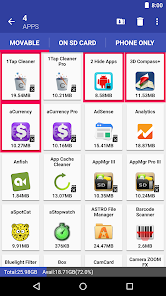
★ Move apps: moves apps to either internal or external storage for getting more available app storage
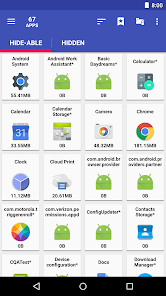
★ Hide apps: hides system (built-in) apps from the app drawer
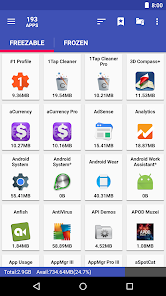
★ Freeze apps: freeze apps so they won't use any CPU or memory resources
★ App manager: manages apps for batch uninstalling, moving apps or sharing apps with friends
Support app 2 sd for Android 2.x and above. For Android 6+, read http://bit.ly/2CtZHb2 if you don't see the Change button. Some devices may not be supported, visit AppMgr > Settings > About > FAQ for details.
Features:
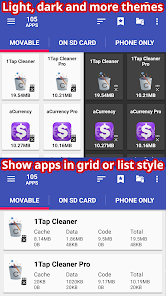
★ up-to-date UI style, themes
★ uninstall apps
★ move apps to external storage
★ notify when movable apps installed
★ hide apps from app drawer
★ freeze apps to a stop state
★ 1-tap to clear all cache
★ clear apps cache or data
★ batch view apps on Google Play
★ export the app list
★ install apps from the exported app list
★ No ads (PRO)
★ quick uninstall or move an app by drag-n-drop
★ sort apps by name, size or installation time
★ share customized app list with friends
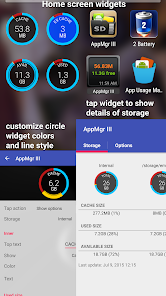
★ support home screen widgets
Functions for rooted device
★ Root uninstaller, Root freeze, Root cache cleaner
★ Root app mover(PRO-only)
Move apps
Are you running out of application storage? Do you hate having to check each and every app if it supports moving to the SD card? Do you want an app that automatically does this for you and can notify you when an app can be moved? This component streamlines the movement of apps to on your device's external or internal storage through your device's Settings. With this, you'll have more control over your ever expanding collection of apps. This is crucial to anyone who has memory management issues.
Hide apps
You don't care for all the apps your carrier adds to Android? Well, now you can get rid of them! This component enables you to hide system (built-in) apps from the app drawer.
Freeze apps
You can freeze apps so they won't use any CPU or memory resources and consume zero-battery. It's good for you to freeze apps that you would like to keep in device, but don't want them to run or be uninstalled.
Permissions
• WRITE/READ_EXTERNAL_STORAGE: use to export/import the apps list
• GET_PACKAGE_SIZE, PACKAGE_USAGE_STATS: get the size information of apps
• BIND_ACCESSIBILITY_SERVICE: this app uses Accessibility services to automate the function (e.g. clear cache, move apps), optional. It helps those who have difficulty in tapping and complete the task easier
• WRITE_SETTINGS: prevent the screen rotation during the automatic function
• SYSTEM_ALERT_WINDOW: draw a wait screen above other apps during the automatic function
We have been selected as a Google I/O 2011 Developer Sandbox partner, for its innovative design and advanced technology.
★ Move apps: moves apps to either internal or external storage for getting more available app storage
★ Hide apps: hides system (built-in) apps from the app drawer
★ Freeze apps: freeze apps so they won't use any CPU or memory resources
★ App manager: manages apps for batch uninstalling, moving apps or sharing apps with friends
Support app 2 sd for Android 2.x and above. For Android 6+, read http://bit.ly/2CtZHb2 if you don't see the Change button. Some devices may not be supported, visit AppMgr > Settings > About > FAQ for details.
Features:
★ up-to-date UI style, themes
★ uninstall apps
★ move apps to external storage
★ notify when movable apps installed
★ hide apps from app drawer
★ freeze apps to a stop state
★ 1-tap to clear all cache
★ clear apps cache or data
★ batch view apps on Google Play
★ export the app list
★ install apps from the exported app list
★ No ads (PRO)
★ quick uninstall or move an app by drag-n-drop
★ sort apps by name, size or installation time
★ share customized app list with friends
★ support home screen widgets
Functions for rooted device
★ Root uninstaller, Root freeze, Root cache cleaner
★ Root app mover(PRO-only)
Move apps
Are you running out of application storage? Do you hate having to check each and every app if it supports moving to the SD card? Do you want an app that automatically does this for you and can notify you when an app can be moved? This component streamlines the movement of apps to on your device's external or internal storage through your device's Settings. With this, you'll have more control over your ever expanding collection of apps. This is crucial to anyone who has memory management issues.
Hide apps
You don't care for all the apps your carrier adds to Android? Well, now you can get rid of them! This component enables you to hide system (built-in) apps from the app drawer.
Freeze apps
You can freeze apps so they won't use any CPU or memory resources and consume zero-battery. It's good for you to freeze apps that you would like to keep in device, but don't want them to run or be uninstalled.
Permissions
• WRITE/READ_EXTERNAL_STORAGE: use to export/import the apps list
• GET_PACKAGE_SIZE, PACKAGE_USAGE_STATS: get the size information of apps
• BIND_ACCESSIBILITY_SERVICE: this app uses Accessibility services to automate the function (e.g. clear cache, move apps), optional. It helps those who have difficulty in tapping and complete the task easier
• WRITE_SETTINGS: prevent the screen rotation during the automatic function
• SYSTEM_ALERT_WINDOW: draw a wait screen above other apps during the automatic function
We have been selected as a Google I/O 2011 Developer Sandbox partner, for its innovative design and advanced technology.
Updated on
Safety starts with understanding how developers collect and share your data. Data privacy and security practices may vary based on your use, region, and age. The developer provided this information and may update it over time.

No data shared with third parties
Learn more about how developers declare sharing

This app may collect these data types
Location, App activity and 2 others

Data is encrypted in transit

Data can’t be deleted
Ratings and reviews
4.6
529K reviews

Rodney Higginson
- Flag inappropriate
July 11, 2024
It seems to being what it supposed to do, clean the cache on your phone, I have the lifetime subscription. However, once in a while, it takes an extremely long time for it to clean certain apps. I mean several minutes, which I find unusual. Also, I hardly ever have apps that can be moved to the SD card, even though I often download games.
AZSoft Technology Inc.
July 12, 2024
I need more information to check what the problem is. Please send me a log by going to:
AppMgr > Settings > App log > MENU > Email > select Gmail
Please describe the problem in the email; otherwise, the system will ignore the log email.
Please also attach some screenshots of the problem.

Mike Pate
- Flag inappropriate
- Show review history
May 2, 2024
Says apps can be moved that cannot. It can't be that hard to write code that can scan an app to see if it when has a "Move" button so you don't waste your time trying to figure out why this app that is supposed to move apps to the SD card is telling you that an app can be moved when in fact it can't. There has to be a "Move" button under the storage tab in your app settings. It is determined by the individual app developer for one reason or another. NO BUTTON, NO MOVE! It's that easy.
14 people found this review helpful
AZSoft Technology Inc.
May 3, 2024
You must format the SD card as *internal(or phone)* storage for moving apps. It's required by Android 6 (and greater) on some devices.
For more help, visit http://bit.ly/2rOy4Uh and read FAQ #10 by going to AppMgr > Settings > About > FAQ
If you don't see the "Format as internal" option, please read PS #1, #2, and #3 from http://bit.ly/2rOy4Uh

Joseph Bigler
- Flag inappropriate
- Show review history
May 7, 2024
Great app. I use it primarily to move apps to SD. Does a great job! It is also great for clearing the cache of all your apps at once. Both help to speed up everything. This is the fifth phone I have moved the app to. Keeps getting faster.😊 I wish people would email the developer with details of their problems and a log before adding a poor rating. If no one replies, then add the review. From what I can see they respond to any complaints, but they almost always request more details and a log.
84 people found this review helpful
AZSoft Technology Inc.
May 8, 2024
Thank you for your comments and rating.
What's new
v5.77
★ fixed: failed to clear the cache on some Xiaomi/Redmi devices
★ update texts for the Swedish language
★ send me an email if you'd like to help with the translation
★ bugs fixed and optimization
v5.76
★ the ignored apps window also shows the package name for each app
★ fixed: cache should be cleared in order of cache size during batch clearing
★ fixed: failed to freeze apps on some Xiaomi/Redmi/Oppo/OnePlus with Android 13+ devices
★ fixed: failed to clear the cache on some Xiaomi/Redmi devices
★ update texts for the Swedish language
★ send me an email if you'd like to help with the translation
★ bugs fixed and optimization
v5.76
★ the ignored apps window also shows the package name for each app
★ fixed: cache should be cleared in order of cache size during batch clearing
★ fixed: failed to freeze apps on some Xiaomi/Redmi/Oppo/OnePlus with Android 13+ devices


