
Fit Notifications (for Fitbit)

4.3star
3K reviews
100K+
Downloads

Everyone
info

About this app
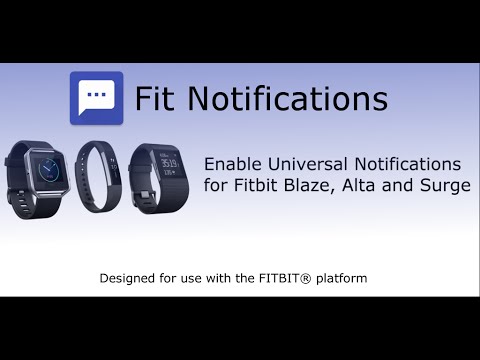
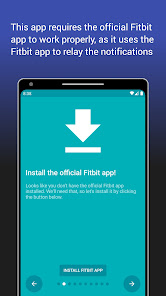
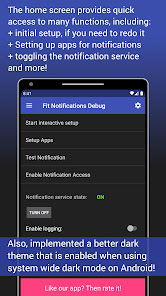
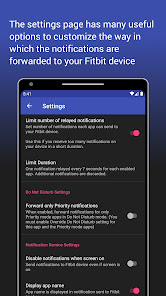
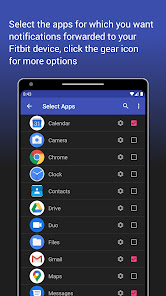
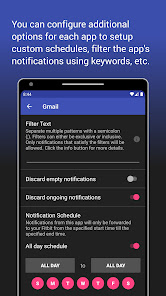
Fit Notifications allows you to view all your Android notifications on your Fitbit device. See list of compatible devices.
No special permissions required!
COMPATIBLE DEVICES:
This app supports any Fitbit device that has text notifications capability. The following is a non-exhaustive list:
Fitbit Alta, Alta HR, Charge 2, Blaze, Surge, Ionic, Versa, Versa 2 and any other device supporting text notifications.
Note: Limited compatibility with Fitbit Flex 2 (lights up the LEDs)
POSSIBLE ISSUES (Troubleshooting):
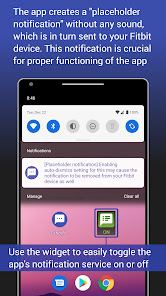
1. Some users have experienced issues receiving notifications when they enable the "Dismiss placeholder notification" setting within this app. If you are experiencing issues with notifications, please try increasing the delay to dismiss placeholder notifications to 5 seconds or more, or try disabling this setting completely.
2. Please make sure that you only choose Fit Notifications for the "Text Notifications" for your Fitbit device via the official Fitbit app. If you accidentally set other types of notifications such as Call or Calendar Notification also using 'Fit Notifications' app, then Fitbit will NOT forward notifications to your device.
3. If you use "do not disturb" mode (also called silent mode) then you will not receive notifications on your Fitbit device as Android disables notification forwarding. To work around this, you have to change the notifications priority for Fit Notifications app. Instructions are provided in the app to fix this.
4. You MAY NOT receive notifications if your Fitbit device has low battery. Please refer to information at the official Fitbit website for your particular device model.
5. You MAY have to restart your phone any time you update the official Fitbit app. Please refer to information at the official Fitbit website for your particular device model.
NOTE: When having issues, always double check if you can receive regular notifications via the Fitbit app before determining that the issue is with the Fit Notifications app. If you do not even receive a phone call or calendar notification, then there may be a configuration issue with the official Fitbit app. Contact Fitbit to troubleshoot this.
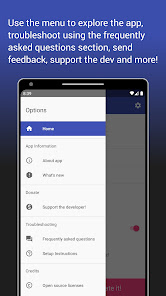
Please troubleshoot the app using the instructions and FAQs. These should help you most of the time. If you still have issues, contact me via email.
If you enjoy the app and find it useful, kindly rate the app and leave a useful review below!
No special permissions required!
COMPATIBLE DEVICES:
This app supports any Fitbit device that has text notifications capability. The following is a non-exhaustive list:
Fitbit Alta, Alta HR, Charge 2, Blaze, Surge, Ionic, Versa, Versa 2 and any other device supporting text notifications.
Note: Limited compatibility with Fitbit Flex 2 (lights up the LEDs)
POSSIBLE ISSUES (Troubleshooting):
1. Some users have experienced issues receiving notifications when they enable the "Dismiss placeholder notification" setting within this app. If you are experiencing issues with notifications, please try increasing the delay to dismiss placeholder notifications to 5 seconds or more, or try disabling this setting completely.
2. Please make sure that you only choose Fit Notifications for the "Text Notifications" for your Fitbit device via the official Fitbit app. If you accidentally set other types of notifications such as Call or Calendar Notification also using 'Fit Notifications' app, then Fitbit will NOT forward notifications to your device.
3. If you use "do not disturb" mode (also called silent mode) then you will not receive notifications on your Fitbit device as Android disables notification forwarding. To work around this, you have to change the notifications priority for Fit Notifications app. Instructions are provided in the app to fix this.
4. You MAY NOT receive notifications if your Fitbit device has low battery. Please refer to information at the official Fitbit website for your particular device model.
5. You MAY have to restart your phone any time you update the official Fitbit app. Please refer to information at the official Fitbit website for your particular device model.
NOTE: When having issues, always double check if you can receive regular notifications via the Fitbit app before determining that the issue is with the Fit Notifications app. If you do not even receive a phone call or calendar notification, then there may be a configuration issue with the official Fitbit app. Contact Fitbit to troubleshoot this.
Please troubleshoot the app using the instructions and FAQs. These should help you most of the time. If you still have issues, contact me via email.
If you enjoy the app and find it useful, kindly rate the app and leave a useful review below!
Updated on
Safety starts with understanding how developers collect and share your data. Data privacy and security practices may vary based on your use, region, and age. The developer provided this information and may update it over time.

No data shared with third parties
Learn more about how developers declare sharing

No data collected
Learn more about how developers declare collection
Ratings and reviews
4.3
2.94K reviews

Jaimee Molloy
- Flag inappropriate
November 4, 2020
It details straight-forwatd instructions upon set-up, which is a fast process overall. The app will assist with troubleshooting right off the bat (within the app without having to go through the trouble if contacting support), although it's simple enough for someone not very tech savvy, like myself, & I've never encountered any issues. I've downloaded this repeatedly, whenever I've switched/gotten a new phone (there aren't many apps where I do that), since I've found it so reliable &
49 people found this review helpful
Smart Dinosaurs Entertainment
December 13, 2020
Hi Jaimee, Thank you so much for your review! It is very wonderful to hear from users that have benefitted for this app! I am glad that I was able to improve your experience using your Fitbit device and I hope it continues to help you out, although I don't plan to add big new features going forward but just aim to keep this supported. :)

A Google user
- Flag inappropriate
October 31, 2019
Worked great originally but is broken on Android 10 (Q). Developer seems unmotivated to fix the issue. I'd be happy to test and help fix it. *Edit* After the late October update, I tested again but it's still broken. Turning on the service causes most of my notifications to become silent. It does forward them to my Fitbit but the phone is silent for those that it forwards.
3 people found this review helpful
Smart Dinosaurs Entertainment
November 19, 2019
Hi Nate, please note that I am working for free on this app. I investigated this problem and have a workaround for Android 10. You can change the default sound I set for the "Placeholder notifications" category, under the notification settings for this app. But this will lead to two sounds! More detailed work around will be provided in an update.
A Google user
- Flag inappropriate
- Show review history
April 20, 2019
Loved it for two years, till Android 9. This app worked great at giving me notifications from my SMS messages, WeChat, calendar, phone calls, DOT road alerts. But once my phone recent updates to Android, all I get it "unknown" whenever someone calls, don't get SMS messages at all. This really sucks. I know it was Android that caused the problem, but that pretty much broke this app, and made it useless. :(
39 people found this review helpful
What's new
+ Updated app to support Android 14 platform, general stability improvements, bug fixes, and UI tweaks.
+ Updated library used for transliteration feature to improve functionality and fix bugs.
+ Updated the app to request notifications permission on newer versions of Android (version 13 and above).
Note: If your Fitbit device doesn't vibrate but still receives notifications, then try enabling the "Always Vibrate" setting in the Fitbit app, under the "Notifications" settings for your device.
+ Updated library used for transliteration feature to improve functionality and fix bugs.
+ Updated the app to request notifications permission on newer versions of Android (version 13 and above).
Note: If your Fitbit device doesn't vibrate but still receives notifications, then try enabling the "Always Vibrate" setting in the Fitbit app, under the "Notifications" settings for your device.
