
Grid App for Artists
Contains adsIn-app purchases

star
3.02K reviews

Everyone
info
100K+
Downloads

Everyone
Learn more


About this app
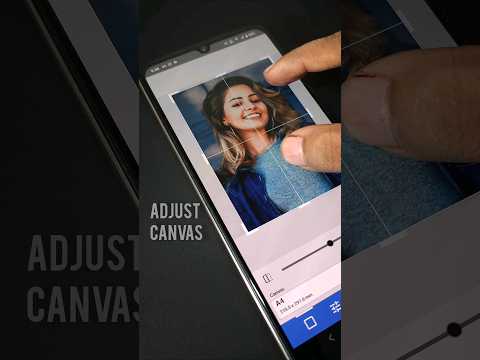
The Grid Method is a simple and accurate way to transfer reference images onto paper, canvas, wood, or any drawing surface. Add a grid to your reference image and recreate it block by block for better proportions, accuracy, and confidence.
Built for artists of all skill levels, this app combines the Grid Method with powerful drawing, tracing, and image editing tools to make creating art easier and more enjoyable.
Canvas
* Preset canvas sizes (A3, A4, A5, etc.) or custom canvas
* Portrait or landscape orientation
* Optional borders for frames or masking tape
* Crop, rotate, and flip reference images
Image Adjustments
* Brightness, contrast, hue, and saturation
* Adjustable Grayscale and Invert filters
Grid
* Solid, dashed, or dotted grid lines
* Custom color, thickness, and opacity
* Diagonal/cross grid and labels for improved accuracy
* Grid size in mm, cm, inches, pixels, or by rows and columns
Draw & Trace
* Compare or trace your artwork using camera overlay
* True-to-scale (Real Size) mode
* Touch lock, grid toggle, and full-screen mode
* Two-finger rotation while drawing
Artist Tools
* Color Finder with Hex, RGB, and HSL values
* Colored pencil suggestions (e.g. Burnt Sienna, Polychromos)
* Save and share images with adjustable resolution
* Export and import projects using the .ga4a format with all edits preserved
More Features
* Draft Manager for organizing multiple projects
* Light, dark, and customizable themes
* Multilingual support
Perfect for sketching, portrait drawing, painting, tracing, scaling reference photos, and creating accurate artwork with ease.
“Outline with Precision. Create with Passion.”
Built for artists of all skill levels, this app combines the Grid Method with powerful drawing, tracing, and image editing tools to make creating art easier and more enjoyable.
Canvas
* Preset canvas sizes (A3, A4, A5, etc.) or custom canvas
* Portrait or landscape orientation
* Optional borders for frames or masking tape
* Crop, rotate, and flip reference images
Image Adjustments
* Brightness, contrast, hue, and saturation
* Adjustable Grayscale and Invert filters
Grid
* Solid, dashed, or dotted grid lines
* Custom color, thickness, and opacity
* Diagonal/cross grid and labels for improved accuracy
* Grid size in mm, cm, inches, pixels, or by rows and columns
Draw & Trace
* Compare or trace your artwork using camera overlay
* True-to-scale (Real Size) mode
* Touch lock, grid toggle, and full-screen mode
* Two-finger rotation while drawing
Artist Tools
* Color Finder with Hex, RGB, and HSL values
* Colored pencil suggestions (e.g. Burnt Sienna, Polychromos)
* Save and share images with adjustable resolution
* Export and import projects using the .ga4a format with all edits preserved
More Features
* Draft Manager for organizing multiple projects
* Light, dark, and customizable themes
* Multilingual support
Perfect for sketching, portrait drawing, painting, tracing, scaling reference photos, and creating accurate artwork with ease.
“Outline with Precision. Create with Passion.”
Draw a grid for outline, realistic, and detailed artwork with zoom and more.
Updated on
Safety starts with understanding how developers collect and share your data. Data privacy and security practices may vary based on your use, region, and age. The developer provided this information and may update it over time.


Ratings and reviews
2.9K reviews

Sunita Patil
- Flag inappropriate
- Show review history
August 22, 2026
this app is very wonderful app inlike it every an drawing artist should use it because it gives attention to like you should drink water so on , so that this app I liked and. it is very useful for beginners too.
5 people found this review helpful

Jaiden Govender
- Flag inappropriate
- Show review history
July 21, 2026
one of the best apps for drawing. sure there are ads, but that's what you get for it being free so I don't mind. overall great app and clean and simple interface that gets you straight I to drawing without any hassles.
8 people found this review helpful

sonia sharma
- Flag inappropriate
August 8, 2024
I have been using this for over a year and found it to be pretty useful until today when I updated it. Not only did I lose my saved reference pic that I was working on, I found that after updating, everything has been messed up... resolution, colours, gray scale. I am half way through my current drawing and this app seems to have become useless for me.
24 people found this review helpful
Trijyas.in
August 9, 2024
We are very sorry for the inconvenience.While the update has been designed to improve user experience and convenience, we also understand the difficulties you must be facing.
Requesting you to extend your support and patience while we try to understand and fix all your issues.
Pls write to us at trijyas.in@gmail.com or https://t.me/trijyas_in 🙏
What’s new
Crash Fix.
Everyone
Learn moreApp support
phone
Phone number
+919153790743
About the developer
TRIJYAS LLP
support@trijyas.in
498nh, 4 Bajrangpuri Shahid Bhagat Singh Lane Gulzarbagh
Sampatchak
Patna, Bihar 800007
India
+91 91537 90743


