
CashBook: Business Ledger Book
Contains ads

4.8star
175K reviews
1M+
Downloads

Everyone
info



About this app
Effortlessly handle all your expenses, transactions, and payments with CashBook, the user-friendly business app!
Seamlessly manage your daily hisab kitab, ledgers, income, sales, expenses, credit and debit entries, as well as day-to-day business finances with ease.
Who can use CashBook?
Account Managers - Accounting Management is now easy. Get your cash flow statement & work book balance without calculating your daily sales balance manually. CashBook helps you reconcile & settle finances easily. It also helps maintain a ledger record book.
Businesses – Simple bookkeeping for small business owners. Use as a cash register to track the movement of money, in the form of a simple ledger. Export reports in Excel or PDF format. Easily know your balance amount. It is much easier to manage an account book on Cash Book compared to pen & paper.
CashBook Features
💸 Easily Track cashflow of your dukaan or store
Cash Book is your free digital account book. Add transactions daily to record all debit and credit entries of your business. Add detailed entries with Category & Payment Mode.
📊 Realtime Calculations
Trust CashBook to calculate your cash-in-hand, net balance and track your online balance easily.
📚 Manage multiple cash books
Manage multiple business account books with CashBook. Or simply create cashbooks for different business or personal purposes: Expense Management, Home Expenses, Daily Sales & more.
🤝 Group Books
Add members to your books and track business sales and expenses together. Group books are the easiest way to share expenses with friends, family, and business partners.
🏦 Bank PassBook -
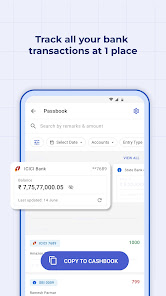
Payment tracker for all your online transactions at one place. CashBook scans SMS information to help you organise your income and expenses. Transfer online entries from Bank passbooks to your cashbooks. 100% Safe
📈 CashBook reports
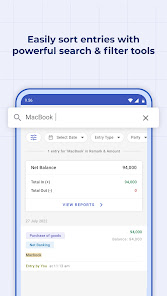
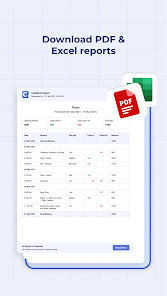
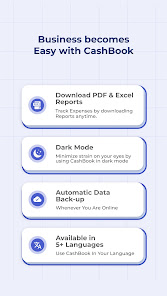
You can download custom reports in PDF or Excel format based on date range, category, payment mode, search term, and more. All these detailed reports in a clean layout for free! Easily share reports with clients & business partners.
🔐 100% Safe and Secure
All your transactions are 100% safe and secure with CashBook. You can also set app lock for additional security
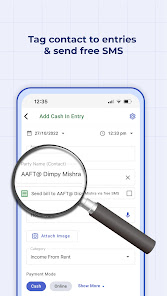
🧾 Attach Bills, Invoices, and Photos to entries
You can add additional information about entries like, item names, bill no., categories, and other details to each entry.
🎙Use Speech to Text feature for remarks
Add remarks to your entries using the voice note feature which converts your audio into text. Fast & easy.
📲 Automatic data backup
Your data and entries get backed up automatically. You can access all your CashBook entries from different devices by logging in with your registered mobile number.
✅ Works without Internet
Have trouble connecting to the internet? Don’t worry, CashBook app works even without an internet connection.
🖥️ Desktop App
Now use CashBook App on Desktop or PC : https://web.cashbookapp.in/login
🌏Available in 6 languages
CashBook is available in English, Hinglish, Hindi (हिंदी), Bangla (বাংলা), Gujarati (ગુજરાતી) and Marathi (मराठी). More languages are coming soon!
Many micro and small businesses use CashBook for money management. From grocery shops to independent business owners, CashBook is trusted by over a million users all over the world.
Start maintaining your cash in and cash out transactions on your digital hisab book, Cashbook!
CashBook is sometimes misspelled as Kas Book, Kash Book, Kata Book, Cashe Book by some users.
CashBook can also be used as a ledger book, income expense manager, credit debit logger, udhar khata, money manager, personal passbook, ok credit app, quick books and account book.
If you've any bugs to report or questions regarding your experience, please contact us at team@cashbook.in
To know more about us, please visit our website http://cashbook.in/
Seamlessly manage your daily hisab kitab, ledgers, income, sales, expenses, credit and debit entries, as well as day-to-day business finances with ease.
Who can use CashBook?
Account Managers - Accounting Management is now easy. Get your cash flow statement & work book balance without calculating your daily sales balance manually. CashBook helps you reconcile & settle finances easily. It also helps maintain a ledger record book.
Businesses – Simple bookkeeping for small business owners. Use as a cash register to track the movement of money, in the form of a simple ledger. Export reports in Excel or PDF format. Easily know your balance amount. It is much easier to manage an account book on Cash Book compared to pen & paper.
CashBook Features
💸 Easily Track cashflow of your dukaan or store
Cash Book is your free digital account book. Add transactions daily to record all debit and credit entries of your business. Add detailed entries with Category & Payment Mode.
📊 Realtime Calculations
Trust CashBook to calculate your cash-in-hand, net balance and track your online balance easily.
📚 Manage multiple cash books
Manage multiple business account books with CashBook. Or simply create cashbooks for different business or personal purposes: Expense Management, Home Expenses, Daily Sales & more.
🤝 Group Books
Add members to your books and track business sales and expenses together. Group books are the easiest way to share expenses with friends, family, and business partners.
🏦 Bank PassBook -
Payment tracker for all your online transactions at one place. CashBook scans SMS information to help you organise your income and expenses. Transfer online entries from Bank passbooks to your cashbooks. 100% Safe
📈 CashBook reports
You can download custom reports in PDF or Excel format based on date range, category, payment mode, search term, and more. All these detailed reports in a clean layout for free! Easily share reports with clients & business partners.
🔐 100% Safe and Secure
All your transactions are 100% safe and secure with CashBook. You can also set app lock for additional security
🧾 Attach Bills, Invoices, and Photos to entries
You can add additional information about entries like, item names, bill no., categories, and other details to each entry.
🎙Use Speech to Text feature for remarks
Add remarks to your entries using the voice note feature which converts your audio into text. Fast & easy.
📲 Automatic data backup
Your data and entries get backed up automatically. You can access all your CashBook entries from different devices by logging in with your registered mobile number.
✅ Works without Internet
Have trouble connecting to the internet? Don’t worry, CashBook app works even without an internet connection.
🖥️ Desktop App
Now use CashBook App on Desktop or PC : https://web.cashbookapp.in/login
🌏Available in 6 languages
CashBook is available in English, Hinglish, Hindi (हिंदी), Bangla (বাংলা), Gujarati (ગુજરાતી) and Marathi (मराठी). More languages are coming soon!
Many micro and small businesses use CashBook for money management. From grocery shops to independent business owners, CashBook is trusted by over a million users all over the world.
Start maintaining your cash in and cash out transactions on your digital hisab book, Cashbook!
CashBook is sometimes misspelled as Kas Book, Kash Book, Kata Book, Cashe Book by some users.
CashBook can also be used as a ledger book, income expense manager, credit debit logger, udhar khata, money manager, personal passbook, ok credit app, quick books and account book.
If you've any bugs to report or questions regarding your experience, please contact us at team@cashbook.in
To know more about us, please visit our website http://cashbook.in/
Updated on
Safety starts with understanding how developers collect and share your data. Data privacy and security practices may vary based on your use, region, and age. The developer provided this information and may update it over time.


Ratings and reviews
4.8
173K reviews

Gail Young
- Flag inappropriate
March 23, 2021
I got exactly what I wanted: a simple app for recording expenses and income, even on the fly! Its usefulness isn't limited to using your data just in the app: Your file can be exported both to Excel and to PDF. There's abundant room for details too. And, to top off these gems, the design is elegant and readable. I'm recommending it far and wide!
221 people found this review helpful

Daanyal HR
- Flag inappropriate
June 15, 2024
When I started my earning, I was thinking of getting a manual - writing ledger system for my finance management. I randomly checked the ledger app over the play store and installed multiple apps. I consider myself so lucky that this app was one of them. The first 3 apps were okay, but when I checked Cashbook, I didn't even give it a second thought to go to the earlier app. This is the best application, interface wise as well as functionality wise... they're maintaining it very well! Highly ...
19 people found this review helpful
CashBook
June 19, 2024
Dear User, thank you very much for sharing your valuable & useful feedback. If you have other feedback or suggestions, please write to us at team@cashbook.in. We would love to hear from you!

Mohammed Zeeshan
- Flag inappropriate
- Show review history
June 10, 2024
The app is great. Everything was working fine until last month after an update the passbook stopped detecting my transactions from federal Bank. all other bank transactions are being detected. Federal Bank was my main account for daily expenses, it's now difficult to manually add all entries. UPDATE: I reached out to the support team and they fixed the issue in a jiffy. They really do deserve 5 stars for that.
11 people found this review helpful
CashBook
June 10, 2024
Hi Zeeshan,
We are investigating the issue.
Please check your mail and share the details as we have asked for.
What's new
V4.6.3
- Fixed number formatting.
- Fixed number formatting.
App support
phone
Phone number
+918287653130


