
CloudBooks audio book player
In-app purchases
4.1star
205 reviews

Everyone
info
10K+
Downloads

Everyone
Learn more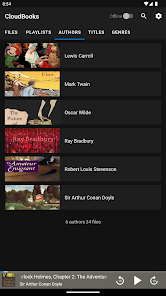






About this app
Take control over your listening experience with
CloudBooks – cloud audio book player.
Listen to your audiobooks, podcasts, lectures and other audio files anywhere directly from Google Drive, DropBox, OneDrive and more. Save space on your device as you no longer need to keep large audio files on your phone.
CloudBooks 🎧 it’s the easiest way to organize, stream & play your audio books on the cloud.
☁️CLOUD BOOKS PLAYER▶️
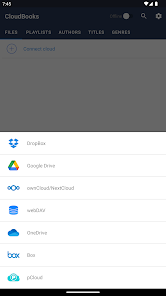
● Works with the popular cloud services for audio files streaming: Dropbox, Google Drive, OneDrive, OneDrive for Business, Box, pCloud, HiDrive. Personal clouds that support webDAV, including ownCloud and NextCloud. Network-Attached Servers (NAS) by Synology, QNAP, Western Digital (WD) and others that support webDAV protocol. These integrations make our cloud audio books and podcasts player one of the most versatile cloud books organizers.
● Plays audio files in different formats: Our free local books player offline app allows you to play mp3, m4a, and m4b audio.
● Works online and offline: Want to enjoy audio books with no wifi? Well, our no wifi books cloud player allows you that. Simply swap between offline/online mode using the dedicated toggle button in the top corner.
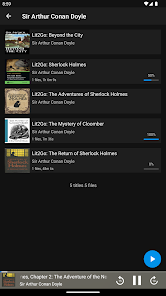
● Sync libraries: The app auto-detects all the audio on your phone and syncs all your audio libraries automatically. All tracks are grouped by author, title, genre.
📲ALL FEATURES:
・Supports most cloud services, personal clouds, and servers.
・Works without internet. Download books, podcasts, lectures, any audio file and entire folders onto the device for playback in offline mode (Premium feature)
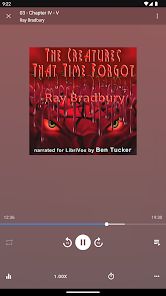
・Remembers last played position for each file and resumes playing where you left off
・Mark tracks as finished or unfinished
・Adjust seek buttons value in the 3-60 seconds range to rewind or fast-forward
・Create playlists by adding individual file or entire folder with files.
・Sync your audio books library with connected network accounts. Sync manager will scan selected folders and add audio files to your library.
・Supports mp3, m4b and m4a (aac only, no ALAC)
・Advanced buffering technologies to provide smooth playback
・Sleep timer
・Equalizer (EQ) to adjust bass and treble settings
・Playback speed control (tempo) within the 0.5x-3.0x range. (Premium feature)
・Play offline–no internet or WiFi needed
・Cast to your Chromecast device and any compatible speaker or TV without losing sound quality (Premium feature)
・Android Auto (Premium feature)
・no ads 💎
☑️ CloudBooks is free with unlimited streaming capabilities from a single cloud account. With a one-time purchase of Premium pack you get:
・download files, as well as folders, playlists and titles
・unlimited number of connected clouds and accounts
・adjust playback speed within the 0.5x-3.0x range.
・customize seek buttons value in the 3-60 seconds range to rewind or fast-forward
・cast to compatible devices
・access content on the cloud folders shared with you
・Android Auto integration
CloudBooks – cloud audio book player.
Listen to your audiobooks, podcasts, lectures and other audio files anywhere directly from Google Drive, DropBox, OneDrive and more. Save space on your device as you no longer need to keep large audio files on your phone.
CloudBooks 🎧 it’s the easiest way to organize, stream & play your audio books on the cloud.
☁️CLOUD BOOKS PLAYER▶️
● Works with the popular cloud services for audio files streaming: Dropbox, Google Drive, OneDrive, OneDrive for Business, Box, pCloud, HiDrive. Personal clouds that support webDAV, including ownCloud and NextCloud. Network-Attached Servers (NAS) by Synology, QNAP, Western Digital (WD) and others that support webDAV protocol. These integrations make our cloud audio books and podcasts player one of the most versatile cloud books organizers.
● Plays audio files in different formats: Our free local books player offline app allows you to play mp3, m4a, and m4b audio.
● Works online and offline: Want to enjoy audio books with no wifi? Well, our no wifi books cloud player allows you that. Simply swap between offline/online mode using the dedicated toggle button in the top corner.
● Sync libraries: The app auto-detects all the audio on your phone and syncs all your audio libraries automatically. All tracks are grouped by author, title, genre.
📲ALL FEATURES:
・Supports most cloud services, personal clouds, and servers.
・Works without internet. Download books, podcasts, lectures, any audio file and entire folders onto the device for playback in offline mode (Premium feature)
・Remembers last played position for each file and resumes playing where you left off
・Mark tracks as finished or unfinished
・Adjust seek buttons value in the 3-60 seconds range to rewind or fast-forward
・Create playlists by adding individual file or entire folder with files.
・Sync your audio books library with connected network accounts. Sync manager will scan selected folders and add audio files to your library.
・Supports mp3, m4b and m4a (aac only, no ALAC)
・Advanced buffering technologies to provide smooth playback
・Sleep timer
・Equalizer (EQ) to adjust bass and treble settings
・Playback speed control (tempo) within the 0.5x-3.0x range. (Premium feature)
・Play offline–no internet or WiFi needed
・Cast to your Chromecast device and any compatible speaker or TV without losing sound quality (Premium feature)
・Android Auto (Premium feature)
・no ads 💎
☑️ CloudBooks is free with unlimited streaming capabilities from a single cloud account. With a one-time purchase of Premium pack you get:
・download files, as well as folders, playlists and titles
・unlimited number of connected clouds and accounts
・adjust playback speed within the 0.5x-3.0x range.
・customize seek buttons value in the 3-60 seconds range to rewind or fast-forward
・cast to compatible devices
・access content on the cloud folders shared with you
・Android Auto integration
Updated on
Safety starts with understanding how developers collect and share your data. Data privacy and security practices may vary based on your use, region, and age. The developer provided this information and may update it over time.

No data shared with third parties
Learn more about how developers declare sharing

This app may collect these data types
Financial info, App activity and 2 others

Data is encrypted in transit
Ratings and reviews
4.1
197 reviews

AlyceAnn Jula Aber
- Flag inappropriate
April 25, 2026
I got this player because it would get my books from Dropbox. It works great. BUT randomly, several times a day, it will stop my book and just pop to another one. Developer answered once, then never again, after repeated emails. I will ask for a refund and will look elsewhere. I used this app since February so I think I gave it a good run to see if they/he would update it and fix it. They/he has not.

Donald Pascale
- Flag inappropriate
January 25, 2026
I wanted to like this app. I liked it enough at first to buy the unlock for it. The problems came after. When trying to cast the audiobooks, about 25% of the time, the book will lose it's place and start at the beginning. The second problem I had with it was I added a book, and it wasn't reading the files correctly. I emailed support, and they answered at first. I followed their suggestions to correct the problem, and that didn't fix the issue, I emailed back and never heard back.
1 person found this review helpful

Nova KiWave
- Flag inappropriate
- Show review history
May 24, 2024
Pretty good. Just wish it could sync where I left off between devices. Didn't fit my need. Earphones control is also kinda wonky. Pressing skip on the earphones should be tied to the fast forward function rather than skip the book function. That way it's possible to fast forward the book using earphones controlls. Seems like the features on this make more sense for songs. Which maybe the idea for this app was a port from the music cloud app they also have. Totally cool, just needs some tweaks.
6 people found this review helpful
What’s new
Several fixes and improvements to the UI and Android Auto
Everyone
Learn moreApp support
About the developer
Roman Burda
dev@cloudbeatsapp.com
Enerhetychna 24
23
Lviv
Львівська область
Ukraine
79026


