
AI Code Editor & Compiler
Contains adsIn-app purchases

star
30 reviews

Everyone
info
10K+
Downloads

Everyone
Learn more


About this app
AI Code Editor & Compiler is a mobile IDE for writing and running real programs on your phone or tablet. Type Python, Java, C++, C#, JavaScript, PHP, SQL or one of 25+ other languages, tap Run and see the output in seconds. When something breaks, the built-in AI assistant explains the error and suggests a fix.
No setup, no toolchains, no laptop. Your programs build and run on our cloud servers, so heavy work does not drain your battery (running needs an internet connection). Use it as a Python compiler, a Java IDE, a C++ compiler, a PHP editor or an SQL editor: one app instead of ten.
HOW IT WORKS
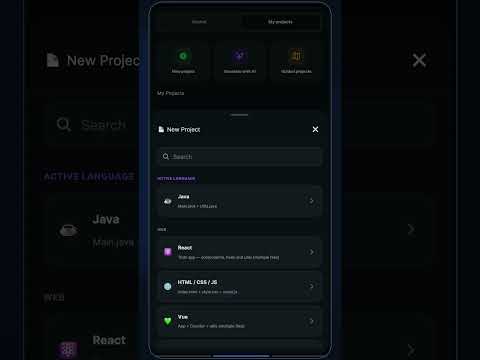
1. Pick a language, open a blank file or start from an example
2. Write in a code editor built for touch screens
3. Tap Run and read the real output a few seconds later
4. If it fails, ask the assistant what went wrong and get a corrected version
WRITE
• Syntax highlighting for 30+ languages and formats, from Python and Java to HTML, CSS, JSON, YAML and Markdown
• Smart keyboard bar with the brackets, quotes and symbols programmers use most
• Find & replace, adjustable font size and tab size, line numbers, word wrap, light or dark theme
• Open a file from your device, attach notes to a snippet, share it as a link
• Multi-file projects for work that outgrows a single file
• Split view keeps your program and its output or preview on screen together
RUN
• Code runner for Python, Java, C, C++, C#, JavaScript, TypeScript, Kotlin, Swift, Go, Rust, PHP, Ruby, SQL (SQLite), Lua, R, Scala, Haskell, Perl, Bash and more
• HTML, CSS and JavaScript render in a live preview next to your markup
• Every run shows the real output or the real error message, not a simulation
• History keeps recent snapshots, so you can roll back after an experiment
DEBUG AND IMPROVE WITH AI
• Fix: send a failing program and its error to the assistant and get a corrected version back
• Explain: select a few lines and ask what they do, step by step
• Optimize, rewrite, format, write a unit test or translate a snippet into another language
• Generate a first draft from a plain description when you are stuck
• Review: get a code review that points out the most important improvement (Pro)
• Pick the language model you prefer
• Optimize, rewrite, format and translate results open as a diff you review before applying
PRACTICE AND KEEP YOUR WORK
• Examples library with ready-made snippets to start from
• Java practice missions with real tasks to solve: a few are free, the rest come with Pro
• Save snippets to your account and continue where you left off
WHY A POCKET IDE
Ideas rarely wait for your desk. A bug you think of on the bus, a homework question between classes, an interview problem in a waiting room: open the app, type, run, done. Reading an error message and fixing it yourself is how syntax turns into skill, and the assistant is there when you want a second pair of eyes.
FREE AND PRO
The editor and the compilers are free to use, with ads. Free users get one AI request a day, plus one more by watching a short ad. Pro removes ads, lifts that daily limit and unlocks the code review and every practice mission.
WHO IT IS FOR
• Students who need a Java compiler or a C compiler for homework on the go
• Developers testing an idea, an algorithm or an SQL query away from the desk
• Interview candidates practicing problems anywhere
• Web learners using it as an HTML editor, with CSS and JavaScript changes in an instant preview
• Anyone who has ever emailed themselves a script "to try later"
The interface is available in 22 languages.
Download AI Code Editor & Compiler and run your first program in under a minute.
No setup, no toolchains, no laptop. Your programs build and run on our cloud servers, so heavy work does not drain your battery (running needs an internet connection). Use it as a Python compiler, a Java IDE, a C++ compiler, a PHP editor or an SQL editor: one app instead of ten.
HOW IT WORKS
1. Pick a language, open a blank file or start from an example
2. Write in a code editor built for touch screens
3. Tap Run and read the real output a few seconds later
4. If it fails, ask the assistant what went wrong and get a corrected version
WRITE
• Syntax highlighting for 30+ languages and formats, from Python and Java to HTML, CSS, JSON, YAML and Markdown
• Smart keyboard bar with the brackets, quotes and symbols programmers use most
• Find & replace, adjustable font size and tab size, line numbers, word wrap, light or dark theme
• Open a file from your device, attach notes to a snippet, share it as a link
• Multi-file projects for work that outgrows a single file
• Split view keeps your program and its output or preview on screen together
RUN
• Code runner for Python, Java, C, C++, C#, JavaScript, TypeScript, Kotlin, Swift, Go, Rust, PHP, Ruby, SQL (SQLite), Lua, R, Scala, Haskell, Perl, Bash and more
• HTML, CSS and JavaScript render in a live preview next to your markup
• Every run shows the real output or the real error message, not a simulation
• History keeps recent snapshots, so you can roll back after an experiment
DEBUG AND IMPROVE WITH AI
• Fix: send a failing program and its error to the assistant and get a corrected version back
• Explain: select a few lines and ask what they do, step by step
• Optimize, rewrite, format, write a unit test or translate a snippet into another language
• Generate a first draft from a plain description when you are stuck
• Review: get a code review that points out the most important improvement (Pro)
• Pick the language model you prefer
• Optimize, rewrite, format and translate results open as a diff you review before applying
PRACTICE AND KEEP YOUR WORK
• Examples library with ready-made snippets to start from
• Java practice missions with real tasks to solve: a few are free, the rest come with Pro
• Save snippets to your account and continue where you left off
WHY A POCKET IDE
Ideas rarely wait for your desk. A bug you think of on the bus, a homework question between classes, an interview problem in a waiting room: open the app, type, run, done. Reading an error message and fixing it yourself is how syntax turns into skill, and the assistant is there when you want a second pair of eyes.
FREE AND PRO
The editor and the compilers are free to use, with ads. Free users get one AI request a day, plus one more by watching a short ad. Pro removes ads, lifts that daily limit and unlocks the code review and every practice mission.
WHO IT IS FOR
• Students who need a Java compiler or a C compiler for homework on the go
• Developers testing an idea, an algorithm or an SQL query away from the desk
• Interview candidates practicing problems anywhere
• Web learners using it as an HTML editor, with CSS and JavaScript changes in an instant preview
• Anyone who has ever emailed themselves a script "to try later"
The interface is available in 22 languages.
Download AI Code Editor & Compiler and run your first program in under a minute.
Mobile IDE to run Python, Java, C++, C#, PHP & SQL programs and debug errors
Updated on
Safety starts with understanding how developers collect and share your data. Data privacy and security practices may vary based on your use, region, and age. The developer provided this information and may update it over time.
- No data shared with third partiesLearn more about how developers declare sharing
- This app may collect these data typesPersonal info and Device or other IDs
- Data is encrypted in transit
- You can request that data be deleted


Ratings and reviews
28 reviews

Harvey Nuñez
- Flag inappropriate
January 3, 2025
Its a good app and easy to use. But if you can, can you add Lua into the app? I'll be waiting for it.
Coddykit
January 7, 2025
Hi Harvey,
We added the LUA language to app. Please keep on the upcoming update. Hope you may change your rate 4 to 5

Hilal D
- Flag inappropriate
- Show review history
January 26, 2026
Even though I subscribed, my account is not recognized and I cannot use my Pro membership.

Tam Just Tam
- Flag inappropriate
December 28, 2025
I paid for pro ... and got nothing no service no money. complete waist
What’s new
• Refreshed look and smoother experience across the app
• Improved translations — the app now feels at home in your language
Thanks for using the app — your reviews help us improve!
• Improved translations — the app now feels at home in your language
Thanks for using the app — your reviews help us improve!
Everyone
Learn moreApp support
About the developer
MEHMET CANKER
info@hotelplus.ai
OYAKKENT 2 SITESI B7 APT, NO:1 U/8 BASAKSEHIR MAHALLESI
ANAFARTALAR CADDESI, BASAKSEHIR
34480 Istanbul (Europe)/İstanbul
Türkiye
+90 535 201 20 17


