
Mathify - Math Editor & Solver
In-app purchases

star
192 reviews

Everyone
info
50K+
Downloads

Everyone
Learn more


About this app
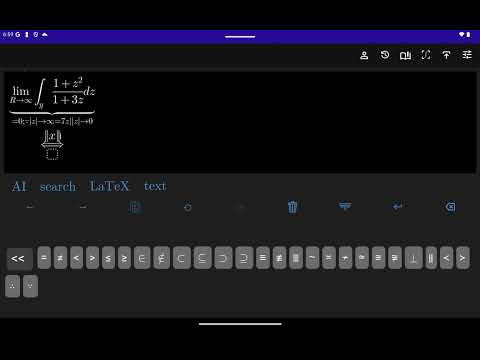
AI powered document style math/equation editor and solver allowing you to
- Create documents and export as PDF
- Solve equations by using AI chat
- OCR scanning of complex math formulas using camera (Pro only)
- Handwriting recognition using AI (Pro only)
- Creating advanced math formulas
- Copy image into clipboard, so you can paste it in Google docs or MS Word or anywhere else paste image is available (working on new Android devices and api versions)
- Copy LaTeX into clipboard, sharing as .jpg or .png images
- Calculate results in WolframAlpha.
- Search buttons using latex or human manner mathematical names (using AI algorithms on your local device)
Mathify - Math Editor is paid software, but it allows users to try it for free with certain limitations.
The free version allows users to write **maximum 20 symbols** and perform a maximum of **2 operations per day** for each action available in the navigation menu (e.g., ""Copy image to clipboard""). If you attempt to perform a third operation of the same action on the same day, a prompt will appear notifying you that the free limit has been exceeded.
-For greek symbols include greek in your native keyboard.
-To select formula longpress on a formula or text.
-To activate zoom using pinch gestures tap with two fingers then start to zoom. To deactivate zoom mode tap with single finger.
-For power or index (superscript, subscript) use '_' (underscore) for sub and '^' for super scripts.
For Big Operators (integrals, sum, product ....) choose type of limits and to add limits press '_' (underscore) for lower limit and '^' for upper limit.
Do not use Mathify as full text editor, instead create short math formulas, and copy them into MS Word or Google docs or any other text editor.
- Create documents and export as PDF
- Solve equations by using AI chat
- OCR scanning of complex math formulas using camera (Pro only)
- Handwriting recognition using AI (Pro only)
- Creating advanced math formulas
- Copy image into clipboard, so you can paste it in Google docs or MS Word or anywhere else paste image is available (working on new Android devices and api versions)
- Copy LaTeX into clipboard, sharing as .jpg or .png images
- Calculate results in WolframAlpha.
- Search buttons using latex or human manner mathematical names (using AI algorithms on your local device)
Mathify - Math Editor is paid software, but it allows users to try it for free with certain limitations.
The free version allows users to write **maximum 20 symbols** and perform a maximum of **2 operations per day** for each action available in the navigation menu (e.g., ""Copy image to clipboard""). If you attempt to perform a third operation of the same action on the same day, a prompt will appear notifying you that the free limit has been exceeded.
-For greek symbols include greek in your native keyboard.
-To select formula longpress on a formula or text.
-To activate zoom using pinch gestures tap with two fingers then start to zoom. To deactivate zoom mode tap with single finger.
-For power or index (superscript, subscript) use '_' (underscore) for sub and '^' for super scripts.
For Big Operators (integrals, sum, product ....) choose type of limits and to add limits press '_' (underscore) for lower limit and '^' for upper limit.
Do not use Mathify as full text editor, instead create short math formulas, and copy them into MS Word or Google docs or any other text editor.
Create and solve equations with a rich text math editor powered by AI.
Updated on
Safety starts with understanding how developers collect and share your data. Data privacy and security practices may vary based on your use, region, and age. The developer provided this information and may update it over time.
- No data shared with third partiesLearn more about how developers declare sharing
- This app may collect these data typesDevice or other IDs
- Data is encrypted in transit


Ratings and reviews
171 reviews

James Iseguan
- Flag inappropriate
July 10, 2026
There are many math script editor a million times better than this app. And they're OFFLINE operating. But this? Nah. I made a mistake. Forget the part it requires an internet connection just to SAVE A SCRIPT 🤦🏻♂️. And when you have an internet connection, the app crashes. I tried to share but it keeps saying error and shii..
Hakob Grigoryan
July 10, 2026
I can see from the logs that you've successfully exported many PDFs. If you encounter an issue, you're welcome to email me and help me fix it. But if you've decided to go in a different direction, then I wish you the best of luck with the millions of other offline apps available.

Kade Frazier
- Flag inappropriate
March 29, 2023
Doesn't really appear to have any great cross app compatibility (I can't copy and paste to or from Google docs) which was what I was hoping for: a more efficient way to type math equations out, then just move them. But it's fine for use on its own.
1 person found this review helpful
Hakob Grigoryan
March 29, 2023
You need to export as image and insert into Google docs or ms word manually. Wise versa is not possible!

Shubham Snehil
- Flag inappropriate
- Show review history
March 25, 2021
Whenever I write a complex equation it crashes. And it doesn’t store the image in the gallery. And Everything is fine. It’s a best app for those who want to write mathematical notation in mobile phone.
8 people found this review helpful
Hakob Grigoryan
April 4, 2021
UPDATE: The issue is fixed, please update to the latest version.
What’s new
Bug fixes
Everyone
Learn moreApp support
phone
Phone number
+37477726937
About the developer
Hakob Grigoryan
haykflexgrigoryan@gmail.com
Sherami 17
26
Yerevan 0084
Armenia


