
DailyRoads Voyager
Contains adsIn-app purchases

star
33.6K reviews

Everyone
info
1M+
Downloads


About this app
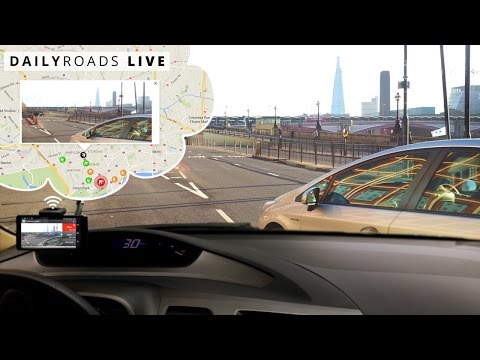
Recording road videos since 2009, DailyRoads Voyager works as a car blackbox, dash cam or auto DVR, continuously capturing videos and photos during your journeys. The app automatically records everything, but only important events are retained for future reference or as evidence. You get to choose what to keep, simply by touching the screen, even while you drive.
The video evidence can be invaluable in case of accidents, insurance fraud, police abuse, protection from crash-for-cash scams and differences of opinion with other drivers.
Key features:
- Continuous video recording, with user-defined length and video quality; sound can be included
- User-defined storage space on the SD card with cyclic recording; i.e. the card never fills up
- One-touch video protection allows you to keep video files for interesting road events during the whole journey
- Auto-protect video upon sudden shock (e.g. accident); configurable g-force sensitivity
- Automatically capture photos at user-defined intervals and resolutions; great for time-lapse photography
- Background video/photo capture, with optional buttons over other applications
- Auto start and shutdown based on car dock detection and related options
- Videos/photos are timestamped & geotagged
- Automatically determine street address of protected videos/photos
- Display videos/photos location on a map
- Display speed, elevation, timestamp and GPS coordinates on videos/photos
- Option to change speed units (km/h, mph) and date format
- Overheating protection
- GPS can be disabled to reduce power consumption
- Brightness adjustment option allows less distraction when driving at night
- Built-in file manager, video/photo browser
- Add title/description/bookmark to files
- Upload files to DailyRoads.com
- App2SD
This is a free application with some ads, but they are disabled after any purchase within the app.
Pro version:
- no ads
- camera selection after installation
- uploads to Dropbox and custom servers
- option to automatically start the app after device boot
- Bluetooth as auto-start and auto-stop options
- 1000 video overlay credits on the server
Enjoy, and have a safe journey!
Working combinations of video settings on various phone models: https://dailyroads.app/voyager/stats
Reviews: https://dailyroads.app/voyager/reviews
Interactive demo of our future plans: http://future.dailyroads.com
The video evidence can be invaluable in case of accidents, insurance fraud, police abuse, protection from crash-for-cash scams and differences of opinion with other drivers.
Key features:
- Continuous video recording, with user-defined length and video quality; sound can be included
- User-defined storage space on the SD card with cyclic recording; i.e. the card never fills up
- One-touch video protection allows you to keep video files for interesting road events during the whole journey
- Auto-protect video upon sudden shock (e.g. accident); configurable g-force sensitivity
- Automatically capture photos at user-defined intervals and resolutions; great for time-lapse photography
- Background video/photo capture, with optional buttons over other applications
- Auto start and shutdown based on car dock detection and related options
- Videos/photos are timestamped & geotagged
- Automatically determine street address of protected videos/photos
- Display videos/photos location on a map
- Display speed, elevation, timestamp and GPS coordinates on videos/photos
- Option to change speed units (km/h, mph) and date format
- Overheating protection
- GPS can be disabled to reduce power consumption
- Brightness adjustment option allows less distraction when driving at night
- Built-in file manager, video/photo browser
- Add title/description/bookmark to files
- Upload files to DailyRoads.com
- App2SD
This is a free application with some ads, but they are disabled after any purchase within the app.
Pro version:
- no ads
- camera selection after installation
- uploads to Dropbox and custom servers
- option to automatically start the app after device boot
- Bluetooth as auto-start and auto-stop options
- 1000 video overlay credits on the server
Enjoy, and have a safe journey!
Working combinations of video settings on various phone models: https://dailyroads.app/voyager/stats
Reviews: https://dailyroads.app/voyager/reviews
Interactive demo of our future plans: http://future.dailyroads.com
Trusted by millions to safely record videos while driving - for evidence or fun
Updated on
Featured stories

Safety starts with understanding how developers collect and share your data. Data privacy and security practices may vary based on your use, region, and age. The developer provided this information and may update it over time.


Ratings and reviews
31.7K reviews

Jason Roberts
- Flag inappropriate
April 18, 2022
Seemed like a good app. Free and easy to use. However, we got struck by another car yesterday and when I reviewed the app videos, there was no video capture of the impact. There were saved videos right before the accident and right after the accident, but no capture of the actual accident. Not sure why this happened, but the app failed when I needed it the most.
17 people found this review helpful
DailyRoads
April 20, 2022
Sorry for the accident and that the app failed you this time. Most likely your device is running on Android 12, for which we uncovered this problem a while ago. More info and a new version: https://dailyroads.app/voyager/protected-videos-on-android-12

A Google user
- Flag inappropriate
April 21, 2019
The app worked fantastic for the first day I used it. I dunno what happened over night, but the next day when I would open the app, it would open to the video library and there was absolutely no way to go to the camera. There's no icon to take you there, and the back button just exited the app. Clearing the cache and the app storage fixed the problem one time, then the next time I opened it, same thing. Stuck in the video library with no way out. Such a shame.
8 people found this review helpful
DailyRoads
April 23, 2019
The app comes with 2 launcher icons. It seems the system on your device somehow hides the icon with the REC text. That one is used to open the main screen with the camera view.
A Google user
- Flag inappropriate
- Show review history
December 27, 2019
Has some issues. Background recording wasn't working while I was trying to get it set up while driving, but in my office it works ok. Only difference that seems to make it work is that I am starting/stopping using the on-screen button rather than from the live video feed. Also, infinity focus is wrong - it actually just keeps focus wherever it happened to be last. For a dash cam I need it to always be focused at infinity, but for this to work I need to make sure to focus to infinity manually before I start, which is a poor workaround as if I forget to do this it will be mis-focused for the entire trip!
8 people found this review helpful
DailyRoads
January 4, 2020
You can try all the focus options in the app's video settings, but ultimately the camera firmware decides how to apply the selection on each device model.
What’s new
- Fixed background video recording on Android 14
- Background GPS improvements on Android 13 and 14
- Added audio track icon into the Files section
- Fixed the Start App functionality on Android 13 and 14
- Design improvements on Android 13 and 14
- Background GPS improvements on Android 13 and 14
- Added audio track icon into the Files section
- Fixed the Start App functionality on Android 13 and 14
- Design improvements on Android 13 and 14
App support
About the developer
DAILYROADS LTD
office@dailyroads.com
Unit 5 20b High Street
LONDON
E15 2PP
United Kingdom
+44 7508 364740


