
Shift Work Schedule Calendar
Contains adsIn-app purchases

star
51.8K reviews

Everyone
info
1M+
Downloads

Everyone
Learn more


About this app
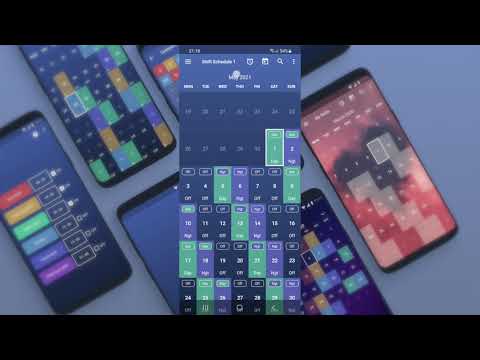
Shift Work Schedule is a free calendar and work shifts schedule widget. This app features a simple yet elegant shift calendar and widget that you can use to show your work shift pattern. It can be used as a firefighter shift calendar, Walmart schedule, or nurse calendar.
This Shift Work Calendar app offers its own list of work shift patterns that you can immediately use. If in case, your work shift doesn’t fall on any of those patterns, you can set a custom shift pattern and use it instead of the pre-loaded shift work patterns.
The app will automatically highlight all corresponding days of your work week based on the day you select, so you can see if you are working or not on a specific date and plan your holidays, trips, or whatever you want to plan.
NOTE: once you selected your shift pattern, you can not edit separate days (like overtime).
The app also has a nice search feature that lets you check if you’re supposed to be working a particular day and it lets you customize its appearance down to the background.
The app offers a sleek, translucent calendar widget, even if you do not work shifts, you might use it as a simple calendar Widget on your main screen or lock screen.
Settings of Shift Work Schedule:
⏰ Alarm clock for shifts
📱 Widgets - 4x1, 4x2, 3x3, 4x4, and resizable widget
🎨 Сhange colors for the selected day, all shifts, day numbers
📊 Adjust your custom shifts pattern
👨👩👧👦 Save up to 8 custom patterns
📖 See 2 schedules on one calendar simultaneously
📖 25 Preset shift patterns
7️⃣ Show week number, change the first day of the week
🖼 Background picture from user gallery
The calendar does not sync with Google calendars, and it is not a wage calculator, all it does is shows your work shifts pattern in a nice way :)
If you have any suggestions or questions, or you do not understand how to make your custom pattern, or you want to correct or add a translation for this app, send me an email please - 4thfloorapps.help@gmail.com
This Shift Work Calendar app offers its own list of work shift patterns that you can immediately use. If in case, your work shift doesn’t fall on any of those patterns, you can set a custom shift pattern and use it instead of the pre-loaded shift work patterns.
The app will automatically highlight all corresponding days of your work week based on the day you select, so you can see if you are working or not on a specific date and plan your holidays, trips, or whatever you want to plan.
NOTE: once you selected your shift pattern, you can not edit separate days (like overtime).
The app also has a nice search feature that lets you check if you’re supposed to be working a particular day and it lets you customize its appearance down to the background.
The app offers a sleek, translucent calendar widget, even if you do not work shifts, you might use it as a simple calendar Widget on your main screen or lock screen.
Settings of Shift Work Schedule:
⏰ Alarm clock for shifts
📱 Widgets - 4x1, 4x2, 3x3, 4x4, and resizable widget
🎨 Сhange colors for the selected day, all shifts, day numbers
📊 Adjust your custom shifts pattern
👨👩👧👦 Save up to 8 custom patterns
📖 See 2 schedules on one calendar simultaneously
📖 25 Preset shift patterns
7️⃣ Show week number, change the first day of the week
🖼 Background picture from user gallery
The calendar does not sync with Google calendars, and it is not a wage calculator, all it does is shows your work shifts pattern in a nice way :)
If you have any suggestions or questions, or you do not understand how to make your custom pattern, or you want to correct or add a translation for this app, send me an email please - 4thfloorapps.help@gmail.com
This work schedule app is a calendar widget for people who work shifts + Alarms
Updated on
Safety starts with understanding how developers collect and share your data. Data privacy and security practices may vary based on your use, region, and age. The developer provided this information and may update it over time.


Ratings and reviews
50.8K reviews

A Google user
- Flag inappropriate
- Show review history
October 22, 2018
I would pay $5 for this app. It is so rare to find an app that is so tremendously useful. The best part is this app supports pattern recognition so if you work a swing shift with a repeating pattern it's just perfect. 6 out of 5 stars. And no I didn't mess up on the math. And if I didn't mention this doesn't require permissions like so many other data sucking parasites.
81 people found this review helpful

Jóhannes Jörundsson
- Flag inappropriate
May 10, 2026
looks like it should be perfect for what it's supposed to do, but it isn't. for some reason, days without an alarm(weekends) use the alarm for friday... and after some editing, I started to get additional alarms that were impossible to remove. I used this app for quite a while with its flaws, but since my schedule changed, it's completely ruined.
1 person found this review helpful

Bobbi Kuva
- Flag inappropriate
June 3, 2026
it used to be a great app. But now every time I open it an ad starts playing and the ads are very long and you can't skip them. It's so very frustrating. For example, standing at the counter at my dentist office trying to book an appointment and having to stand there like an idiot waiting for a really long ad to finish (seriously, they're like 5 minutes long each) is not cool. I'll be looking for a new app now.
9 people found this review helpful
Everyone
Learn moreApp support
About the developer
4TH FLOOR APPS, SIA
4thfloorapps.help@gmail.com
2A-14 Lacu iela
Riga, LV-1013
Latvia
+371 25 930 257


