
Dotori Unit Converter
Contains ads


Everyone
info
1+
Downloads

Everyone
Learn more


About this app
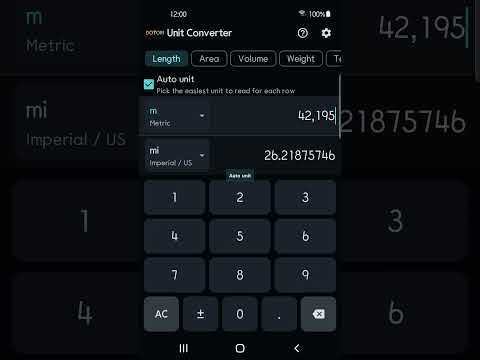
Dotori Unit Converter compares several units on one screen. Choose a category and enter a number in any row; the other rows update together. You can check metric, customary and Korean traditional units without setting up a separate conversion for each result.
Eight categories:
- Length
- Area
- Volume
- Weight
- Temperature
- Speed
- Time
- Data size, with decimal and binary units shown separately
Choose readable units:
Automatic unit selection adjusts other rows to a suitable scale where available. A distance entered in Korean ri can be shown in kilometres instead of a long number of centimetres. The row you are entering stays in your chosen unit. Pick a unit manually to keep it fixed, or return that row to automatic selection. Temperature and time use fixed comparison rows.
Korean traditional measures:
Compare pyeong, don, geun, doe, ja and ri with other units. Korean measures appear by default when the app language is Korean or your device region is Korea. Settings let you choose automatic display, always show, or hide.
Geun has two clearly labelled definitions: 600 g for meat and medicinal herbs, and 375 g for vegetables and fruit. Choose the definition you need; automatic unit selection does not switch between them. Traditional measures use the stated conversion definitions, which may differ from local market practice.
Conversions work offline from the first launch. There is no conversion-table download, account or login. Use the built-in keypad and compare the results directly on the screen.
Privacy and ads:
The app does not send your conversion numbers or selected units to the developer or advertising SDK. It displays one banner using Google Mobile Ads, with no interstitial ads. Online ads and privacy-choice management may need a connection. Applicable privacy choices are handled through Google's consent flow, and available privacy options can be reopened in Settings. See the app's Privacy Policy for advertising data and Android backup details.
Eight categories:
- Length
- Area
- Volume
- Weight
- Temperature
- Speed
- Time
- Data size, with decimal and binary units shown separately
Choose readable units:
Automatic unit selection adjusts other rows to a suitable scale where available. A distance entered in Korean ri can be shown in kilometres instead of a long number of centimetres. The row you are entering stays in your chosen unit. Pick a unit manually to keep it fixed, or return that row to automatic selection. Temperature and time use fixed comparison rows.
Korean traditional measures:
Compare pyeong, don, geun, doe, ja and ri with other units. Korean measures appear by default when the app language is Korean or your device region is Korea. Settings let you choose automatic display, always show, or hide.
Geun has two clearly labelled definitions: 600 g for meat and medicinal herbs, and 375 g for vegetables and fruit. Choose the definition you need; automatic unit selection does not switch between them. Traditional measures use the stated conversion definitions, which may differ from local market practice.
Conversions work offline from the first launch. There is no conversion-table download, account or login. Use the built-in keypad and compare the results directly on the screen.
Privacy and ads:
The app does not send your conversion numbers or selected units to the developer or advertising SDK. It displays one banner using Google Mobile Ads, with no interstitial ads. Online ads and privacy-choice management may need a connection. Applicable privacy choices are handled through Google's consent flow, and available privacy options can be reopened in Settings. See the app's Privacy Policy for advertising data and Android backup details.
Convert 8 categories offline, with Korean units and automatic unit selection
Updated on
Safety starts with understanding how developers collect and share your data. Data privacy and security practices may vary based on your use, region, and age. The developer provided this information and may update it over time.
- No data shared with third partiesLearn more about how developers declare sharing
- No data collectedLearn more about how developers declare collection


What’s new
Added Google Play update checks and a restart option after an update downloads. Updated the catalog of other Dotori apps.
Everyone
Learn moreApp support
phone
Phone number
+821022871282
About the developer
곽종근
hugemail2me@gmail.com
South Korea


