Automatic Tag Editor
Contains adsIn-app purchases
3.8star
97.5K reviews
1M+
Downloads

Everyone
info
Enjoy this app for free, plus many more free of ads and in-app purchases, with a Google Play Pass subscription. Learn more

About this app
Do you remember times when you first decided to keep your music library more tidy? You found out that the only solution was to fill in manually all songs info, one by one.
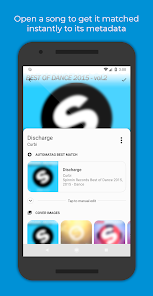
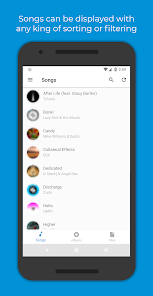
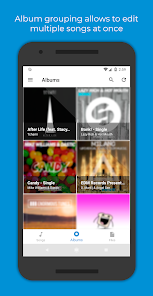
These days are over! Automatic Tag Editor analyses your library and pick for you close tag matches, just tap on the one you prefer and you are done. It will only take five seconds per song...Guaranteed! And that's not all: it also gives you some squared hi-res pictures you can use as cover art by tapping on them.
This automatic editor is perfect for editing ID3 tag of your music library. It updates the embedded tags so you don't lose them when you move files away from your phone.
Edit all the most known tag information
‣ Title
‣ Artist
‣ Album artist
‣ Album
‣ Genre
‣ Year
‣ Track number
‣ Track total
‣ Disc number
‣ Disc total
‣ Lyrics
‣ Comment
Multiple audio formats are supported:
‣ Mp3
‣ M4a
‣ Ogg
‣ Flac
‣ Wma
‣ Wav
Supports editing files on SD card!
Note: Automatic Tag Editor is only intended to help users to recover metadata related to the songs they have previously bought as digital copy but for which they lost their metadata in any way. Automatic Tag Editor and its staff do not support music piracy in any way.
These days are over! Automatic Tag Editor analyses your library and pick for you close tag matches, just tap on the one you prefer and you are done. It will only take five seconds per song...Guaranteed! And that's not all: it also gives you some squared hi-res pictures you can use as cover art by tapping on them.
This automatic editor is perfect for editing ID3 tag of your music library. It updates the embedded tags so you don't lose them when you move files away from your phone.
Edit all the most known tag information
‣ Title
‣ Artist
‣ Album artist
‣ Album
‣ Genre
‣ Year
‣ Track number
‣ Track total
‣ Disc number
‣ Disc total
‣ Lyrics
‣ Comment
Multiple audio formats are supported:
‣ Mp3
‣ M4a
‣ Ogg
‣ Flac
‣ Wma
‣ Wav
Supports editing files on SD card!
Note: Automatic Tag Editor is only intended to help users to recover metadata related to the songs they have previously bought as digital copy but for which they lost their metadata in any way. Automatic Tag Editor and its staff do not support music piracy in any way.
Updated on
Safety starts with understanding how developers collect and share your data. Data privacy and security practices may vary based on your use, region, and age. The developer provided this information and may update it over time.

No data shared with third parties
Learn more about how developers declare sharing

No data collected
Learn more about how developers declare collection

Data is encrypted in transit

Data can’t be deleted
Ratings and reviews
3.7
95.2K reviews

Bournefort17
- Flag inappropriate
- Show review history
December 31, 2024
STILL WORKS GREAT - NEED TO MOVE MUSIC TO DIFFERENT FOLDER This app doesn't deserve the negative reviews. It is still the BEST automating mp3 tagging software I have found. After a recent android update, the app no longer has access to the Downloads folder. You need to move your mp3 files to a different folder (I used the Music Folder) and it will work perfectly.
77 people found this review helpful

t̶h̶e̶ h̶y̶d̶r̶o̶m̶a̶n̶i̶a̶c̶
- Flag inappropriate
April 22, 2026
I've been using this app for years and have come to rely on it so much. But recently, it's become unusable because it keeps saying to grant storage permission access. I could go into my settings and grant complete access to everything and it will still pop up no matter which folder I choose. You could edit a song's metadata, and then when you grant access to your storage, it just pops up again over and over and over again. This one thing makes the app COMPLETELY unusable.
3 people found this review helpful

Brandon Theurer
- Flag inappropriate
November 17, 2025
Great app and I use it to edit albums. However now it's got a glitch. I cannot change the album cover to any image I have locally stored on my device without being asked to grant permission to the download folder now, which is a security risk in Android. It does not matter if you have never had the file located in the downloads folder. Meaning neither the audio files nor the album cover file. The app just wants access to the downloads folder to execute its programming. Please help.
2 people found this review helpful
App support
About the developer
Filippo Bottonelli
fillobotto@gmail.com
Via Pietro Gubellini, 4
40141 Bologna
Italy


