Sony | Music Center
4.5star
280K reviews
10M+
Downloads

Everyone
info


About this app
- The center for all music lovers -
Do you want to fully enjoy music whether at home or out and about?
Then this Sony app is exactly what you've been waiting for.
The Sony l Music Center app will singlehandedly enable you
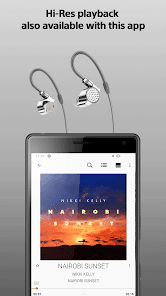
to listen to Hi-Res sound sources in the excellent audio quality.
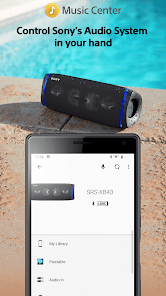
You can also connect to other Sony audio devices to play music in the
best possible sound field, with the settings optimized for each individual device.
To use the control function of audio devices, an audio device compatible with Sony | Music Center is required.
Please check if your audio products are compatible with Sony | Music Center from our support site.
Devices that were compatible with SongPal are compatible with Sony | Music Center as well.
Main Feature
You can playback music including Hi-Res tracks on your smartphone.
Play the music contents from CD, USB, and Smartphone.
Access music by browsing or searching music folders stored on your computer or NAS drive thru network(DLNA)*.
You can set Multi-room, Surround, Stereo wirelessly with multiple speakers.*
Change the setting on the audio device, such as Equalizer, Sleep Timer, Network* and so on.
*Limited to compatible devices.
This application supports TalkBack.
Note
* Starting with version 7.4 of this app, it is only available on Android OS 9.0 or later.
This app does not support Atom™ processor-based mobile devices.
With the update to ver.5.2, Music Center will no longer be compatible with STR-DN850/STR-DN1050/ICF-CS20BT/XDR-DS21BT.
Some features may not be supported by certain devices.
Some functions and services may not be supported in certain regions/countries.
Please make sure to update Sony | Music Center to the latest version.
Sony | Music Center confirm the permission below.
【Device & app history】
●retrieve running apps
⇒Check if Sony | Music Center is running and launch Sony | Music Center automatically when connecting to the compatible devices or performing the initial setup.
【Photos/Media/Files】
●test access to protected storage
【Microphone】
●record audio
⇒Use the microphone when performing voice operation.
【Wi-Fi connection information】
●view Wi-Fi connections
【Device ID & call information】
●read device status and identity
⇒While Sony | Music Center is connecting to the car audio Sony | Music Center check the call status so as not to read text message during calling..
Do you want to fully enjoy music whether at home or out and about?
Then this Sony app is exactly what you've been waiting for.
The Sony l Music Center app will singlehandedly enable you
to listen to Hi-Res sound sources in the excellent audio quality.
You can also connect to other Sony audio devices to play music in the
best possible sound field, with the settings optimized for each individual device.
To use the control function of audio devices, an audio device compatible with Sony | Music Center is required.
Please check if your audio products are compatible with Sony | Music Center from our support site.
Devices that were compatible with SongPal are compatible with Sony | Music Center as well.
Main Feature
You can playback music including Hi-Res tracks on your smartphone.
Play the music contents from CD, USB, and Smartphone.
Access music by browsing or searching music folders stored on your computer or NAS drive thru network(DLNA)*.
You can set Multi-room, Surround, Stereo wirelessly with multiple speakers.*
Change the setting on the audio device, such as Equalizer, Sleep Timer, Network* and so on.
*Limited to compatible devices.
This application supports TalkBack.
Note
* Starting with version 7.4 of this app, it is only available on Android OS 9.0 or later.
This app does not support Atom™ processor-based mobile devices.
With the update to ver.5.2, Music Center will no longer be compatible with STR-DN850/STR-DN1050/ICF-CS20BT/XDR-DS21BT.
Some features may not be supported by certain devices.
Some functions and services may not be supported in certain regions/countries.
Please make sure to update Sony | Music Center to the latest version.
Sony | Music Center confirm the permission below.
【Device & app history】
●retrieve running apps
⇒Check if Sony | Music Center is running and launch Sony | Music Center automatically when connecting to the compatible devices or performing the initial setup.
【Photos/Media/Files】
●test access to protected storage
【Microphone】
●record audio
⇒Use the microphone when performing voice operation.
【Wi-Fi connection information】
●view Wi-Fi connections
【Device ID & call information】
●read device status and identity
⇒While Sony | Music Center is connecting to the car audio Sony | Music Center check the call status so as not to read text message during calling..
Updated on
Safety starts with understanding how developers collect and share your data. Data privacy and security practices may vary based on your use, region, and age. The developer provided this information and may update it over time.

No data shared with third parties
Learn more about how developers declare sharing

This app may collect these data types
Location, Personal info and 4 others

Data is encrypted in transit

Data can’t be deleted
Ratings and reviews
4.5
268K reviews

Woofie
- Flag inappropriate
January 29, 2026
Cannot prevent this app from playing music automatically. Every time I connect to a device, this app starts playing whatever music it feels like. I use different music apps like Spotify and Samsung Music for the features they support, and Music Center just isn't one of them. Even worse, I had one song coming out of my phone while another song was coming out of my connected speaker! Please allow me the option to disable the music player feature of this app. I don't need it.

Charley Buehner
- Flag inappropriate
January 25, 2026
Moody connection issues, absolute nightmare to reconnect every time it decides to forget a speaker. Sony speakers boast great playback range, but you need to drag them all back "within arms reach" whenever the app flakes out. Worked good with two speakers, party-connect is a sh!tshow. It'd be nice to have multiple stereo options, but that's a lot to ask for an app that already sucks at what it's designed for 🙄

Dan W.
- Flag inappropriate
March 31, 2024
Well Sony, new phone and the app can't find the licence agreement and I can't skip that step. So, I'm 'locked out' until you fix this. I don't care about your license, I just want to change the equalizer. In your insistance to present the agreement in real-time, you are letting customers down. Either ensure 100% uptime of the licensing server, or use a stored copy.
28 people found this review helpful
What’s new
User interface improvements.
App support
About the developer
SONY CORPORATION
info_apps_e@sony.com
1-7-1, KONAN
MINATO-KU, 東京都 108-0075
Japan
+1 213-314-7867


