
GrooveMixer Beat Maker
Contains adsIn-app purchases

star
28.3K reviews

Everyone
info
5M+
Downloads

Everyone
Learn more


About this app
Groove Mixer is a music beat maker with drum machine and piano roll to create and mix music beats. Mix loops and samples, make music and create remixes, record a song or instruments from microphone 🚀.
Mix, arrange and play audio loops and drum patterns with GrooveMixer beat maker. Export your tracks to WAV, OGG, FLAC or MIDI files and share your compositions on Soundcloud 🎶
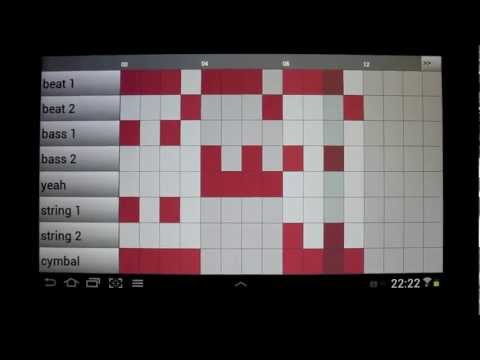
Each drum machine pattern has 8 channel step sequencer with piano roll. You can change a note's pitch and velocity, a channel’s velocity and panning, mute channels. The default time signature of drum pattern is 4/4, but it is possible to change the grid settings to support 3/4, 6/8, 9/8…
Improve the sound with sound effects: Delay, Filter, Compressor, Distortion or Bitcrusher.
With Groove Mixer beat maker you can make hip-hop, pop, rock, house, dubstep, trap and any other music genre. Are you playing on guitar, piano or drums? You can use it as a metronome or a rhythm accompaniment.
The beatmaker machine was created for mobile musicians to sketch music rhythm ideas everywhere. GrooveMixer is your pocket beatbox machine, your pocket rhythm drum station that is always with you. It is a music game for beginners and a powerful music studio for pros.
This beat maker is a portable alternative to drum pad machines. A music studio is in your pocket for creating music anywhere anytime.
Mix, arrange and play audio loops and drum patterns with GrooveMixer beat maker. Export your tracks to WAV, OGG, FLAC or MIDI files and share your compositions on Soundcloud 🎶
Each drum machine pattern has 8 channel step sequencer with piano roll. You can change a note's pitch and velocity, a channel’s velocity and panning, mute channels. The default time signature of drum pattern is 4/4, but it is possible to change the grid settings to support 3/4, 6/8, 9/8…
Improve the sound with sound effects: Delay, Filter, Compressor, Distortion or Bitcrusher.
With Groove Mixer beat maker you can make hip-hop, pop, rock, house, dubstep, trap and any other music genre. Are you playing on guitar, piano or drums? You can use it as a metronome or a rhythm accompaniment.
The beatmaker machine was created for mobile musicians to sketch music rhythm ideas everywhere. GrooveMixer is your pocket beatbox machine, your pocket rhythm drum station that is always with you. It is a music game for beginners and a powerful music studio for pros.
This beat maker is a portable alternative to drum pad machines. A music studio is in your pocket for creating music anywhere anytime.
Beat making drum machine with piano roll to mix music beats and create remixes
Updated on
Safety starts with understanding how developers collect and share your data. Data privacy and security practices may vary based on your use, region, and age. The developer provided this information and may update it over time.
- No data shared with third partiesLearn more about how developers declare sharing
- No data collectedLearn more about how developers declare collection


Ratings and reviews
25.2K reviews

Daniel Joyner
- Flag inappropriate
- Show review history
January 30, 2022
Great app. I love that I can add my own samples. And I don't know if it's new or I just overlooked it til recently but the ability to use samples melodically (in a piano roll) is awesome. The only thing that could make it better would be if when you pause playback it actually stops and goes back to the beginning of the pattern. Also, 32nd notes would be cool, even if that & other things are included in a premium version.
164 people found this review helpful
Flexbyte Software
February 1, 2022
Thanks Daniel, instead of pause click, use long click on play/pause button and it will start from the beginning. 32nd notes are planned in the future releases. Thanks for your feedback!

A Google user
- Flag inappropriate
- Show review history
June 11, 2019
This might singlehandedly be one of the best, if not the best, music making apps on the store. If you like programs like PXtone or FLStudio, but don't have the money for it, then this is a must! No bugs, no glitches, easy and intuitive UI, No invasive ads every few seconds, and best of all, it's free! If you're looking for a free easy way to make sequenced beats, than this is the perfect tool for it!
101 people found this review helpful
Flexbyte Software
June 15, 2019
Thank you for downloading our app! We will keep working on it!

Zany Quest
- Flag inappropriate
November 20, 2024
Still a great app but this time, wat happened to being able to export it to mp3 adding on to this one since i cant leave another review on it, the timing of it is a bit off and sometimes it'll cut itself off as not play the first note of the beat like it fades into it and doesn't play it fully from the start for example if it starts off wit 3 bass sound effects only the second 2 will play and not the very first
2 people found this review helpful
Flexbyte Software
March 25, 2014
Please update to the latest version 1.5. I changed saving concept, so it is much easy now.
What’s new
⚡ This update brings stability improvements.
• Upgraded the audio player engine for smoother and more stable playback.
• Resolved issues with in-app purchases to ensure reliable transactions.
• Fixed a UI layout bug for a cleaner, more consistent interface.
❤ Love Groovemixer? Rate us! Write to us via the Support section.
• Upgraded the audio player engine for smoother and more stable playback.
• Resolved issues with in-app purchases to ensure reliable transactions.
• Fixed a UI layout bug for a cleaner, more consistent interface.
❤ Love Groovemixer? Rate us! Write to us via the Support section.
Everyone
Learn moreApp support
About the developer
SERGII NIKITIN
support@flexbyte.com
Zhabaeva Zhambylo str, 22
flat 99
Kyiv
місто Київ
Ukraine
04112


