
Sync2 Outlook Google Companion

star
3.29K reviews

Everyone
info
100K+
Downloads


About this app
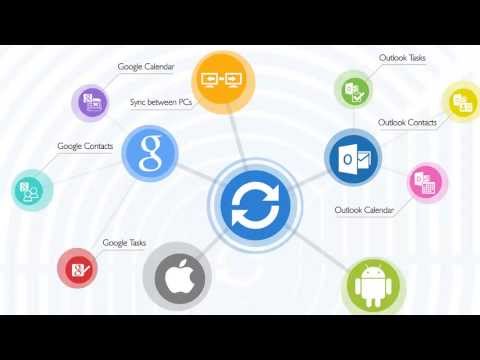
This is a Complimentary Companion that helps you set up synchronization for Outlook with Google, Office 365, Exchange, iCloud and Android, iPhone, iPad sync with iCloud and other cloud services. Sync2 Companion will go through all the necessary settings to set up synchronization.
Public Folder Sync to smartphones
Public Folders sync solution. Microsoft Exchange Public Folders are not displayed natively on smartphones. Choose sync type “Public Folders on Mobile Device" and you will be guided to set up Sync2 Cloud. The new Sync2 Cloud helps to sync Public Folders. Sync & Share Public Folders on multiple platforms or smartphones (Android, iPhone, iPad). Sync any type of Public folders (calendars, contacts, tasks, emails, notes).
About Sync2 desktop app:
The Microsoft Outlook synchronization add-in software keeps your Emails, Calendar, Contacts and Tasks in sync between your Outlook, Google, iPhone, iPad, Android or any other smartphone, tablet or PC. You can schedule automatic Outlook synchronization or perform a manual sync on demand, or use an instant sync feature for changes made on Outlook to be moved immediately.
Sync2 is the right tool for you if you are looking for a way to:
• sync Outlook with your smartphone or tablet;
• sync your Outlook Contacts, Calendars and/or Tasks with Google services in one-way or two-way direction;
• easily sync your Outlook data, such as emails, calendars, contacts, tasks, notes, Outlook journals between multiple PCs without the Microsoft Exchange server;
• synchronize specific Outlook folders with different workgroups.
Main Sync2 features:
* Sync Microsoft Outlook between PC’s without a server.
* Sync Outlook Calendar with Google Calendars.
* Instant synchronization of changes made on Microsoft Outlook.
* Synchronize Microsoft Outlook Contacts with Google Contacts.
* Sync Outlook Tasks with Google Tasks Lists.
* Automatic backup of Contacts and Calendar folders before each synchronization.
* Synchronize data even when Microsoft Outlook is closed.
* Manual or scheduled synchronization.
* Sync Exchange folders.
Public Folder Sync to smartphones
Public Folders sync solution. Microsoft Exchange Public Folders are not displayed natively on smartphones. Choose sync type “Public Folders on Mobile Device" and you will be guided to set up Sync2 Cloud. The new Sync2 Cloud helps to sync Public Folders. Sync & Share Public Folders on multiple platforms or smartphones (Android, iPhone, iPad). Sync any type of Public folders (calendars, contacts, tasks, emails, notes).
About Sync2 desktop app:
The Microsoft Outlook synchronization add-in software keeps your Emails, Calendar, Contacts and Tasks in sync between your Outlook, Google, iPhone, iPad, Android or any other smartphone, tablet or PC. You can schedule automatic Outlook synchronization or perform a manual sync on demand, or use an instant sync feature for changes made on Outlook to be moved immediately.
Sync2 is the right tool for you if you are looking for a way to:
• sync Outlook with your smartphone or tablet;
• sync your Outlook Contacts, Calendars and/or Tasks with Google services in one-way or two-way direction;
• easily sync your Outlook data, such as emails, calendars, contacts, tasks, notes, Outlook journals between multiple PCs without the Microsoft Exchange server;
• synchronize specific Outlook folders with different workgroups.
Main Sync2 features:
* Sync Microsoft Outlook between PC’s without a server.
* Sync Outlook Calendar with Google Calendars.
* Instant synchronization of changes made on Microsoft Outlook.
* Synchronize Microsoft Outlook Contacts with Google Contacts.
* Sync Outlook Tasks with Google Tasks Lists.
* Automatic backup of Contacts and Calendar folders before each synchronization.
* Synchronize data even when Microsoft Outlook is closed.
* Manual or scheduled synchronization.
* Sync Exchange folders.
Synchronize Microsoft Outlook with Google services and Smartphone devices.
Updated on
Featured stories

Safety starts with understanding how developers collect and share your data. Data privacy and security practices may vary based on your use, region, and age. The developer provided this information and may update it over time.
- No data shared with third partiesLearn more about how developers declare sharing
- No data collectedLearn more about how developers declare collection
- Data is encrypted in transit
- Data can’t be deleted


Ratings and reviews
3.1K reviews

Van H. Masengill
- Flag inappropriate
March 4, 2025
Beware product I bought this product with out using the trail as you can read in other reviews it is kinda complicated I did call there five star support just about the only way to communicate is email. Get to the point it only sync your contacts in to one folder not in as you have set up in different categories. This service is offered for free between Google and macrsoft already. I told them that I am unsatisfied and would like a refund or another product that will. Now they are ignoring me.
6 people found this review helpful

Veaceslav Vasilache
- Flag inappropriate
October 18, 2024
First impressions - Misleading app and for me unusable. My expectations were that once i install the app i can configure the sync already -- And that's not true ! What the app did , was to make me register my email so that i can receive a download link of a windows desktop app. WHAAT? My Ubuntu operating system is not even supported. -- Sorry, deleted. Bye
3 people found this review helpful

Darrell
- Flag inappropriate
May 10, 2025
To download Sync2 on your desktop, the link they send is not a secure link, and you are asked to change your security settings in order for you to continue. I safeguard my devices at all times. Sinc2 may want to gain access to your data and personal information.
6 people found this review helpful
App support
phone
Phone number
+19547968161
About the developer
Alittera Limited Inc
support@4team.biz
5645 Coral Ridge Dr
Coral Springs, FL 33076
United States
+1 954-603-2161


