
Mileage Tracker by Ewooks
In-app purchases

4.7star
231 reviews
10K+
Downloads

Everyone
info
About this app
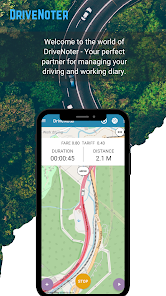
Unleash the Power of DriveNoter: The Ultimate App for Effortless Mileage Tracking!
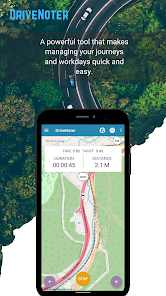
Are you an employee or a transportation entrepreneur looking for a hassle-free way to track your trips and log your mileage? DriveNoter is here to revolutionize your experience. With its intuitive interface, switching between work, private, and transportation modes has never been easier. Let DriveNoter handle the details while you focus on the road.
Precise Mileage Tracking
Ensure you never miss out on mileage reimbursements again. DriveNoter operates in the background to provide accurate tracking, utilizing automatic start/stop detection and navigation integration to deliver all the data you need for compensation claims.
Advanced OBD/GPS Tracking
Whether you prefer GPS or OBD mode (ELM327 compatible), DriveNoter has you covered. It supports both distance and time-based tracking and allows seamless switching between metric and imperial units, catering to your specific needs.
Secure and Reliable Data Management
Your driving data is safe with DriveNoter. It stores information securely on your device with automatic backups to Google Drive or ewooks.fi cloud. Your privacy is our priority, and we never share your data with third parties without your consent.
User-Friendly Editing & Navigation
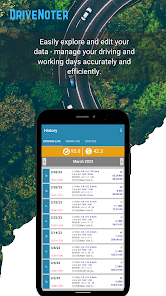
DriveNoter makes it simple to edit and add entries to your driving log. Integrated with Google Navigation and Waze, it ensures seamless navigation, making it the perfect driving companion for every journey.
Try DriveNoter Risk-Free
Experience the full benefits of DriveNoter with our 14-day free trial, included in our 1-month and 12-month subscription plans on Google Play. Take advantage of limited free trials before deciding to subscribe.
Join Over 50,000 Satisfied Users
Become part of a thriving community that trusts DriveNoter for their mileage tracking. With continuous development and dedicated support, DriveNoter evolves to meet your ever-changing needs.
Start Your Free Trial Today!
Discover the ultimate mileage tracking solution with DriveNoter. Sign up for your free trial now and transform how you track your driving.
Are you an employee or a transportation entrepreneur looking for a hassle-free way to track your trips and log your mileage? DriveNoter is here to revolutionize your experience. With its intuitive interface, switching between work, private, and transportation modes has never been easier. Let DriveNoter handle the details while you focus on the road.
Precise Mileage Tracking
Ensure you never miss out on mileage reimbursements again. DriveNoter operates in the background to provide accurate tracking, utilizing automatic start/stop detection and navigation integration to deliver all the data you need for compensation claims.
Advanced OBD/GPS Tracking
Whether you prefer GPS or OBD mode (ELM327 compatible), DriveNoter has you covered. It supports both distance and time-based tracking and allows seamless switching between metric and imperial units, catering to your specific needs.
Secure and Reliable Data Management
Your driving data is safe with DriveNoter. It stores information securely on your device with automatic backups to Google Drive or ewooks.fi cloud. Your privacy is our priority, and we never share your data with third parties without your consent.
User-Friendly Editing & Navigation
DriveNoter makes it simple to edit and add entries to your driving log. Integrated with Google Navigation and Waze, it ensures seamless navigation, making it the perfect driving companion for every journey.
Try DriveNoter Risk-Free
Experience the full benefits of DriveNoter with our 14-day free trial, included in our 1-month and 12-month subscription plans on Google Play. Take advantage of limited free trials before deciding to subscribe.
Join Over 50,000 Satisfied Users
Become part of a thriving community that trusts DriveNoter for their mileage tracking. With continuous development and dedicated support, DriveNoter evolves to meet your ever-changing needs.
Start Your Free Trial Today!
Discover the ultimate mileage tracking solution with DriveNoter. Sign up for your free trial now and transform how you track your driving.
Updated on
Safety starts with understanding how developers collect and share your data. Data privacy and security practices may vary based on your use, region, and age. The developer provided this information and may update it over time.

No data shared with third parties
Learn more about how developers declare sharing

No data collected
Learn more about how developers declare collection

Data is encrypted in transit

Data can’t be deleted
Ratings and reviews
4.7
207 reviews

David Jones
- Flag inappropriate
May 10, 2023
Free = ONLY 10-12 trips. Misleading. Other than that, worked good, especially if you're a taxi driver (it has a feature that imcludes rate & fare charges plus work schedule) , which made NO since to me. Not intended for gig-workers.
1 person found this review helpful
Ewooks
May 10, 2023
Please read description, that app includes free trial and after that need pay. No misslead, there no read that this is free. in first purchase you will get also 14 day more free trial time.

Danielle O71
- Flag inappropriate
March 3, 2022
Did not track miles. I enabled every feature on this app and it certainly tracks duration of travel but not actual distance. It showed that I had traveled 32:10 duration and 0.0 M distance, which is useless for me.
24 people found this review helpful
Ewooks
March 7, 2022
Please check from Android app settings that you are allowed Location permission correctly. Latest Android OS requires user action for do that. Check more instruction from Google how to allow Location services. Apps->DriApp->Permissions->allow all the time or foreground.

A Google user
- Flag inappropriate
- Show review history
December 19, 2019
I had an issue with sensor orientation Huawei. Developer and respond very quickly and fixed plus answer all inquiries. Perfect, recommended app..
17 people found this review helpful
Ewooks
December 18, 2019
If you need use app in landscape mode you find landscape mode form app settings (General Settings - View to landscape) by sefault mode is vertical since example SumUp won't support landscape mode and that is reason why you app is also forced by default to vertical.
What's new
The app is updated regularly so we can make it better for you. Always download the latest version!
- Interface fixes and other improvements
- Google API upgrade
- Urgent Break Timer fix!
- Android 34 bug fixes
- Interface fixes and other improvements
- Google API upgrade
- Urgent Break Timer fix!
- Android 34 bug fixes
App support
phone
Phone number
+358823712077
