
Universal Remote: TV Remote
Contains ads


Everyone
info
100K+
Downloads

Everyone
Learn more


About this app
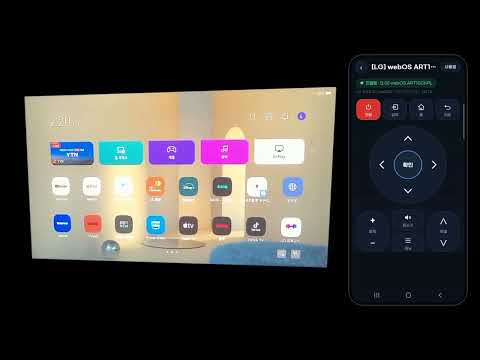
Turn your phone into a TV remote.
WI-FI TV REMOTE (no infrared needed)
Works on any phone connected to the same Wi-Fi as your smart TV.
• Finds your TV automatically, or connect with its IP address
• Samsung Smart TV (2016 or later), LG webOS, Google TV, Android TV, Sony Bravia and Roku
• Power, volume, channel, arrows, OK, home, back, input, playback and number buttons
• Turn on a TV that is off (Samsung and LG models that support it, after connecting once)
INFRARED REMOTE (phones with an IR sensor only)
• Remotes for LG, Samsung, Sony, Panasonic, Philips, Sharp, Toshiba, Vizio and more
• Works with non-smart TVs too
• Move buttons and change their icons, colors and shapes
• Save several remotes and switch between them
HOW TO START
1. Connect your phone and TV to the same Wi-Fi.
2. Tap [+ Wi-Fi TV] and choose your TV.
3. The first time, allow the connection on the TV or enter the code shown.
SEND TO TV (Chromecast and screen mirroring)
Send photos, videos and music from your phone to a TV on the same Wi-Fi.
• Chromecast, Google TV and Android TV
• Smart TVs with DLNA (Samsung, LG, Sony and more)
• Photos: full screen and slideshow
• Videos: play on the TV, with subtitles (srt, smi, vtt); vertical videos fit the TV screen
• Music: play through the TV speakers
• Screen mirroring: show your phone screen on the TV
• Your photos, videos and music go straight from your phone to the TV and are never uploaded to the internet.
GOOD TO KNOW
• Infrared works only on phones with an IR sensor. Most recent phones do not have one, so please use the Wi-Fi remote.
• Non-smart TVs and Samsung TVs made before 2016 cannot be controlled over Wi-Fi.
• Connection may fail if your router blocks communication between devices (AP isolation).
This is an independent app and is not affiliated with any TV manufacturer. Brand names are used only to show compatibility.
WI-FI TV REMOTE (no infrared needed)
Works on any phone connected to the same Wi-Fi as your smart TV.
• Finds your TV automatically, or connect with its IP address
• Samsung Smart TV (2016 or later), LG webOS, Google TV, Android TV, Sony Bravia and Roku
• Power, volume, channel, arrows, OK, home, back, input, playback and number buttons
• Turn on a TV that is off (Samsung and LG models that support it, after connecting once)
INFRARED REMOTE (phones with an IR sensor only)
• Remotes for LG, Samsung, Sony, Panasonic, Philips, Sharp, Toshiba, Vizio and more
• Works with non-smart TVs too
• Move buttons and change their icons, colors and shapes
• Save several remotes and switch between them
HOW TO START
1. Connect your phone and TV to the same Wi-Fi.
2. Tap [+ Wi-Fi TV] and choose your TV.
3. The first time, allow the connection on the TV or enter the code shown.
SEND TO TV (Chromecast and screen mirroring)
Send photos, videos and music from your phone to a TV on the same Wi-Fi.
• Chromecast, Google TV and Android TV
• Smart TVs with DLNA (Samsung, LG, Sony and more)
• Photos: full screen and slideshow
• Videos: play on the TV, with subtitles (srt, smi, vtt); vertical videos fit the TV screen
• Music: play through the TV speakers
• Screen mirroring: show your phone screen on the TV
• Your photos, videos and music go straight from your phone to the TV and are never uploaded to the internet.
GOOD TO KNOW
• Infrared works only on phones with an IR sensor. Most recent phones do not have one, so please use the Wi-Fi remote.
• Non-smart TVs and Samsung TVs made before 2016 cannot be controlled over Wi-Fi.
• Connection may fail if your router blocks communication between devices (AP isolation).
This is an independent app and is not affiliated with any TV manufacturer. Brand names are used only to show compatibility.
Control your smart TV over Wi-Fi, or use infrared on phones with an IR sensor.
Updated on
Safety starts with understanding how developers collect and share your data. Data privacy and security practices may vary based on your use, region, and age. The developer provided this information and may update it over time.
- No data shared with third partiesLearn more about how developers declare sharing
- No data collectedLearn more about how developers declare collection
- Data is encrypted in transit


What’s new
• New “Send to TV”: send photos, videos and music from your phone to Chromecast and smart TVs
• Photo slideshow, video subtitles and screen mirroring
• Photo slideshow, video subtitles and screen mirroring


