
USB Driver for Android Devices
Contains adsIn-app purchases

star
242K reviews

Everyone
info
10M+
Downloads


About this app
USB Drivers for Android – Connect Android to PC (Windows, Mac, Linux)
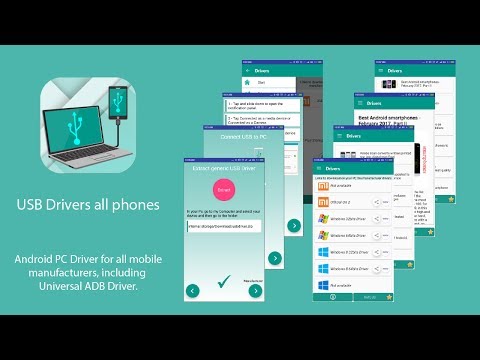
USB Drive for Android phones. The ultimate solution to safely connect your smartphone to your computer using the Universal ADB Driver.
It provides the ADB driver compatible with over 800 manufacturers, including Samsung, Xiaomi, Huawei, Sony, LG, Motorola, OnePlus, and many more, ensuring a stable connection on Windows XP, 7, 8, 10, and 11.
NEW: USB DIAGNOSTICS AND CHARGING OPTIMIZER
Troubleshoot connection issues and optimize every charging session:
USB Diagnostic Tool: Detect connection errors, evaluate cable quality, and identify all available USB modes: MTP, PTP, RNDIS, MIDI, ADB.
Charging Optimizer: Monitor voltage, current (mA), wattage, and temperature in real-time. Instantly identify if your charge is Fast, Normal, or Slow.
USB Status and History: View connection history, total usage time, and receive recommendations to resolve detected issues.
HOW TO CONNECT YOUR DEVICE:
1 - Open USB Driver for Android Devices.
2 - Connect the USB cable to your PC or laptop.
3 - Download and install the included Universal ADB Driver to recognize your device.
4 - Select MTP connection for file transfer or ADB for debugging.
ADVANCED USB AND OTG FEATURES
Universal MTP Connection: High-speed file transfer for Windows, Mac, Linux, and Chrome OS.
USB Host and OTG Support: Check compatibility and detect connected external devices (USB drives, keyboards).
USB Camera: Detection of external webcams (UVC compatible).
Note: This application enables the download of the Universal ADB Driver to ensure a proper connection between your Android device and your computer. Compatible with most smartphones and tablets on the market.
USB Drive for Android phones. The ultimate solution to safely connect your smartphone to your computer using the Universal ADB Driver.
It provides the ADB driver compatible with over 800 manufacturers, including Samsung, Xiaomi, Huawei, Sony, LG, Motorola, OnePlus, and many more, ensuring a stable connection on Windows XP, 7, 8, 10, and 11.
NEW: USB DIAGNOSTICS AND CHARGING OPTIMIZER
Troubleshoot connection issues and optimize every charging session:
USB Diagnostic Tool: Detect connection errors, evaluate cable quality, and identify all available USB modes: MTP, PTP, RNDIS, MIDI, ADB.
Charging Optimizer: Monitor voltage, current (mA), wattage, and temperature in real-time. Instantly identify if your charge is Fast, Normal, or Slow.
USB Status and History: View connection history, total usage time, and receive recommendations to resolve detected issues.
HOW TO CONNECT YOUR DEVICE:
1 - Open USB Driver for Android Devices.
2 - Connect the USB cable to your PC or laptop.
3 - Download and install the included Universal ADB Driver to recognize your device.
4 - Select MTP connection for file transfer or ADB for debugging.
ADVANCED USB AND OTG FEATURES
Universal MTP Connection: High-speed file transfer for Windows, Mac, Linux, and Chrome OS.
USB Host and OTG Support: Check compatibility and detect connected external devices (USB drives, keyboards).
USB Camera: Detection of external webcams (UVC compatible).
Note: This application enables the download of the Universal ADB Driver to ensure a proper connection between your Android device and your computer. Compatible with most smartphones and tablets on the market.
Universal Android USB Driver for Windows Xp, Vista, 7, 8, 10 (x86 and x64).
Updated on
Safety starts with understanding how developers collect and share your data. Data privacy and security practices may vary based on your use, region, and age. The developer provided this information and may update it over time.
- No data shared with third partiesLearn more about how developers declare sharing
- No data collectedLearn more about how developers declare collection
- Data is encrypted in transit
- Data can’t be deleted


Ratings and reviews
226K reviews

Mark Vanderbloemen
- Flag inappropriate
May 30, 2026
I DO tell others about this app. I don't like ada in the apps I have, but the ones here are obvious, it's not ambush advertising. So what you DO get, really, more so than drivers for your phone, is even more important which is the strength of connectivity of your cable, and I guess maybe the charging port? This app tells you exactly in voltage and amperes, which is how they measure the power of a block for your plug. with this app, you'll know which cords to throw away in which ones to keep.
8 people found this review helpful

Larry Kraus
- Flag inappropriate
- Show review history
June 2, 2025
Wanted to transfer files from my GPS to phone via MTP. Once connected, the GPS does not show up in any Android file manager. The viewer in the app only selects one file for transfer at a time. The app is confusing & tries to install other related apps if you are not careful. Bluetooth had to be active to recognize the GPS. I could not transfer files more than once without uninstalling and re-installing the app.
22 people found this review helpful

Josh Brennan1950
- Flag inappropriate
August 7, 2026
It is always pleasing to find an app that looks nice and works well for me. The tools in this app are well worth having on my device. Excellent.
4 people found this review helpful
What’s new
• USB drivers for Windows XP, Vista, 8, 10, 11 · Linux · Mac
• New: Charging Guardian — prevent overcharging and overheating
• New: Cable & Charger Health Tester
• Extends your battery's lifespan
• Android 16 support
• Bug fixes
App support
phone
Phone number
+34964031059
About the developer
Hexamob S.L.
hexamob@gmail.com
CALLE MONESTIR DE POBLET, 13 - PISO 1 B
12540 VILA-REAL
Spain
+34 616 75 67 96


