

Blur Faces in Video
Contains ads

2.8star
203 reviews
10K+
Downloads

Everyone
info




About this app
Protect Privacy in Your Videos with Ease!
Hide the identity of people in your videos by blurring or pixelating their faces—quickly and effectively.
- AI-Powered Automatic Face Detection:
Let the app detect faces for you (faces must be clear and large enough). Simply select the ones you want to blur, and the app will automatically apply the effect. Adjust the blur level and size to your preference.
- Manual Mode for Full Control:
Place static shapes (squares or circles) over any area of your video, not just faces. Add as many as needed throughout the video and set their start and end times with ease. Perfect for precise editing or when automatic detection isn’t suitable.
- Combine Both Modes:
Use automatic and manual methods together for maximum flexibility.
- Extra Features:
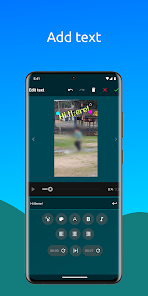
Add text and background music to personalize your videos further.
With an intuitive interface and powerful features, this app makes it simple to protect privacy and enhance your videos.
Hide the identity of people in your videos by blurring or pixelating their faces—quickly and effectively.
- AI-Powered Automatic Face Detection:
Let the app detect faces for you (faces must be clear and large enough). Simply select the ones you want to blur, and the app will automatically apply the effect. Adjust the blur level and size to your preference.
- Manual Mode for Full Control:
Place static shapes (squares or circles) over any area of your video, not just faces. Add as many as needed throughout the video and set their start and end times with ease. Perfect for precise editing or when automatic detection isn’t suitable.
- Combine Both Modes:
Use automatic and manual methods together for maximum flexibility.
- Extra Features:
Add text and background music to personalize your videos further.
With an intuitive interface and powerful features, this app makes it simple to protect privacy and enhance your videos.
Updated on
Safety starts with understanding how developers collect and share your data. Data privacy and security practices may vary based on your use, region, and age. The developer provided this information and may update it over time.

No data shared with third parties
Learn more about how developers declare sharing

This app may collect these data types
App activity, App info and performance, and Device or other IDs

Data is encrypted in transit

Data can’t be deleted
Ratings and reviews
2.8
202 reviews

Steve Johnston
- Flag inappropriate
January 18, 2026
Very poor at auto-detecting faces. No way to tell it where the face is.

Sarah Schroeder
- Flag inappropriate
December 26, 2025
can't load any video which is the entire point.

MRF
- Flag inappropriate
May 3, 2025
Working as intended, but it definitely needs an export setting such as video resolution,l or bitrate, as it stand I can't seem to find the output resolution.
4 people found this review helpful
What’s new
- Bug fixes.
App support
About the developer
Fabricio Alexander Cordova Lucero
lunorm88@gmail.com
C. de los Manzanos, 18, Planta Piso 1, Puerta B
28703 San Sebastián de los Reyes
Spain


