
NinoClip: Animation & Drawing
Contains ads


Teen
info
100+
Downloads


About this app
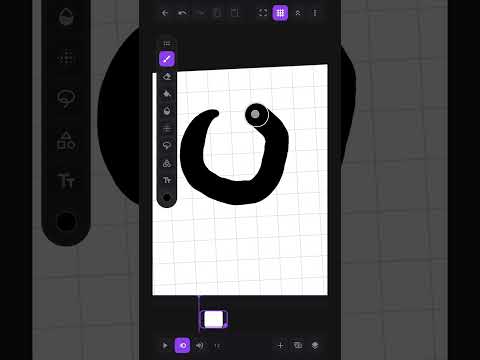
NinoClip is a frame-by-frame 2D animation and digital drawing studio for phone and tablet: draw with real brushes, build every frame by hand, add sound and publish your animation for the world to see. From the first scribble to the finished cartoon, all on your Android, no computer needed. Free to download and use.
DRAW WITH REAL BRUSHES
• A brush collection for every drawing and painting style: ink pen, marker, graphite pencil, charcoal, crayon, airbrush, spray, watercolor, oil, textured dry brushes and pattern brushes like halftone and hatching
• Real watercolor and oil: the paint blends with the color already on the paper
• Every brush with adjustable size, opacity and pressure response, and a low-latency stroke that follows the pressure and tilt of your stylus
• Stroke stabilizer for clean lines, and hold at the end of a stroke to snap it into a straight line
• Textured papers that give your drawing body
A COMPLETE DRAWING TOOLSET
• Eraser with opacity and fade for gentle erasing
• Paint bucket with tolerance and gap closing: fills inside the outline even when the line doesn't close
• Freehand, rectangle, ellipse lasso and magic wand: cut, move, rotate, flip, copy and paste across frames and layers
• Smudge and blur with adjustable reach and strength
• Shapes with ratio lock and a ruler that snaps the stroke
• Text with fonts, bold, shadow, outline, curve and neon effect
• Eyedropper with loupe, color wheel and saved swatches
• Undo and redo for almost everything
LAYERS LIKE DESKTOP SOFTWARE
• Layers per frame with blend modes, clipping mask, lock, folders and opacity
• Import a photo or image as a background or reference layer
ANIMATE FRAME BY FRAME
• Onion skin shows the previous and next frames under the one you're drawing
• Duplicate, reorder and drag frames on the timeline
• Control frames per second (fps) and paper format
• Zoom for fine detail, two-finger canvas rotation, and the app autosaves the whole time
• Works like a digital flipbook, with the precision of a traditional animation studio
GUIDES, SYMMETRY AND REFERENCE
• Grid, isometric and perspective guides with vanishing points for backgrounds and scenery
• Vertical, horizontal and radial symmetry for ornaments and characters
• Floating reference window with your photo, and screen mirror to check proportions
SOUND THAT FOLLOWS THE ANIMATION
• Record straight from the microphone, import a file, or search sound effects and music in a library inside the app
• Trim audio before placing it and organize it in tracks with individual volume and mute
• The soundtrack shows on the timeline, in sync with the frames, so you can time every movement
EXPORT AND SHARE
• Export as video with audio, looping GIF or a single frame as an image, at the resolution you choose
• Save to the gallery or send straight to another app, social media or WhatsApp
A COMMUNITY OF ANIMATORS
• Browse and explore without an account — sign in only when you like, comment or publish
• Publish choosing who can see it: everyone, anyone with the link, or only you
• Follow your favorite animators, like, comment and build your profile with bio and link
• Download and remix community animations — the remix carries frames, layers and audio, with automatic credit to the author
• Reporting and blocking keep the feed healthy
TABLET, STYLUS AND DRAWING TABLET
• A dedicated interface for Android tablets, with docked panels and shortcuts, and the same paint engine on the phone
• Works with active styluses, S Pen and compatible drawing tablets, with pressure and tilt
For creating 2D animation, cartoons and anime, animating a sketch, testing a storyboard, making an animated GIF, studying motion, illustrating and painting digitally. Start with a blank canvas and a single frame. Download NinoClip for free and turn your drawings into animation — frame by frame.
DRAW WITH REAL BRUSHES
• A brush collection for every drawing and painting style: ink pen, marker, graphite pencil, charcoal, crayon, airbrush, spray, watercolor, oil, textured dry brushes and pattern brushes like halftone and hatching
• Real watercolor and oil: the paint blends with the color already on the paper
• Every brush with adjustable size, opacity and pressure response, and a low-latency stroke that follows the pressure and tilt of your stylus
• Stroke stabilizer for clean lines, and hold at the end of a stroke to snap it into a straight line
• Textured papers that give your drawing body
A COMPLETE DRAWING TOOLSET
• Eraser with opacity and fade for gentle erasing
• Paint bucket with tolerance and gap closing: fills inside the outline even when the line doesn't close
• Freehand, rectangle, ellipse lasso and magic wand: cut, move, rotate, flip, copy and paste across frames and layers
• Smudge and blur with adjustable reach and strength
• Shapes with ratio lock and a ruler that snaps the stroke
• Text with fonts, bold, shadow, outline, curve and neon effect
• Eyedropper with loupe, color wheel and saved swatches
• Undo and redo for almost everything
LAYERS LIKE DESKTOP SOFTWARE
• Layers per frame with blend modes, clipping mask, lock, folders and opacity
• Import a photo or image as a background or reference layer
ANIMATE FRAME BY FRAME
• Onion skin shows the previous and next frames under the one you're drawing
• Duplicate, reorder and drag frames on the timeline
• Control frames per second (fps) and paper format
• Zoom for fine detail, two-finger canvas rotation, and the app autosaves the whole time
• Works like a digital flipbook, with the precision of a traditional animation studio
GUIDES, SYMMETRY AND REFERENCE
• Grid, isometric and perspective guides with vanishing points for backgrounds and scenery
• Vertical, horizontal and radial symmetry for ornaments and characters
• Floating reference window with your photo, and screen mirror to check proportions
SOUND THAT FOLLOWS THE ANIMATION
• Record straight from the microphone, import a file, or search sound effects and music in a library inside the app
• Trim audio before placing it and organize it in tracks with individual volume and mute
• The soundtrack shows on the timeline, in sync with the frames, so you can time every movement
EXPORT AND SHARE
• Export as video with audio, looping GIF or a single frame as an image, at the resolution you choose
• Save to the gallery or send straight to another app, social media or WhatsApp
A COMMUNITY OF ANIMATORS
• Browse and explore without an account — sign in only when you like, comment or publish
• Publish choosing who can see it: everyone, anyone with the link, or only you
• Follow your favorite animators, like, comment and build your profile with bio and link
• Download and remix community animations — the remix carries frames, layers and audio, with automatic credit to the author
• Reporting and blocking keep the feed healthy
TABLET, STYLUS AND DRAWING TABLET
• A dedicated interface for Android tablets, with docked panels and shortcuts, and the same paint engine on the phone
• Works with active styluses, S Pen and compatible drawing tablets, with pressure and tilt
For creating 2D animation, cartoons and anime, animating a sketch, testing a storyboard, making an animated GIF, studying motion, illustrating and painting digitally. Start with a blank canvas and a single frame. Download NinoClip for free and turn your drawings into animation — frame by frame.
Draw and animate frame by frame: brushes, layers, sound, stylus. Video & GIF.
Updated on
Safety starts with understanding how developers collect and share your data. Data privacy and security practices may vary based on your use, region, and age. The developer provided this information and may update it over time.


App support
About the developer
JARDSON COSTA SILVA
contact@jalloft.com
Av. Centenário, 1307 - apto. 107
Aeroporto
TERESINA - PI
64006-700
Brazil


