
Opus Player - WhatsApp Audio
Contains adsIn-app purchases
3.8star
27.2K reviews
10M+
Downloads

Everyone
info

About this app
WARNING: the app doesn't save the voice notes. If you delete the files from WhatsApp or from a file manager, they can't be recovered by the app.
Opus Player was born as a simple audio player for the opus format, but now it is something more.
As most audio players, you can start it in your file manager, but differently from the others, you can choose the audio output, selecting the main speaker or the earpiece (the speaker for the voice call). It is useful if you don't have a headphone with you.
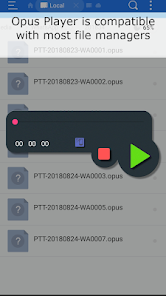
Opus Player is compatible with most file explorers on Google Play.
Moreover it provides a lot of features for managing your audio messages such as deleting, sharing and organizing, that make it the best audio manager for WhatsApp's voice notes.
Features:
-SHARE THE AUDIO ON FACEBOOK: Opus Player is the only app that lets you share an audio as a Facebook post, a WhatsApp status or an Instagram story.
-CHOOSE THE AUDIO OUTPUT: you can switch your audio output between the standard multimedia and the voice call's speaker. Use it if you have problems with the proximity sensor when using WhatsApp.
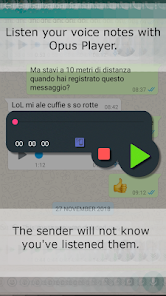
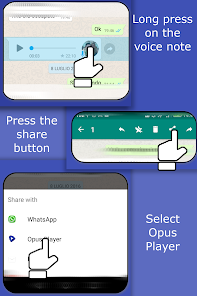
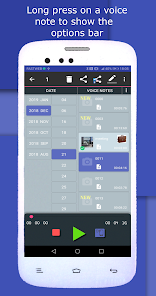
-USE IT WITH WHATSAPP: if you listen a voice message through Opus Player, the sender will not know you’ve listened it. Just long press on the WhatsApp VNs, press on the share button and select Opus Player.
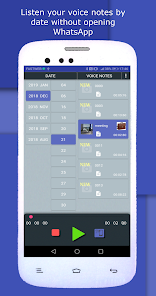
-WHATSAPP VOICE NOTES HISTORY: Opus Player takes a history of all your voice messages, received and sent, and it shows them to you in order of date, giving you the possibility to easily find an old voice note and share it with other apps.
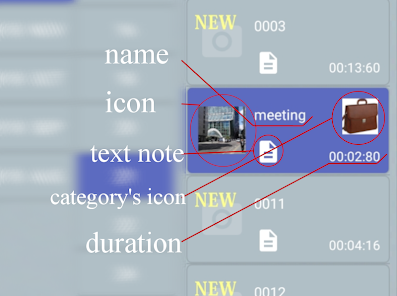
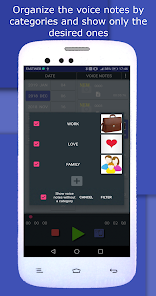
-ORGANIZE IN CATEGORIES: you can create a category, giving it a name and an image and associate to it all the audio messages you want. After created the categories, you can filter the voice notes choosing to show only those belonging to one or more categories. Moreover you can delete all the voice notes in a category with only one click.
-RENAME THE VOICE NOTES: you can change the name to each audio message without worrying about the compatibility with WhatsApp: the name is stored and shown only in Opus Player, without modifying the file, in order to avoid problems while running on WhatsApp.
-SET A TEXT NOTE: you can relate each vNote to a text note, maybe for summarizing the content of the audio or for taking note of who is the sender.
-MULTIPLE SELECTION: you can select multiple voice messages received in a day and you can perform different actions on them:
-delete
-share
-add to a category
-set an icon
-set a text note
-SELECT THE FOLDER: you can manually select the folder in which Opus Player must search the .opus files. You can select the Telegram folder (Telegram\Telegram Audio\) as well. Just remember to select the "select the ogg files" option, because it uses the .ogg extension instead of .opus, and "use file's date", because it doesn't save the date in the name as WhatsApp does.
Why download Opus Player:
- it saves you time when you need to find old voice messages;
- listening the new received voice notes directly from the app, WhatsApp will not be notified and the blue ticks will not be shown;
- you can share the voice messages on the main social networks: create Facebook and Twitter posts, share on WhatsApp status and on Instagram stories.
Follow the updates on the Facebook page:
https://www.facebook.com/OpusPlayer/
If you have any problem or even any tips, please contact us to little.pako87@gmail.com or directly write on the Facebook page.
Opus Player was born as a simple audio player for the opus format, but now it is something more.
As most audio players, you can start it in your file manager, but differently from the others, you can choose the audio output, selecting the main speaker or the earpiece (the speaker for the voice call). It is useful if you don't have a headphone with you.
Opus Player is compatible with most file explorers on Google Play.
Moreover it provides a lot of features for managing your audio messages such as deleting, sharing and organizing, that make it the best audio manager for WhatsApp's voice notes.
Features:
-SHARE THE AUDIO ON FACEBOOK: Opus Player is the only app that lets you share an audio as a Facebook post, a WhatsApp status or an Instagram story.
-CHOOSE THE AUDIO OUTPUT: you can switch your audio output between the standard multimedia and the voice call's speaker. Use it if you have problems with the proximity sensor when using WhatsApp.
-USE IT WITH WHATSAPP: if you listen a voice message through Opus Player, the sender will not know you’ve listened it. Just long press on the WhatsApp VNs, press on the share button and select Opus Player.
-WHATSAPP VOICE NOTES HISTORY: Opus Player takes a history of all your voice messages, received and sent, and it shows them to you in order of date, giving you the possibility to easily find an old voice note and share it with other apps.
-ORGANIZE IN CATEGORIES: you can create a category, giving it a name and an image and associate to it all the audio messages you want. After created the categories, you can filter the voice notes choosing to show only those belonging to one or more categories. Moreover you can delete all the voice notes in a category with only one click.
-RENAME THE VOICE NOTES: you can change the name to each audio message without worrying about the compatibility with WhatsApp: the name is stored and shown only in Opus Player, without modifying the file, in order to avoid problems while running on WhatsApp.
-SET A TEXT NOTE: you can relate each vNote to a text note, maybe for summarizing the content of the audio or for taking note of who is the sender.
-MULTIPLE SELECTION: you can select multiple voice messages received in a day and you can perform different actions on them:
-delete
-share
-add to a category
-set an icon
-set a text note
-SELECT THE FOLDER: you can manually select the folder in which Opus Player must search the .opus files. You can select the Telegram folder (Telegram\Telegram Audio\) as well. Just remember to select the "select the ogg files" option, because it uses the .ogg extension instead of .opus, and "use file's date", because it doesn't save the date in the name as WhatsApp does.
Why download Opus Player:
- it saves you time when you need to find old voice messages;
- listening the new received voice notes directly from the app, WhatsApp will not be notified and the blue ticks will not be shown;
- you can share the voice messages on the main social networks: create Facebook and Twitter posts, share on WhatsApp status and on Instagram stories.
Follow the updates on the Facebook page:
https://www.facebook.com/OpusPlayer/
If you have any problem or even any tips, please contact us to little.pako87@gmail.com or directly write on the Facebook page.
Updated on
Safety starts with understanding how developers collect and share your data. Data privacy and security practices may vary based on your use, region, and age. The developer provided this information and may update it over time.

No data shared with third parties
Learn more about how developers declare sharing

This app may collect these data types
App activity, App info and performance, and Device or other IDs

Data is encrypted in transit
Ratings and reviews
3.8
26.7K reviews

Mokhlis
- Flag inappropriate
July 3, 2024
Since last June 28 the voice notes are there but not playing? Didn't change anything... Any ideas? Other than that, the app is useful and easy to use. Using it for last 4 years.
1 person found this review helpful
pasquapp
July 15, 2024
Hi. Update the app to the new version and let us know if the problem is fixed.

Zab bz
- Flag inappropriate
June 9, 2024
This app is not play in background and also it dont play other types of audio file like mp3 and it should have a play all option which allow to play all files one after the other and not stop..... Please fix it
5 people found this review helpful
pasquapp
June 9, 2024
We're planning to renovate the app with the new graphic library and there will be the features you are mentioning.About the audio format, the app can play other audio formats but only from the widget (when you open tit from another app like a file manager). At the moment it doesn't show these files in the list because it can't manage too many files

Thix Gaming
- Flag inappropriate
- Show review history
March 16, 2024
The app was great before I changed phones, but it won't let me use any other file app to access the android/data folder since android made it so you can't get in there, which makes the app absolutely unusable. Will there be an update to fix this in the foreseeable future?
19 people found this review helpful
pasquapp
March 18, 2024
Starting from Android 11 all the apps are not allowed to access that folder and there's nothing we can do about that. However if you are using the app to listen to the WhatsApp voice notes, you can still do it since WhatsApp saves the files in "Android/media" folder.
What's new
Solved the bug that occurred when playing recent WhatsApp voice notes due to a format change.
We tested it on our devices and found that the problem occurred on Android 9 and earlier versions, so the update will only affect these devices.
If you have Android 10 or a later version and encounter the same issue, please report it to us.
We tested it on our devices and found that the problem occurred on Android 9 and earlier versions, so the update will only affect these devices.
If you have Android 10 or a later version and encounter the same issue, please report it to us.


