
WiLock: Lock Screen
Contains adsIn-app purchases
3.2star
1.72K reviews

Everyone
info
500K+
Downloads


About this app
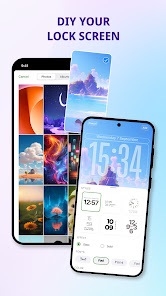
WiLock is a DIY lock screen maker app to refresh your current screen lock on Android phones. With WiLock, you can customize widgets, text, colors, wallpapers, and even access a quick settings panel right on your lock screen. You can also make it more fun by adding exclusive animated widgets to your design.
Let’s explore all the great features in WiLock: Lock Screen now.
Key features:
- Aesthetic screen lock themes: choose from girly, cartoon, abstract, and more
- Quick settings panel: swipe down from the top bar to access (works on lock screen only)
- Fun animated widgets: add playful elements to your liking
- HD wallpaper collection: stunning wallpapers to use for free
- Fully customizable: change text, widgets, shortcuts, colors, and more
- Unlock themes for free with ads, free to use all themes
- Slide to unlock for style, or keep using your device’s existing security lock
- Custom notification view: manage notifications directly on the lock screen in stack or expanded view
- Widgets: add favorite widgets or contacts directly on the lock screen
- Wallpaper changer: switch wallpapers directly from the lock screen without opening the app
How to set up WiLock: Lock Screen:
1. Open the app & allow required permissions
2. Pick a lock screen theme and customize it
3. Apply your design to match your style
4. Enjoy your new lock screen
For the best experience, you may turn off other custom lock screen apps to avoid duplicates.
Disclaimer:
1/ Features and performance may vary depending on device model and Android version.
2/ This app may require enabling Accessibility Service to provide certain customization features on your lock screen, such as showing widgets, changing wallpapers, and offering quick access tools. This permission is optional and used only for the functions described above. You can use Wilock without enabling Accessibility Service, but some customization features will be limited.
We do not collect, store, or share any personal information through the Accessibility Service. The permission will not affect your device’s security or privacy.
To enable these features, go to Settings > Accessibility > Services and turn on WiLock: Lock Screen.
Download the WiLock app today and personalize your phone with themes and widgets. Make your screen lock as unique as you are!
Let’s explore all the great features in WiLock: Lock Screen now.
Key features:
- Aesthetic screen lock themes: choose from girly, cartoon, abstract, and more
- Quick settings panel: swipe down from the top bar to access (works on lock screen only)
- Fun animated widgets: add playful elements to your liking
- HD wallpaper collection: stunning wallpapers to use for free
- Fully customizable: change text, widgets, shortcuts, colors, and more
- Unlock themes for free with ads, free to use all themes
- Slide to unlock for style, or keep using your device’s existing security lock
- Custom notification view: manage notifications directly on the lock screen in stack or expanded view
- Widgets: add favorite widgets or contacts directly on the lock screen
- Wallpaper changer: switch wallpapers directly from the lock screen without opening the app
How to set up WiLock: Lock Screen:
1. Open the app & allow required permissions
2. Pick a lock screen theme and customize it
3. Apply your design to match your style
4. Enjoy your new lock screen
For the best experience, you may turn off other custom lock screen apps to avoid duplicates.
Disclaimer:
1/ Features and performance may vary depending on device model and Android version.
2/ This app may require enabling Accessibility Service to provide certain customization features on your lock screen, such as showing widgets, changing wallpapers, and offering quick access tools. This permission is optional and used only for the functions described above. You can use Wilock without enabling Accessibility Service, but some customization features will be limited.
We do not collect, store, or share any personal information through the Accessibility Service. The permission will not affect your device’s security or privacy.
To enable these features, go to Settings > Accessibility > Services and turn on WiLock: Lock Screen.
Download the WiLock app today and personalize your phone with themes and widgets. Make your screen lock as unique as you are!
Updated on
Safety starts with understanding how developers collect and share your data. Data privacy and security practices may vary based on your use, region, and age. The developer provided this information and may update it over time.

No data shared with third parties
Learn more about how developers declare sharing

No data collected
Learn more about how developers declare collection

Data is encrypted in transit

Data can’t be deleted
Ratings and reviews
3.3
1.67K reviews

Demetria Viera
- Flag inappropriate
May 6, 2026
I love it, but the lock screen won't stay for awhile
5 people found this review helpful
Quynh BupBe
May 15, 2026
Thanks for your feedback! Glad you love the app. If the lock screen doesn’t stay, please make sure all permissions are enabled and disable battery optimization for the app so it can run continuously. We’re also working on improving stability in upcoming updates.

Mohsin Ali
- Flag inappropriate
February 26, 2026
the clock and widget doesn't show on wallpaper
7 people found this review helpful
Quynh BupBe
February 27, 2026
Please try these steps:
1️⃣ Make sure **“Display over other apps”** permission is enabled.
2️⃣ Check that the app is allowed to run in the background (disable battery optimization).
3️⃣ Restart the app (or your phone) after applying the wallpaper.
4️⃣ Update to the latest version of the app for the best stability and fixes.

ZayXD
- Flag inappropriate
September 26, 2025
your app ruined the way I open my phone when it's locked. now I have a keyboard to put my password in and it sucks. and I added it all, and it doesn't even work. it shows the same home screen, the only thing that changed was the wallpaper. thanks a lot. 😐
17 people found this review helpful
What’s new
✨ Refined OS Lock design: Smoother animations and a more polished lock screen look.
🎨 Customization upgrades: More wallpaper and style options to personalize your screen.
⚡ Performance boost: Optimized speed, and lighter app size.
🎨 Customization upgrades: More wallpaper and style options to personalize your screen.
⚡ Performance boost: Optimized speed, and lighter app size.
App support
About the developer
Vũ Ngọc Anh
quynhermione@gmail.com
Hà Thượng, Đại Từ, Thái Nguyên
Thái Nguyên
255300
Vietnam


