
DeskBeam: Mac · SSH · VNC
In-app purchases


Everyone
info
0+
Downloads

Everyone
Learn more


About this app
English input support
No extra app to install on your Mac
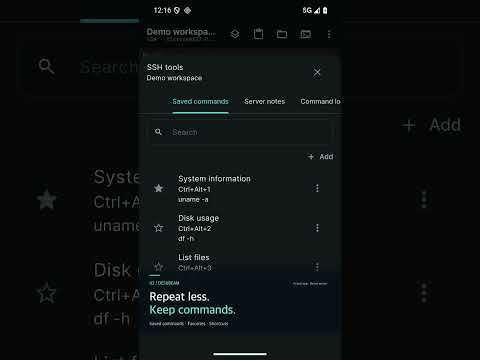
Connect to macOS Screen Sharing, compatible VNC computers and SSH servers. Enable Screen Sharing or Remote Login in macOS Settings; no separate DeskBeam app is needed on the Mac for these connections.
Use one saved profile for free. Pro unlocks unlimited saved profiles.
Try Pro for 7 days with no automatic charge. When the trial ends, one profile stays free. Other profiles remain saved and require a separate lifetime Pro purchase.
Unicode text input uses your device keyboard. Results depend on the remote server, input method, fonts and application. Some app screens currently use English. Optional Mac system audio requires DeskBeam Audio on the Mac, recording permission and SSH.
support@lunalink.co.kr
https://deskbeam.lunalink.co.kr/privacy
No extra app to install on your Mac
Connect to macOS Screen Sharing, compatible VNC computers and SSH servers. Enable Screen Sharing or Remote Login in macOS Settings; no separate DeskBeam app is needed on the Mac for these connections.
Use one saved profile for free. Pro unlocks unlimited saved profiles.
Try Pro for 7 days with no automatic charge. When the trial ends, one profile stays free. Other profiles remain saved and require a separate lifetime Pro purchase.
Unicode text input uses your device keyboard. Results depend on the remote server, input method, fonts and application. Some app screens currently use English. Optional Mac system audio requires DeskBeam Audio on the Mac, recording permission and SSH.
support@lunalink.co.kr
https://deskbeam.lunalink.co.kr/privacy
English input support · Mac · SSH · VNC
Updated on
Safety starts with understanding how developers collect and share your data. Data privacy and security practices may vary based on your use, region, and age. The developer provided this information and may update it over time.
- No data shared with third partiesLearn more about how developers declare sharing
- This app may collect these data typesApp activity, App info and performance, and Device or other IDs
- Data isn’t encrypted
- Data can’t be deleted


What’s new
Remote desktop, SSH and SFTP for your own computers. Includes local demo mode and verified complimentary access codes.
Everyone
Learn moreApp support
phone
Phone number
+821048319151
About the developer
루나링크
admin@lunalink.co.kr
서초구 서초대로65길 13-10, 12호 A03호(서초동, 상가 제비층)
서초구, 서울특별시 06602
South Korea
+82 10-4831-9151


