
English Arabic Dictionary
Contains adsIn-app purchases

star
88.3K reviews

Everyone
info
10M+
Downloads

Everyone
Learn more


About this app
Q Dictionary is your ultimate companion for quick and easy English-Arabic translations, whether you're online or offline. Designed for simplicity and efficiency, this app brings you comprehensive and accurate translations right at your fingertips.
Key Features:
- Bidirectional Translation: Effortlessly translate between English and Arabic.
- Offline Mode: Access translations without needing an internet connection.
- Cross-App Translation: Translate text from other apps like web browsers, email, or SMS.
- Language Detection: Automatically detects the language of the text you want to translate.
- Sentence Translation: Translate sentences with high-quality translation (Requires internet connection)
- Comprehensive Translations: Get detailed translations with definitions, synonyms, and antonyms.
- Fast Search: Enjoy quick search results with automatic suggestions.
- Camera Translation: Translate text directly from camera images for on-the-go convenience.
- Voice Translation: Use your voice to get translations quickly.
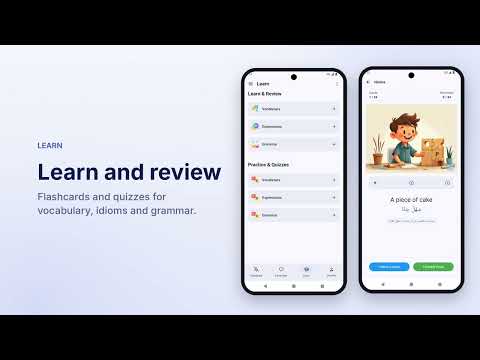
- Boost your English skills with interactive flashcards featuring everyday vocabulary and essential expressions. Enjoy visual learning with real-life context, master key idioms and phrasal verbs, and track your progress with personalized quizzes (requires an internet connection).
- Pronunciation Guide: Listen to accurate pronunciations in both English and Arabic. Customize by choosing separate voices for each language.
- Built-in definitions to describe part of speech and word type with examples
- Word History: Keep track of your search history for easy reference.
- Favorites List: Save your favorite words for quick access.
- Easy Sharing: Copy or share translations with ease.
Why Q Dictionary?
Q Dictionary offers a seamless translation experience with its powerful features, making it a must-have tool for students, travelers, professionals, and language enthusiasts. Download now and break the language barrier effortlessly!
Foreground Service Permission Usage
Q Dictionary utilizes foreground service permission to enable our instant translation feature. This functionality allows users to translate text instantly by displaying an overlay window on top of other apps. The foreground service ensures that the overlay remains active and responsive while users interact with content on their device, providing a seamless translation experience without interruptions.
Key Features:
- Bidirectional Translation: Effortlessly translate between English and Arabic.
- Offline Mode: Access translations without needing an internet connection.
- Cross-App Translation: Translate text from other apps like web browsers, email, or SMS.
- Language Detection: Automatically detects the language of the text you want to translate.
- Sentence Translation: Translate sentences with high-quality translation (Requires internet connection)
- Comprehensive Translations: Get detailed translations with definitions, synonyms, and antonyms.
- Fast Search: Enjoy quick search results with automatic suggestions.
- Camera Translation: Translate text directly from camera images for on-the-go convenience.
- Voice Translation: Use your voice to get translations quickly.
- Boost your English skills with interactive flashcards featuring everyday vocabulary and essential expressions. Enjoy visual learning with real-life context, master key idioms and phrasal verbs, and track your progress with personalized quizzes (requires an internet connection).
- Pronunciation Guide: Listen to accurate pronunciations in both English and Arabic. Customize by choosing separate voices for each language.
- Built-in definitions to describe part of speech and word type with examples
- Word History: Keep track of your search history for easy reference.
- Favorites List: Save your favorite words for quick access.
- Easy Sharing: Copy or share translations with ease.
Why Q Dictionary?
Q Dictionary offers a seamless translation experience with its powerful features, making it a must-have tool for students, travelers, professionals, and language enthusiasts. Download now and break the language barrier effortlessly!
Foreground Service Permission Usage
Q Dictionary utilizes foreground service permission to enable our instant translation feature. This functionality allows users to translate text instantly by displaying an overlay window on top of other apps. The foreground service ensures that the overlay remains active and responsive while users interact with content on their device, providing a seamless translation experience without interruptions.
English-Arabic dictionary with offline access and comprehensive features.
Updated on
Safety starts with understanding how developers collect and share your data. Data privacy and security practices may vary based on your use, region, and age. The developer provided this information and may update it over time.


Ratings and reviews
81.2K reviews

Kareem Abboud
- Flag inappropriate
September 1, 2026
it was good until the last update, you need to watch a video to translate a word. too disappointed, one star is a compliment for this $#@÷×€\{¢

Baher
- Flag inappropriate
- Show review history
September 1, 2026
unfortunately I can't sign in to my old account, how can i fix that? update 1/9/2026 I sent 2 emails with all required data, kindly I'm waiting for response
1 person found this review helpful
Leapile
August 31, 2026
Please send us email with details and we will help you as much as we can

Omar Khamis
- Flag inappropriate
June 20, 2026
I've tried many dictionary apps but this one stands out the definitions are clear, the examples are helpful and the overall user experience is excellent It's become an essential part of my English learning journey
4 people found this review helpful
What’s new
• NEW: AI Tutor — practice real conversations and get corrected as you speak
• NEW: Invite friends and both get free Premium days
• Proofread and Translate: faster, more reliable requests
• Various bug fixes and improvements
• NEW: Invite friends and both get free Premium days
• Proofread and Translate: faster, more reliable requests
• Various bug fixes and improvements
Everyone
Learn moreApp support
About the developer
Mohamed Mahmoud Hassan Mahmoud El-Bably
support@leapile.com
6 Abu Baker Al Siddiq St.
3
El-Kanater El-Khairia
القليوبية 13621
Egypt


