
ZenDay: Calendar, Tasks, To-do

star
2.89K reviews

Everyone
info
100K+
Downloads


About this app
ZenDay: Plan smarter. Live better.
ZenDay helps you stay organized, improve your work/life balance, and fight procrastination — all in a beautifully fluid, 3D timeline.
Forget endless task lists. Start managing your time instead.
ZenDay schedules your tasks directly into your day based on your real availability, using customizable Time Slots. No more fake calendar events — just real planning that adapts to your life.
Your tasks float forward with time. If you don’t complete them, ZenDay reschedules them automatically.
Upcoming and overdue tasks change color, so you can take action before it’s too late.
With new Quick Actions, you can instantly add preset actions to any task or event.
Use multiple task lists, each with their own Time Slots, to keep your work and personal life in sync.
You can even self-evaluate your activity to track your progress over time.
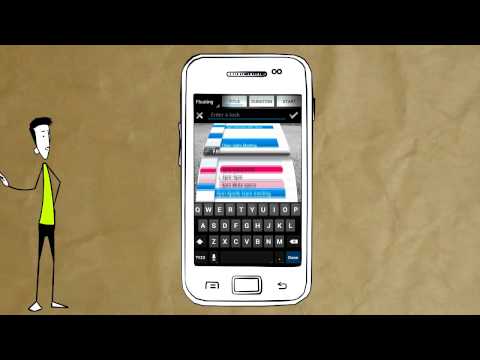
All of this happens in a unique 3D view that feels like a GPS for your time — helping you move forward, toward your goals.
Key Features
• Smart scheduling of tasks and meetings
• Automatic rescheduling as time moves forward
• Multiple task lists with custom Time Slots
• Quick Actions for faster task entry
• Improved self-evaluation and weekly debriefing
• Syncs with all your calendars
• Intuitive 3D timeline: zoom, scroll, focus
• Clean, modern interface
ZenDay is not just another planner — it’s your personal time assistant.
Requires Android 5.0 and up
🚫 Tablet support has been removed in this version.
*** Featured on Samsung's S Suggest ***
*** Featured on Google Play: App to watch, Play Pick ***
*** Selected by Google India as Best App for Everyday Life for 2013 *** http://bitly.com/zenday-indiatimes
ZenDay helps you stay organized, improve your work/life balance, and fight procrastination — all in a beautifully fluid, 3D timeline.
Forget endless task lists. Start managing your time instead.
ZenDay schedules your tasks directly into your day based on your real availability, using customizable Time Slots. No more fake calendar events — just real planning that adapts to your life.
Your tasks float forward with time. If you don’t complete them, ZenDay reschedules them automatically.
Upcoming and overdue tasks change color, so you can take action before it’s too late.
With new Quick Actions, you can instantly add preset actions to any task or event.
Use multiple task lists, each with their own Time Slots, to keep your work and personal life in sync.
You can even self-evaluate your activity to track your progress over time.
All of this happens in a unique 3D view that feels like a GPS for your time — helping you move forward, toward your goals.
Key Features
• Smart scheduling of tasks and meetings
• Automatic rescheduling as time moves forward
• Multiple task lists with custom Time Slots
• Quick Actions for faster task entry
• Improved self-evaluation and weekly debriefing
• Syncs with all your calendars
• Intuitive 3D timeline: zoom, scroll, focus
• Clean, modern interface
ZenDay is not just another planner — it’s your personal time assistant.
Requires Android 5.0 and up
🚫 Tablet support has been removed in this version.
*** Featured on Samsung's S Suggest ***
*** Featured on Google Play: App to watch, Play Pick ***
*** Selected by Google India as Best App for Everyday Life for 2013 *** http://bitly.com/zenday-indiatimes
Be better organized with ZenDay: your calendars, tasks & to-dos in a 3D timeline
Updated on
Safety starts with understanding how developers collect and share your data. Data privacy and security practices may vary based on your use, region, and age. The developer provided this information and may update it over time.
- No data shared with third partiesLearn more about how developers declare sharing
- This app may collect these data typesPersonal info, Calendar, and Contacts
- Data is encrypted in transit
- Data can’t be deleted


Ratings and reviews
2.66K reviews

A Google user
- Flag inappropriate
August 10, 2019
Great idea, but useless without support for multiple task lists with different 'working hours'. Otherwise it's only suitable for work tasks. It's no good having tasks automatically move to the next available slot if where that slot is depends on the type of task (which it usually does).
20 people found this review helpful

Natalie Kinnick
- Flag inappropriate
March 11, 2021
Downloaded and almost immediately deleted it. I hate hate hate the toggle between day and month, there doesnt seem to be an option to show the month where you phone isnt sideways. They visual of everything bending as it scrolled was also very aggravating. If I cant bear to look at the basic functions of the app I can't use it
9 people found this review helpful

Abhinav Dhere
- Flag inappropriate
March 25, 2021
The clean and flexible interface is great. However, often slight movement of phone triggers the switch to month mode, and sometimes switches to previous year (I assume this is some movement based shortcut to change year). There must be some option to set the app to not switch mode on rotation and instead allow switching manually. It gets really irritating to have the year or mode switched while you're adding tasks or viewing tasks for the day.
3 people found this review helpful
What’s new
- Fixed account sync option in settings (occurred on recent android devices)
- Improved stability
- Improved stability
App support
About the developer
ARNAUD GILLES MARCEL GUYON
nonuguyon@gmail.com
337 Chem. de Chiron Bat B4
73000 Chambéry
France


