
SimpleMind Lite - Mind Mapping

star
50.8K reviews

Everyone
info
5M+
Downloads

Everyone
Learn more


About this app
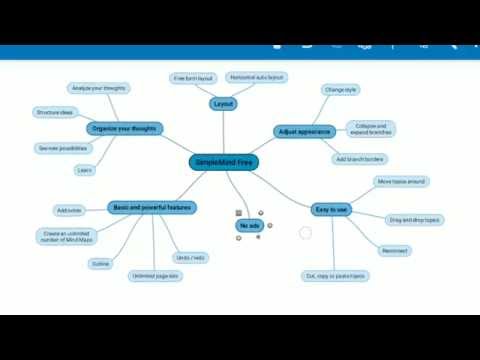
Mind mapping helps you organize your thoughts, remember information and generate new ideas. We've created a beautiful, intuitive app, so you can mind map wherever you are and whenever you want.
Free Functionality
• Everything you need to get started with mind mapping.
• Easy to use.
• Create as many Mind Maps as you want.
• Change the overall appearance by selecting one of the many style sheets.
• Add notes.
• Collapse and expand branches.
• Outline view.
• Brainstorm.
• Continuously fine-tuned based on customer feedback.
Private by Design
• No ads.
• No tracking.
• No need to sign up for an account.
• We do not have access to your Mind Maps.
More features in SimpleMind Pro for Android:
• Add images and photos.
• Share Mind Maps.
• Customize the style of the Mind Map.
• Tools to help you maintain overview.
• Sync Mind Maps across devices using Dropbox or other clouds.
• Upgrade to Pro functionality is a one-time purchase, not a subscription.
SimpleMind for Android is optimized for phones and tablets.
Free Functionality
• Everything you need to get started with mind mapping.
• Easy to use.
• Create as many Mind Maps as you want.
• Change the overall appearance by selecting one of the many style sheets.
• Add notes.
• Collapse and expand branches.
• Outline view.
• Brainstorm.
• Continuously fine-tuned based on customer feedback.
Private by Design
• No ads.
• No tracking.
• No need to sign up for an account.
• We do not have access to your Mind Maps.
More features in SimpleMind Pro for Android:
• Add images and photos.
• Share Mind Maps.
• Customize the style of the Mind Map.
• Tools to help you maintain overview.
• Sync Mind Maps across devices using Dropbox or other clouds.
• Upgrade to Pro functionality is a one-time purchase, not a subscription.
SimpleMind for Android is optimized for phones and tablets.
Mind Map and Brainstorm, Collect ideas and Structure thoughts
Updated on
Safety starts with understanding how developers collect and share your data. Data privacy and security practices may vary based on your use, region, and age. The developer provided this information and may update it over time.
- No data shared with third partiesLearn more about how developers declare sharing
- No data collectedLearn more about how developers declare collection
- Committed to follow the Play Families Policy


Ratings and reviews
40.5K reviews

Chad Bell
- Flag inappropriate
April 9, 2026
I bought Pro on my phone as it said I could export to my files to my PC , you cannot edit them, except on the device you purchased on. if you change phones you lose everything. So in reality there's no way to register an account or the system to recognize you on a reinstall. Might want to consider other options if you need a more robust workspace. PowerPoint and One-Note also accommodate similar aspects as many other options that retain your workspace. I emailed them but no response yet.
2 people found this review helpful
ModelMaker Tools
April 16, 2026
HI, I see we e-mail you back that day. Just in case, SimpleMind is a one-time purchase per platform, there are no subscriptions or monthly fees. See also: https://simplemind.eu/support/#!/purchase-install/how-does-licensing-work/

Jalene Johnson
- Flag inappropriate
August 22, 2024
I love this app. I had it before my computer crashed and it was something I had to have again. It helps me so much with journaling. Sometim3s my brain just needs the "chaos" that mind mapping in this way provides that writing on paper can't provide, even when paper is used to mind map. Dsappointed to pay again, but understood. It's plainly stated that's how they work. The price paid is for each device. That would be where I dropped to four stars. A lifetime subscription option would be nice.
26 people found this review helpful

Kaija Weldon
- Flag inappropriate
February 17, 2024
Definitely one of the best apps I've found for what I use it for. I've been using it for a few days now, and it's so easy to use! I do have a few personal suggestions I'd like to see incorporated into the mind maps, like bigger buttons when accessing topics and perhaps an option for a drop-down menu/preview to better see the notes put on each topic (if these are already features than I missed it). Otherwise, I love it and hope to upgrade someday!! Great work!
16 people found this review helpful
What’s new
• Full Screen button on phones.
• Open mind maps in read-only mode to avoid making (accidental) changes.
• Open mind maps in read-only mode to avoid making (accidental) changes.
Everyone
Learn moreApp support
About the developer
ModelMaker Tools B.V.
android@simpleapps.eu
Stalen Enk 18
6881 BR Velp GLD
Netherlands
+31 6 43920392


