Myanmar Photo Editor
Contains ads
4.0star
3.02K reviews
100K+
Downloads

Everyone
info
About this app
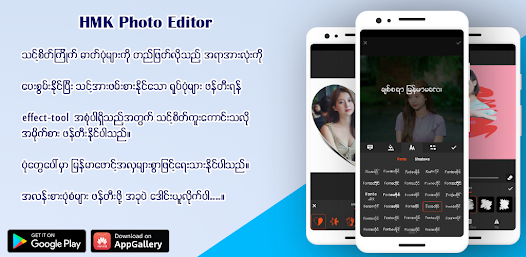
MM Photo Editor is an easy-to-use and powerful photo editing app designed for everyone who loves creativity.
You can edit your photos beautifully with English Fonts or Myanmar Unicode fonts, stylish filters, stickers, and many more amazing effects.
Perfect for making your photos stand out on social media!
✨ Key Features
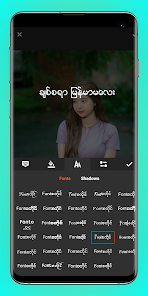
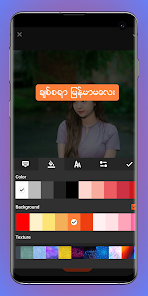
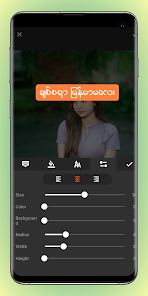
•Add Text to Photos (Myanmar & English Fonts):
Easily add text to your photos using Myanmar Unicode or English fonts. Personalize your images with style!
•Photo Filters:
Choose from various filters to give your photos unique moods and tones.
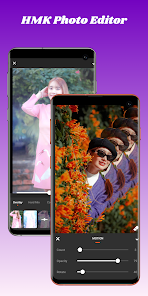
•Overlay Effects:
Apply over 90+ overlay effects and adjust opacity to enhance the look of your photos.
•Neon Effects:
Add glowing neon effects around your photos with different colors for a modern, eye-catching design.
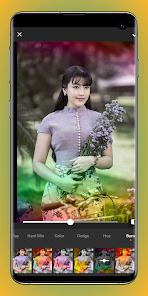
•Splash – Black & White Effect:
Convert your photos into black-and-white with customizable color splash filters.
•Drip Effects:
Add trendy drip art effects to make your photos stylish and unique.
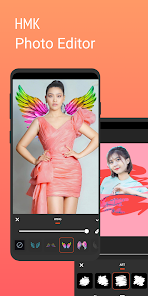
•Stickers:
Access a wide collection of high-quality stickers across multiple categories to decorate your pictures.
•Blur Background – DSLR Effect:
Focus on your main subject and create a professional DSLR-style blur in the background.
•Drip Art Frames:
Combine your photo with artistic drip frames to create something truly one-of-a-kind.
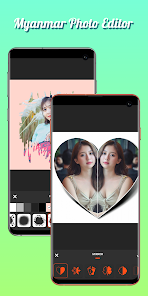
•Photo Frames:
Add colorful or gradient frames with adjustable border sizes for a perfect finish.
•Draw & Paint (Neon Brush):
Use the draw or neon tool to paint freely on your images with adjustable color and size.
•Adjustments:
Fine-tune your photos by adjusting brightness, contrast, warmth, hue, HSL, and saturation.
•And much more!
Explore many other powerful tools and creative effects inside the app.
💡 Why Choose MM Photo Editor?
•User-friendly design with easy navigation
•Supports English Fonts or Myanmar Unicode fonts
Fast, smooth, and works offline
•Perfect for creating photos for social media or personal use
MM Photo Editor – Make every photo a masterpiece!
Download now and start creating your own beautiful photo edits today.
You can edit your photos beautifully with English Fonts or Myanmar Unicode fonts, stylish filters, stickers, and many more amazing effects.
Perfect for making your photos stand out on social media!
✨ Key Features
•Add Text to Photos (Myanmar & English Fonts):
Easily add text to your photos using Myanmar Unicode or English fonts. Personalize your images with style!
•Photo Filters:
Choose from various filters to give your photos unique moods and tones.
•Overlay Effects:
Apply over 90+ overlay effects and adjust opacity to enhance the look of your photos.
•Neon Effects:
Add glowing neon effects around your photos with different colors for a modern, eye-catching design.
•Splash – Black & White Effect:
Convert your photos into black-and-white with customizable color splash filters.
•Drip Effects:
Add trendy drip art effects to make your photos stylish and unique.
•Stickers:
Access a wide collection of high-quality stickers across multiple categories to decorate your pictures.
•Blur Background – DSLR Effect:
Focus on your main subject and create a professional DSLR-style blur in the background.
•Drip Art Frames:
Combine your photo with artistic drip frames to create something truly one-of-a-kind.
•Photo Frames:
Add colorful or gradient frames with adjustable border sizes for a perfect finish.
•Draw & Paint (Neon Brush):
Use the draw or neon tool to paint freely on your images with adjustable color and size.
•Adjustments:
Fine-tune your photos by adjusting brightness, contrast, warmth, hue, HSL, and saturation.
•And much more!
Explore many other powerful tools and creative effects inside the app.
💡 Why Choose MM Photo Editor?
•User-friendly design with easy navigation
•Supports English Fonts or Myanmar Unicode fonts
Fast, smooth, and works offline
•Perfect for creating photos for social media or personal use
MM Photo Editor – Make every photo a masterpiece!
Download now and start creating your own beautiful photo edits today.
Updated on
Safety starts with understanding how developers collect and share your data. Data privacy and security practices may vary based on your use, region, and age. The developer provided this information and may update it over time.

No data shared with third parties
Learn more about how developers declare sharing

No data collected
Learn more about how developers declare collection

Data is encrypted in transit

Data can’t be deleted
Ratings and reviews
4.0
2.98K reviews

HANA Event Planning Service
- Flag inappropriate
September 17, 2025
Great app, I mostly use this app for making text on photos. ( My English is not good.) So, editing tools should be improved like text adjustment (word space, line space, customizable shadow, stroke, adjustable text frame, should contain built-in English fonts, local fonts add tab, please inverse the increase decrease capacity in color tab, These are only about the text tool. I haven't used the other tools. When I try to use it, I will tell you what is still needed. 😜 lay sar par tal byar
1 person found this review helpful

Lydia Mawi
- Flag inappropriate
- Show review history
July 18, 2025
I think it is good for people who are interesting in creating and editing and I am one of those people.So that it is really useful and helpful for me . And I love using it
2 people found this review helpful

Aye Thinn
- Flag inappropriate
December 8, 2023
not even worth a star. they said they fixed the bugs but i don't see any sign of improvement. After version 5.0.9 i can't even open the app anymore lol.
78 people found this review helpful
HMK DEV MM
January 23, 2024
Use the latest update version 5.1.1. Thank You.
What’s new
-Fixed Some bugs.
-Improve App Performance.
-Improve App Performance.
App support
About the developer
HTAY MIN KHINE
hmkdevjp@hotmail.com
東田中604
コーポ 金井戸 203号
小牧市, 愛知県 485-0826
Japan


