
NextGen mParivahan

3.1star
646K reviews
50M+
Downloads

Everyone
info


About this app
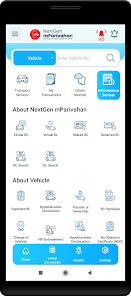
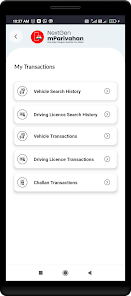
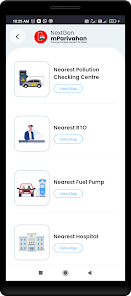
Provides Transport Service access to citizens through a mobile-based application. This app empowers citizen with instant access to various information, services and utilities related to the Transport Sector. Aimed to bring convenience to citizen and transparency in the system.
It is a genuine government app for all India RTO vehicle registration number search. It provides complete information about any vehicle which is registered in India like -
- Owner Name
- Registration date
- Registering Authority
- Make Model
- Fuel Type
- Vehicle Age
- Vehicle class
- Insurance Validity
- Fitness Validity
All this information will be displayed in details.
The main benefits of this app are -
1. Find details of any parked, accidental or theft vehicle by just entering the registration number.
2. Verify your car registration details.
3. Verify details of a second-hand vehicle.
4. If you want to buy a second-hand car you can verify the age and registration details.
Along with the above features, you can also verify DL details and create virtual DL and RC
in this app.
Highlights: Virtual RC/DL, Encrypted QR Code, Information Services, DL/RC search, Transport Notification to the citizen, RTO/Traffic Office Locations. Complete Transport Office related services will also be facilitated soon..
It is a genuine government app for all India RTO vehicle registration number search. It provides complete information about any vehicle which is registered in India like -
- Owner Name
- Registration date
- Registering Authority
- Make Model
- Fuel Type
- Vehicle Age
- Vehicle class
- Insurance Validity
- Fitness Validity
All this information will be displayed in details.
The main benefits of this app are -
1. Find details of any parked, accidental or theft vehicle by just entering the registration number.
2. Verify your car registration details.
3. Verify details of a second-hand vehicle.
4. If you want to buy a second-hand car you can verify the age and registration details.
Along with the above features, you can also verify DL details and create virtual DL and RC
in this app.
Highlights: Virtual RC/DL, Encrypted QR Code, Information Services, DL/RC search, Transport Notification to the citizen, RTO/Traffic Office Locations. Complete Transport Office related services will also be facilitated soon..
Updated on
Safety starts with understanding how developers collect and share your data. Data privacy and security practices may vary based on your use, region, and age. The developer provided this information and may update it over time.

No data shared with third parties
Learn more about how developers declare sharing

This app may collect these data types
Location, Personal info and 5 others

Data is encrypted in transit

You can request that data be deleted
Ratings and reviews
3.0
644K reviews

Surajit Dash
- Flag inappropriate
May 6, 2024
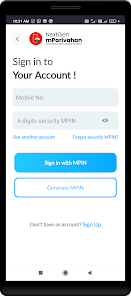
Though the responses repeatedly say it has been fixed - It has not been. It is not allowing me to sign in - repeatedly giving the error "Unable to verify mpin". There are many people that have reported similar issues, but it is sad to see that the issue is not yet fixed. This is an important app we depend on while commuting. Please fix it. I am unable to create screenshot (the phone gives error saying it has personal info, so cannot capture). Kindly fix it.
37 people found this review helpful
National Informatics Centre.
May 8, 2024
Hi, please email us a screenshot of the error you are facing along with your mobile number at helpdesk-mparivahan@gov.in so we can look into this for you. We apologise for any inconvenience.

Heramb Dhwaj
- Flag inappropriate
July 24, 2024
I can't access to the app because it constantly asks me to switch off USB debugging which is already off. It also recommends to also Switch off developer option. I cannot switch off developer option in this matter. An application should not ask to switch off developer option or any other setting in the mobile phone. There are other applications but they never ask for such conditions to operate.
10 people found this review helpful

Harikrishnan P V
- Flag inappropriate
- Show review history
June 4, 2024
You enabled USB debugging is showing every time even though it is not turned on. To open the apps I have to disable developer options which is not justifyable. Update : I have updated to the latest app and still facing the same issue. Uninstall and reinstall also not resloving the problem. I have emailed again on the same mail id you have provided. With this review also I have mailed a last time. No proper solutions are obtained. Still waiting for the latest mail reply. Get rid of this blocker.
76 people found this review helpful
National Informatics Centre.
May 28, 2024
Hi, can you please try reinstalling the app. Please contact us at helpdesk-mparivahan@gov.in if the issue persists.


