
NOAA Weather Unofficial (Pro)

star
18.3K reviews

Everyone
info
100K+
Downloads

Everyone
Learn more


About this app
This weather app is not affiliated with NOAA or the National Weather Service. Products provided by NOAA are in the public domain, and this app's use of those products is compliant with NOAA/NWS terms of use.
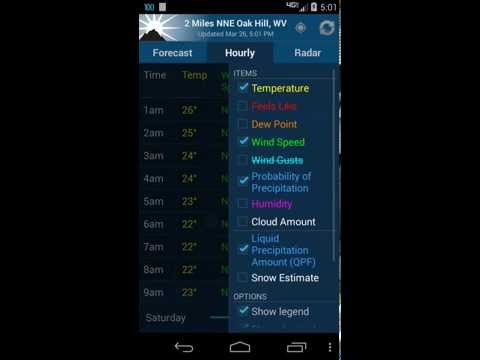
This app provides forecasts, animated radar, hourly forecast, and current conditions, all in an intuitive and easy to use interface. Just the information you need, provided accurately, quickly, and for your exact location.
★ "A no-nonsense approach to show weather data on your phone, but done well and great looking" - Android Central
This app uses NOAA point forecasts from your GPS location to get the most localized weather available. Point forecasts are great for climbing, hiking, skiing, or any outdoor activity where weather from a nearby city isn't accurate enough.
GPS on the phone will provide the most accurate location, but usually isn't needed. Nearby cell towers and Wi-Fi networks can also provide this information, and will be checked first to save time and battery. You can also enter a location manually.
To provided highly localized forecasting, this app uses point forecasts from the National Weather Service (NOAA/NWS), and is therefore only available in the US.
If there is severe weather this will display at the top of the forecast. This app currently does NOT support severe weather alerts or notifications. NOAA is providing this service directly through cell carriers. You can read more about the service at https://www.weather.gov/wrn/wea.
There are also several differently sized widgets available which can be placed on your homescreen to provide some basic weather information, without the need to open the app.
Forecast discussion is available through the menu button.
Permission: Location
This app requires your location to provide you with the most accurate weather. This is fundamental to how the app works. You can still add manual locations as well if you prefer.
Permission: Photos/Media/Files
This permission is required by Google Maps so that it can cache map tiles for faster loading. It sounds like the app is doing something with your photos or media, but it is not. The permission means that the app has permission to access your files (which includes photos and media), but does not mean they are actually being accessed. It is a subtle but important distinction. Contact me if you have further questions about this.
These are the non-simplified permissions as listed in the Android manifest:
android.permission.ACCESS_FINE_LOCATION" (location access listed above)
android.permission.ACCESS_NETWORK_STATE" (check for network connection)
android.permission.INTERNET" (download weather)
android.permission.VIBRATE" (for zoom feedback on old radar)
android.permission.WRITE_EXTERNAL_STORAGE" (this is Photos/Media/Files listed above)
com.google.android.providers.gsf.permission.READ_GSERVICES" (required by google maps)
FAQ (Frequently asked questions):
http://graniteapps.net/noaaweather/faq.html
Please contact me if you have any further questions or problems.
This is the premium version and is 100% Ad free, and has no limitations.
NOAA Weather on Twitter
https://twitter.com/noaa_weather
Beta Channel (for newest features)
https://play.google.com/apps/testing/com.nstudio.weatherhere
This app provides forecasts, animated radar, hourly forecast, and current conditions, all in an intuitive and easy to use interface. Just the information you need, provided accurately, quickly, and for your exact location.
★ "A no-nonsense approach to show weather data on your phone, but done well and great looking" - Android Central
This app uses NOAA point forecasts from your GPS location to get the most localized weather available. Point forecasts are great for climbing, hiking, skiing, or any outdoor activity where weather from a nearby city isn't accurate enough.
GPS on the phone will provide the most accurate location, but usually isn't needed. Nearby cell towers and Wi-Fi networks can also provide this information, and will be checked first to save time and battery. You can also enter a location manually.
To provided highly localized forecasting, this app uses point forecasts from the National Weather Service (NOAA/NWS), and is therefore only available in the US.
If there is severe weather this will display at the top of the forecast. This app currently does NOT support severe weather alerts or notifications. NOAA is providing this service directly through cell carriers. You can read more about the service at https://www.weather.gov/wrn/wea.
There are also several differently sized widgets available which can be placed on your homescreen to provide some basic weather information, without the need to open the app.
Forecast discussion is available through the menu button.
Permission: Location
This app requires your location to provide you with the most accurate weather. This is fundamental to how the app works. You can still add manual locations as well if you prefer.
Permission: Photos/Media/Files
This permission is required by Google Maps so that it can cache map tiles for faster loading. It sounds like the app is doing something with your photos or media, but it is not. The permission means that the app has permission to access your files (which includes photos and media), but does not mean they are actually being accessed. It is a subtle but important distinction. Contact me if you have further questions about this.
These are the non-simplified permissions as listed in the Android manifest:
android.permission.ACCESS_FINE_LOCATION" (location access listed above)
android.permission.ACCESS_NETWORK_STATE" (check for network connection)
android.permission.INTERNET" (download weather)
android.permission.VIBRATE" (for zoom feedback on old radar)
android.permission.WRITE_EXTERNAL_STORAGE" (this is Photos/Media/Files listed above)
com.google.android.providers.gsf.permission.READ_GSERVICES" (required by google maps)
FAQ (Frequently asked questions):
http://graniteapps.net/noaaweather/faq.html
Please contact me if you have any further questions or problems.
This is the premium version and is 100% Ad free, and has no limitations.
NOAA Weather on Twitter
https://twitter.com/noaa_weather
Beta Channel (for newest features)
https://play.google.com/apps/testing/com.nstudio.weatherhere
NOAA forecast & radar for your exact location.
Updated on
Safety starts with understanding how developers collect and share your data. Data privacy and security practices may vary based on your use, region, and age. The developer provided this information and may update it over time.


Ratings and reviews
16.5K reviews

Tim Elam
- Flag inappropriate
August 14, 2026
Simple, fast, and accurate. I especially like having a refresh button on each tab, particularly on the weather map. My favorite feature is being able to have one widget in Fahrenheit and another in Celsius. The widgets could use a little more polish, and I occasionally get battery drain notices. Those are minor issues for an otherwise excellent weather app.
1 person found this review helpful

Scott
- Flag inappropriate
August 10, 2026
Clean UI without ads or bloat, but it relies entirely on the api.weather.gov endpoint with zero fallback. The NWS server is notoriously fragile, crashing not just during severe weather, but at random times when you just want a routine forecast. A weather app is nearly useless if it depends entirely on a single, unstable source of information. Without a commercial backup or cached fallback, a nice interface doesn't stop it from being an unreliable brick. Fix the pipeline. Oh, and it phones home.

Brent I.
- Flag inappropriate
- Show review history
July 9, 2026
Overall a decent app however the accuracy of the current conditions widget needs to be improved. Many times the temperature will say zero when it's like 75° outside. Also, the location of the reading needs to be more accurate. The dew point, temperature and wind speed are rarely ever correct and don't update like they should. Please fix those things. Otherwise forecasts are mostly accurate.
What’s new
v2.18.1
* Added new resizeable widget with new design for Android 12+
* Improved widget configuration screen
* Fixed hourly color change not applying whne viewed as a table
* Bug fixes
* Added new resizeable widget with new design for Android 12+
* Improved widget configuration screen
* Fixed hourly color change not applying whne viewed as a table
* Bug fixes
Everyone
Learn moreApp support
About the developer
GRANITE APPS LLC
support@graniteapps.net
1425 Broadway
Seattle, WA 98122
United States
+1 253-204-8475


