
NOAA Weather Unofficial
Contains ads

star
106K reviews

Everyone
info
1M+
Downloads

Everyone
Learn more


About this app
This weather app is not affiliated with NOAA or the National Weather Service. Products provided by NOAA are in the public domain, and this app's use of those products is compliant with NOAA/NWS terms of use.
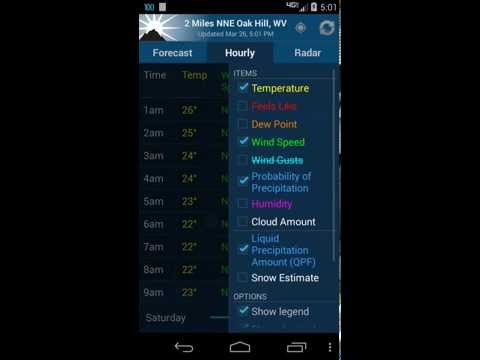
This app provides forecasts, animated radar, hourly forecast, and current conditions, all in an intuitive and easy to use interface. Just the information you need, provided accurately, quickly, and for your exact location.
★ "A no-nonsense approach to show weather data on your phone, but done well and great looking" - Android Central
This app uses NOAA point forecasts from your GPS location to get the most localized weather available. Point forecasts are great for climbing, hiking, skiing, or any outdoor activity where weather from a nearby city isn't accurate enough.
GPS on the phone will provide the most accurate location, but usually isn't needed. Nearby cell towers and Wi-Fi networks can also provide this information, and will be checked first to save time and battery. You can also enter a location manually.
To provided highly localized forecasting, this app uses point forecasts from the National Weather Service (NOAA/NWS), and is therefore only available in the US.
If there is severe weather this will display at the top of the forecast. This app currently does NOT support severe weather alerts or notifications. NOAA is providing this service directly through cell carriers. You can read more about the service at https://www.weather.gov/wrn/wea.
There are also several differently sized widgets available which can be placed on your homescreen to provide some basic weather information, without the need to open the app.
Forecast discussion is available through the menu button.
Permission: Location
This app requires your location to provide you with the most accurate weather. This is fundamental to how the app works. You can still add manual locations as well if you prefer.
Permission: Photos/Media/Files
This permission is required by Google Maps so that it can cache map tiles for faster loading. It sounds like the app is doing something with your photos or media, but it is not. The permission means that the app has permission to access your files (which includes photos and media), but does not mean they are actually being accessed. It is a subtle but important distinction. Contact me if you have further questions about this.
These are the non-simplified permissions as listed in the Android manifest:
android.permission.ACCESS_FINE_LOCATION" (location access listed above)
android.permission.ACCESS_NETWORK_STATE" (check for network connection)
android.permission.INTERNET" (download weather)
android.permission.VIBRATE" (for zoom feedback on old radar)
android.permission.WRITE_EXTERNAL_STORAGE" (this is Photos/Media/Files listed above)
com.google.android.providers.gsf.permission.READ_GSERVICES" (required by google maps)
FAQ (Frequently asked questions):
http://graniteapps.net/noaaweather/faq.html
Please contact me if you have any further questions or problems.
This is the ad supported free version of NOAA Weather. You are also limited to 3 saved locations. Upgrade to remove ads and this restriction.
NOAA Weather on Twitter
https://twitter.com/noaa_weather
Beta Channel (for newest features)
https://play.google.com/apps/testing/com.nstudio.weatherhere.free
This app provides forecasts, animated radar, hourly forecast, and current conditions, all in an intuitive and easy to use interface. Just the information you need, provided accurately, quickly, and for your exact location.
★ "A no-nonsense approach to show weather data on your phone, but done well and great looking" - Android Central
This app uses NOAA point forecasts from your GPS location to get the most localized weather available. Point forecasts are great for climbing, hiking, skiing, or any outdoor activity where weather from a nearby city isn't accurate enough.
GPS on the phone will provide the most accurate location, but usually isn't needed. Nearby cell towers and Wi-Fi networks can also provide this information, and will be checked first to save time and battery. You can also enter a location manually.
To provided highly localized forecasting, this app uses point forecasts from the National Weather Service (NOAA/NWS), and is therefore only available in the US.
If there is severe weather this will display at the top of the forecast. This app currently does NOT support severe weather alerts or notifications. NOAA is providing this service directly through cell carriers. You can read more about the service at https://www.weather.gov/wrn/wea.
There are also several differently sized widgets available which can be placed on your homescreen to provide some basic weather information, without the need to open the app.
Forecast discussion is available through the menu button.
Permission: Location
This app requires your location to provide you with the most accurate weather. This is fundamental to how the app works. You can still add manual locations as well if you prefer.
Permission: Photos/Media/Files
This permission is required by Google Maps so that it can cache map tiles for faster loading. It sounds like the app is doing something with your photos or media, but it is not. The permission means that the app has permission to access your files (which includes photos and media), but does not mean they are actually being accessed. It is a subtle but important distinction. Contact me if you have further questions about this.
These are the non-simplified permissions as listed in the Android manifest:
android.permission.ACCESS_FINE_LOCATION" (location access listed above)
android.permission.ACCESS_NETWORK_STATE" (check for network connection)
android.permission.INTERNET" (download weather)
android.permission.VIBRATE" (for zoom feedback on old radar)
android.permission.WRITE_EXTERNAL_STORAGE" (this is Photos/Media/Files listed above)
com.google.android.providers.gsf.permission.READ_GSERVICES" (required by google maps)
FAQ (Frequently asked questions):
http://graniteapps.net/noaaweather/faq.html
Please contact me if you have any further questions or problems.
This is the ad supported free version of NOAA Weather. You are also limited to 3 saved locations. Upgrade to remove ads and this restriction.
NOAA Weather on Twitter
https://twitter.com/noaa_weather
Beta Channel (for newest features)
https://play.google.com/apps/testing/com.nstudio.weatherhere.free
NOAA forecast & radar for your exact location.
Updated on
Featured stories

Safety starts with understanding how developers collect and share your data. Data privacy and security practices may vary based on your use, region, and age. The developer provided this information and may update it over time.


Ratings and reviews
96.6K reviews

A B
- Flag inappropriate
- Show review history
August 30, 2026
Still the best weather app I have used in regards to information I need at a quick look. Does seem to be glitchy at times especially when I need it the most, when weather is the worst! During this time it comes up with error messages when I try to get the weather to download so I have to uninstall it and reinstall it. And it's not my reception because the other weather apps come through just fine, but these apps have not shown to be as thorough or as accurate.
14 people found this review helpful

Puddle Jumper Jones
- Flag inappropriate
- Show review history
September 5, 2026
Excellent detailed info, displayed in this App. My wife has an S8+, & I have an S8. The hourly format on S8+ is in graph form: the S8 is in list. Is it possible to change the S8+ to list form.....Thanks / keep up the good work. *09/05/2026. Here it is a few years later, and we are still using what we consider the most accurate, and easy to use weather app. Set up, options are very simple. and easy to use, or change. As far as adds go, I do not find them intrusive.

Dan G.
- Flag inappropriate
August 18, 2026
love it probably going to buy the paid version as soon as I have the money. I've spent probably close to $50 on multiple different paid weather apps and none of them can seem to give me even remotely accurate information. this one's not perfect either. there's obviously times it's not right but it's 1000s times better than any other And uses a great user interface graphs and from reliable source hands down the best weather app
3 people found this review helpful
What’s new
v2.18.3
* Fixed radar update not adding new frames for mesonet source
* Fixed a missing icon on widgets using older station data
* Stability and crash fixes
v2.18.2
* Settings re-organization
* Bug fixes
v2.18.1
* Added new resizeable widget with new design for Android 12+
* Improved widget configuration screen
* Fixed hourly color change not applying whne viewed as a table
* Bug fixes
* Fixed radar update not adding new frames for mesonet source
* Fixed a missing icon on widgets using older station data
* Stability and crash fixes
v2.18.2
* Settings re-organization
* Bug fixes
v2.18.1
* Added new resizeable widget with new design for Android 12+
* Improved widget configuration screen
* Fixed hourly color change not applying whne viewed as a table
* Bug fixes
Everyone
Learn moreApp support
About the developer
GRANITE APPS LLC
support@graniteapps.net
1425 Broadway
Seattle, WA 98122
United States
+1 253-204-8475


