
Password Manager
In-app purchases


Everyone
info
10+
Downloads


About this app
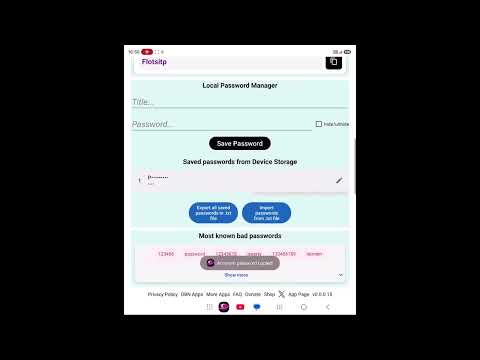
OBN Apps's Password Manager that keeps your passwords offline, on your device. Nothing is sent to a cloud or a server, and there is no account to create. Your passwords stay with you, on your phone.
Save the passwords you need to remember, organize them, and open them again when you need them. Lock the app with your fingerprint so only you can open it.
Features:
- Store your passwords offline on your device.
- Lock the app with your fingerprint.
- No cloud, no server, no account required.
- Add, edit, and organize your saved passwords.
- Simple and lightweight to use.
If you want a simple place to keep your passwords on your own device, locked behind your fingerprint and never sent online, this app keeps it local and offline. Download now to start keeping your passwords offline.
Other apps developed by OBN Apps:
PDF Editor - https://play.google.com/store/apps/details?id=com.obn.pdf
Text Editor - https://play.google.com/store/apps/details?id=com.obn.texteditor
Delivery Text - https://play.google.com/store/apps/details?id=com.obn.deliverytext
Memory Game - https://play.google.com/store/apps/details?id=com.obn.memorygame
Timer Countdown - https://play.google.com/store/apps/details?id=com.obn.timerapp
Mpedance - https://play.google.com/store/apps/details?id=com.obn.mpedance
Camera - https://play.google.com/store/apps/details?id=com.obn.camera
Password Manager - https://play.google.com/store/apps/details?id=com.obn.password
Save the passwords you need to remember, organize them, and open them again when you need them. Lock the app with your fingerprint so only you can open it.
Features:
- Store your passwords offline on your device.
- Lock the app with your fingerprint.
- No cloud, no server, no account required.
- Add, edit, and organize your saved passwords.
- Simple and lightweight to use.
If you want a simple place to keep your passwords on your own device, locked behind your fingerprint and never sent online, this app keeps it local and offline. Download now to start keeping your passwords offline.
Other apps developed by OBN Apps:
PDF Editor - https://play.google.com/store/apps/details?id=com.obn.pdf
Text Editor - https://play.google.com/store/apps/details?id=com.obn.texteditor
Delivery Text - https://play.google.com/store/apps/details?id=com.obn.deliverytext
Memory Game - https://play.google.com/store/apps/details?id=com.obn.memorygame
Timer Countdown - https://play.google.com/store/apps/details?id=com.obn.timerapp
Mpedance - https://play.google.com/store/apps/details?id=com.obn.mpedance
Camera - https://play.google.com/store/apps/details?id=com.obn.camera
Password Manager - https://play.google.com/store/apps/details?id=com.obn.password
Offline password manager with fingerprint lock. No cloud, no server.
Updated on
Featured stories

Safety starts with understanding how developers collect and share your data. Data privacy and security practices may vary based on your use, region, and age. The developer provided this information and may update it over time.


What’s new
It is fun to generate complex and random passwords here!
The Password app is designed to securely store and manage your passwords directly on your Android device’s internal memory, without transmitting your sensitive data to the internet.
All passwords you create and save in the application are stored locally on your device, which means there is no cloud synchronization of your passwords, no external server storage, and no remote database access at any time.
The Password app is designed to securely store and manage your passwords directly on your Android device’s internal memory, without transmitting your sensitive data to the internet.
All passwords you create and save in the application are stored locally on your device, which means there is no cloud synchronization of your passwords, no external server storage, and no remote database access at any time.
App support
About the developer
Onur Yolal
onuryolal7@gmail.com
6265 Contessa Dr APT 307 307
Orlando, FL 32829-8003
United States


