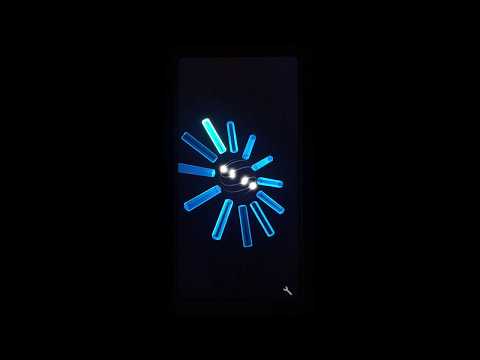

PS2 Clock Live Wallpaper

star
271 reviews

Everyone
info
1K+
Downloads

Everyone
Learn more


About this app
Revitalize your Android device with the "PS2 Clock Live Wallpaper," inspired by the legendary PlayStation2. This app combines timeless design with modern technology, offering a unique way to celebrate the classic gaming era. Install it on your phone, tablet, or Android TV, and enjoy a live wallpaper that features a crystal clock reminiscent of the PS2's original system clock.
Key Highlights:
🎮 Transform your device with a live wallpaper that brings the PS2's soul to your screen.
🎮 Versatile use on Android phones, tablets, and exclusively as a screensaver on Android TV and Google TV.
🎮 Experience a nostalgic journey with a boot animation inspired by the "Save Towers" from the PS2 startup sequence.
🎮 Customize the clock to match your style, ensuring it fits perfectly with your device's aesthetic.
📺 Special Note for TV Users:
🎮 The PS2 Clock Live Wallpaper is designed to elevate your device's aesthetic, but it is important to note that on Android TV and Google TV, the app functions solely as a Screensaver. It cannot be set as a Live Wallpaper due to platform restrictions.
🎮 Setting Screensaver on Google TV: Google TV users, we understand that customizing your screensaver settings through the standard UI is currently not an option. However, there's a workaround for tech-savvy users who are comfortable with using ADB commands. You can set the PS2 Clock Live Wallpaper as your screensaver by executing the following ADB command:
"adb shell settings put secure screensaver_components com.phardera.ps2clock/com.phardera.lwplib.livewallpaper.UnityDaydreamService"
Please note that this app is not affiliated with PlayStation or Sony Interactive Entertainment. All trademarks, logos, and brand names are the property of their respective owners.
Key Highlights:
🎮 Transform your device with a live wallpaper that brings the PS2's soul to your screen.
🎮 Versatile use on Android phones, tablets, and exclusively as a screensaver on Android TV and Google TV.
🎮 Experience a nostalgic journey with a boot animation inspired by the "Save Towers" from the PS2 startup sequence.
🎮 Customize the clock to match your style, ensuring it fits perfectly with your device's aesthetic.
📺 Special Note for TV Users:
🎮 The PS2 Clock Live Wallpaper is designed to elevate your device's aesthetic, but it is important to note that on Android TV and Google TV, the app functions solely as a Screensaver. It cannot be set as a Live Wallpaper due to platform restrictions.
🎮 Setting Screensaver on Google TV: Google TV users, we understand that customizing your screensaver settings through the standard UI is currently not an option. However, there's a workaround for tech-savvy users who are comfortable with using ADB commands. You can set the PS2 Clock Live Wallpaper as your screensaver by executing the following ADB command:
"adb shell settings put secure screensaver_components com.phardera.ps2clock/com.phardera.lwplib.livewallpaper.UnityDaydreamService"
Please note that this app is not affiliated with PlayStation or Sony Interactive Entertainment. All trademarks, logos, and brand names are the property of their respective owners.
Retro PS2 clock style for your device's wallpaper and screensaver.
Updated on
Safety starts with understanding how developers collect and share your data. Data privacy and security practices may vary based on your use, region, and age. The developer provided this information and may update it over time.
- No data shared with third partiesLearn more about how developers declare sharing
- This app may collect these data typesApp info and performance
- Data is encrypted in transit
- Data can’t be deleted


Ratings and reviews
252 reviews

Travis
- Flag inappropriate
March 8, 2024
I absolutely love the wallpaper I use it on all of my devices since I found it, I've noticed on a recent software update on my Samsung devices it has some momentary lags that are consistent, not the worst thing ever but wish it wasn't a thing, if at all possible I would love to see if the playstation 2 background sound be implemented in future updates. Over all a great wallpaper except that glitch witch could very well be Samsungs fault.
2 people found this review helpful

Caleb M
- Flag inappropriate
July 26, 2026
I have to say I do love this app as something so simple as a live wallpaper can completely change the experience of using your phone and the customizations available are very appreciated. In that sense, a couple very minor things that bothered me was not being able to turn the orb trails completely off and a lack of sound. Sony's menu sounds are copyrighted, obviously, but the ability to upload your own sounds would be excellent for more personalization.

Richard M
- Flag inappropriate
June 6, 2026
i agree with the other comment this is great but being able to have the save towers as an option for the main screen would be great or even the crystals for the lock screen
What’s new
Improved compatibility and stability on the latest Android
Everyone
Learn moreApp support
About the developer
芬達實驗室
service@phardera.com
320068台湾桃園市中壢區
中福路222號
+886 910 802 818


