
Pix2D - Pixel art studio

star
1.05K reviews

Everyone
info
100K+
Downloads


About this app
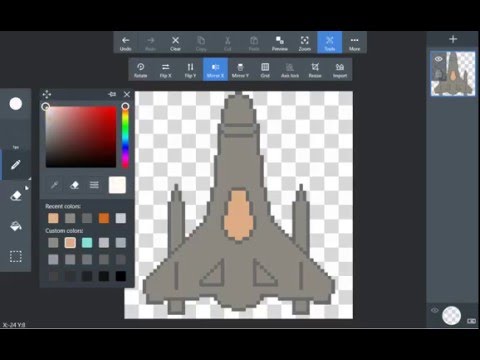
Pix2D is a powerful animated sprite, game art and pixel art editor.
With modern UI and optimized for using on desktops, tablets and smartphones.
Easy to use and powerful user interface
Standard instruments for graphic editing (freehand drawing, flood-fill, erase, etc.)
Tiled and sprite preview mode
Import/export to PNG
Different brushes types
Brush opacity and size settings
Pen pressure supprort for some brushes
Special effects on layers (shadow, color overlay)
Custom canvas size
Advanced layers functionality
Symmetrical drawing
Control over every pixel of your artwork
Shape drawing with selected brushes
With modern UI and optimized for using on desktops, tablets and smartphones.
Easy to use and powerful user interface
Standard instruments for graphic editing (freehand drawing, flood-fill, erase, etc.)
Tiled and sprite preview mode
Import/export to PNG
Different brushes types
Brush opacity and size settings
Pen pressure supprort for some brushes
Special effects on layers (shadow, color overlay)
Custom canvas size
Advanced layers functionality
Symmetrical drawing
Control over every pixel of your artwork
Shape drawing with selected brushes
Simple, powerful pixel art and sprite editor for indie game developers
Updated on
Safety starts with understanding how developers collect and share your data. Data privacy and security practices may vary based on your use, region, and age. The developer provided this information and may update it over time.
- No data shared with third partiesLearn more about how developers declare sharing
- No data collectedLearn more about how developers declare collection


Ratings and reviews
830 reviews

Boden Hargrove
- Flag inappropriate
August 5, 2021
I have used this app for a short amount of time, and it feels very intuitive! But I have found a couple of problems, first off the app crashes way too often, and I lose what little progress I manage to make by that point. And second is little more than a suggestion (this may already be a feature), that perhaps in the resize function it actually shrinks the image itself, allowing for easier pixel art? Otherwise, this app is very good and I recommend it!
32 people found this review helpful
Igor Gritsenko
October 31, 2023
Hi, McGus. Thanks for the review. We fixed stability issues in the latest update.

Imogen Obrien
- Flag inappropriate
June 29, 2026
the ui is okay, and the animation tool is fine, but I PHYSICALLY CANNOT EXPORT IT COTRRECTLY. I have exported it as a gif more than 10 times, 2 actually saved, and both had odd glitches coloring. the app continuously crashes. FIX YOUR EXPORTING FUNCTION.

m m
- Flag inappropriate
- Show review history
April 8, 2026
hello i love this app, but could u asd a thing qhere u can scroll along the image? like a moving tool, so when ur zoomed in its easier to scroll or move to the place u want? ots easier then zooming out then rezooming to get to somehere specific.
2 people found this review helpful
App support
About the developer
Игорь Гриценко
igor@pix2d.com
3-й Нижнелихобрский пр-д
73
Москва
Russia
127238


