
Pumble

star
644 reviews

Everyone
info
100K+
Downloads


About this app
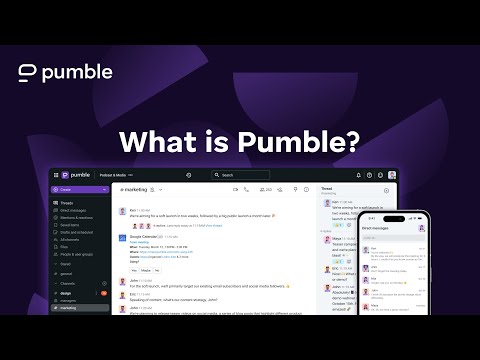
Communicate with your team through organized chats, channels, and video meetings. Pumble is a team messaging app built for businesses that need clear communication and an unlimited message history. Create channels for projects and teams, start meetings directly from conversations, and keep all work discussions in one place.
TEAM MESSAGING THAT STAYS ORGANIZED
- Create channels for teams, projects, or topics
- Send direct messages for quick conversations
- Share updates where everyone can see them
- Keep conversations focused and easy to follow
CHANNELS FOR TEAM COMMUNICATION
- Channels help teams keep discussions organized. Use channels for:
- Projects
- Departments
- Announcements
- Daily work conversations
BUILT-IN VIDEO MEETINGS
- Start video meetings directly from a conversation.
- Host team meetings in seconds
- Share your screen during presentations
- Collaborate without switching tools
FILE SHARING AND MESSAGE HISTORY
- Share files, links, and important information with your team.
- Upload documents and images
- Keep files connected to conversations
- Find messages and shared files later
SEARCHABLE CONVERSATIONS
- Quickly find any information shared in the past. Search across:
- Messages
- Channels
- Files
- Links
WORK FROM ANYWHERE
- Pumble works across devices, so your team stays connected wherever work happens. Use Pumble on:
- Mobile
- Desktop
- Web
- Stay in touch with your team whether you’re at the office, working remotely, or on the move.
FREE PLAN AVAILABLE
- Get started with a FREE plan that includes:
- Unlimited users
- Unlimited message history
- Team channels and direct messages
- 1-on-1 video meetings
ADVANCED TEAM FEATURES
- Organizations that need more control and security can benefit from advanced capabilities, such as:
- Unlimited integrations with other tools
- Meeting recordings
- Single sign-on (SSO)
- User and workspace management
- Permissions and access control
- Advanced administration settings
Download the app and create an account for free, or log in using your existing details.
TEAM MESSAGING THAT STAYS ORGANIZED
- Create channels for teams, projects, or topics
- Send direct messages for quick conversations
- Share updates where everyone can see them
- Keep conversations focused and easy to follow
CHANNELS FOR TEAM COMMUNICATION
- Channels help teams keep discussions organized. Use channels for:
- Projects
- Departments
- Announcements
- Daily work conversations
BUILT-IN VIDEO MEETINGS
- Start video meetings directly from a conversation.
- Host team meetings in seconds
- Share your screen during presentations
- Collaborate without switching tools
FILE SHARING AND MESSAGE HISTORY
- Share files, links, and important information with your team.
- Upload documents and images
- Keep files connected to conversations
- Find messages and shared files later
SEARCHABLE CONVERSATIONS
- Quickly find any information shared in the past. Search across:
- Messages
- Channels
- Files
- Links
WORK FROM ANYWHERE
- Pumble works across devices, so your team stays connected wherever work happens. Use Pumble on:
- Mobile
- Desktop
- Web
- Stay in touch with your team whether you’re at the office, working remotely, or on the move.
FREE PLAN AVAILABLE
- Get started with a FREE plan that includes:
- Unlimited users
- Unlimited message history
- Team channels and direct messages
- 1-on-1 video meetings
ADVANCED TEAM FEATURES
- Organizations that need more control and security can benefit from advanced capabilities, such as:
- Unlimited integrations with other tools
- Meeting recordings
- Single sign-on (SSO)
- User and workspace management
- Permissions and access control
- Advanced administration settings
Download the app and create an account for free, or log in using your existing details.
Team messaging and video meetings built for organized work.
Updated on
Safety starts with understanding how developers collect and share your data. Data privacy and security practices may vary based on your use, region, and age. The developer provided this information and may update it over time.


Ratings and reviews
626 reviews

Sterling Hearth
- Flag inappropriate
- Show review history
January 21, 2025
I've used this for a while, at the request of someone who manages a house for a client. I don't see the advantage of this over a group text. People in the group often miss messages and notifications and I end up just having to text them to get their attention. update: yes the notifications are turned on, they just aren't as prevalent as rcs (text) notifications.
CAKE.com Inc
January 21, 2025
Hi Sterling, Thank you for your review. Please make sure that your notification schedule is set according to the hours you wish to receive notifications at. If you have any further issues, please feel free to reach us at support@pumble.com and we will be happy to troubleshoot with you! Cheers!

Whitley Love
- Flag inappropriate
- Show review history
March 9, 2023
Ughhh it's doing the keyboard thing again😮💨 I'm not sure if it's because I got a new phone, or if it's the latest update. So frustrating... Update*** The last update fixed the issue with the keyboard. Thanks! It was fine until the Feb 7th update changed the keyboard. I can't use the Swype to text feature anymore. It takes way too long to message in the group
5 people found this review helpful
CAKE.com Inc
February 10, 2023
Hello,
We're sorry to hear you had such problems with our Pumble app. We'd like to speak with you in order to better understand the issue you've encountered. Please contact us at support@clockify.me so that we can assist you in resolving this issue. Thank you very much.

Parham Khanlarkhani
- Flag inappropriate
- Show review history
August 24, 2025
unlike the web version, the mobile app lacks the option for sorting direct messages and chats by recency. if you are in a direct message and accidentally go back to the list, you have to scan through an alphabetically sorted list of directs to find the same chat and it is very frustrating. you easily miss the messages. this is also the same for the channels list. I already made a feature request 2 months ago but nothing has happened since. I'm a paid customer.
2 people found this review helpful
CAKE.com Inc
February 24, 2026
Hi Parham, thank you for taking the time to leave your honest feedback!
We're pleased to let you know that the feature you mentioned has been released.
Please feel free to test it on your end and let us know what you think!
Cheers!
What’s new
We’ve added “View newer replies” for ASTC messages when newer messages are available in the thread, along with a draft indicator for channels and DMs with an unsent thread reply.
App support
About the developer
Cake.com Inc.
support@cake.com
2100 Geng Rd Ste 210
Palo Alto, CA 94303
United States
+1 650-285-3391


