
RECnGO: Live stream like a pro
In-app purchases
3.1star
189 reviews
10K+
Downloads

Everyone
info
About this app
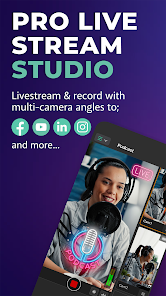
RECnGO is the ultimate live streaming studio app for video content creators and streamers.
It replaces a complicated, expensive (and unnecessary!) live streaming kit and lets you stream with your mobile devices in studio quality. Finally, an effortless streaming experience to Facebook, Youtube, Twitch, TikTok, your website, or any custom RTMP destinations–it’s perfect if you’re a content creator, podcaster, sports club, or videographer for social and corporate events.
- LIVE STREAM TO FACEBOOK, YOUTUBE, TWITCH, OR CUSTOM RTMP
Reach your audience on whatever platform they hang out on–set up and start streaming in minutes!
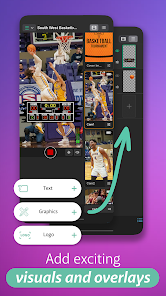
- PERSONALIZE/BRAND YOUR LIVE STREAMS OR PODCASTS
Insert logos, overlays, speaker names, and other visuals during your live stream–giving your production an instant “It’s like a TV studio!” wow factor
- USE MULTIPLE CAMERA ANGLES FOR A SHOW-STOPPING STREAM
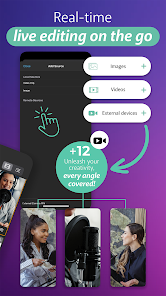
Use as many devices and camera angles as you need–you can link up to 12 phones and/or tablets into a live streaming chain. For a more immersive experience audiences love, switch between camera angles often during streaming (vs. making a single-camera yawn-inducing production).
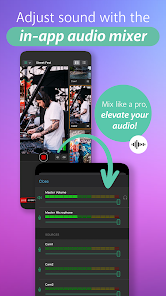
- EDIT SOUND LIVE WITH THE STUDIO’S BUILT-IN AUDIO MIXER
Adjust and balance the sound during your live stream for each device independently from the studio device’s audio mixer–this is huge. When you see people chatting next to a device you’re using to record or live stream, you can mute the mic on it from where you sit! Shhh!
- USE WHATEVER LENS YOU PREFER (FRONT, BACK, ULTRA-WIDE)
Switch between the front and back cameras without walking up to the device during your streams–handy during live Q&As when the mic is handed to someone in the audience
- ADJUST WHITE BALANCE
Individually, on all cameras–perfect when the sun decides to come out/hide and the video suddenly goes cold/warm as your stream goes on
- USE THE FLASH WHEN YOU NEED IT
Turn the flash on and off independently for each device–ideal when you're streaming on cloudy days and the room becomes darker... and what was a bright spot when you set up is now dark
- ZOOM IN AND OUT FROM YOUR STUDIO DEVICE
Individually, on all cameras–insanely useful when streaming whiteboard presentations with ridiculously small letters even the audience in the room can’t see (... imagine the people watching the steam!)
- ADJUST LATENCY WHEN YOU NEED TO
Adjust your external camera’s latency settings according to the quality of your WiFi connection as you're streaming–perfect for balancing the data flow (audio & video) from your individual cameras
- ENJOY AUTOMATIC STREAM BITRATE BALANCING
It’s streaming magic in the background–a generous 10-second buffer zone irons out sudden changes in your upload speed during your live stream
- LIVE STREAM, RECORD, OR BOTH
Record your live stream and save it on your local device–edit and repurpose later to get the most ROI for your efforts
- MANAGE YOUR DEVICES REMOTELY
Orchestrate your entire stream from inside the intuitive live video studio app while sitting down at the back of the room with a coffee–it’s that easy to use
- MINIMAL LEARNING CURVE
When you’re stuck or need help, navigate to the tutorial section or contact the live video support team for a solution.
Grab a seat in this powerful live video production studio and enjoy pro live streaming and video content creation–with your mobile devices.
It replaces a complicated, expensive (and unnecessary!) live streaming kit and lets you stream with your mobile devices in studio quality. Finally, an effortless streaming experience to Facebook, Youtube, Twitch, TikTok, your website, or any custom RTMP destinations–it’s perfect if you’re a content creator, podcaster, sports club, or videographer for social and corporate events.
- LIVE STREAM TO FACEBOOK, YOUTUBE, TWITCH, OR CUSTOM RTMP
Reach your audience on whatever platform they hang out on–set up and start streaming in minutes!
- PERSONALIZE/BRAND YOUR LIVE STREAMS OR PODCASTS
Insert logos, overlays, speaker names, and other visuals during your live stream–giving your production an instant “It’s like a TV studio!” wow factor
- USE MULTIPLE CAMERA ANGLES FOR A SHOW-STOPPING STREAM
Use as many devices and camera angles as you need–you can link up to 12 phones and/or tablets into a live streaming chain. For a more immersive experience audiences love, switch between camera angles often during streaming (vs. making a single-camera yawn-inducing production).
- EDIT SOUND LIVE WITH THE STUDIO’S BUILT-IN AUDIO MIXER
Adjust and balance the sound during your live stream for each device independently from the studio device’s audio mixer–this is huge. When you see people chatting next to a device you’re using to record or live stream, you can mute the mic on it from where you sit! Shhh!
- USE WHATEVER LENS YOU PREFER (FRONT, BACK, ULTRA-WIDE)
Switch between the front and back cameras without walking up to the device during your streams–handy during live Q&As when the mic is handed to someone in the audience
- ADJUST WHITE BALANCE
Individually, on all cameras–perfect when the sun decides to come out/hide and the video suddenly goes cold/warm as your stream goes on
- USE THE FLASH WHEN YOU NEED IT
Turn the flash on and off independently for each device–ideal when you're streaming on cloudy days and the room becomes darker... and what was a bright spot when you set up is now dark
- ZOOM IN AND OUT FROM YOUR STUDIO DEVICE
Individually, on all cameras–insanely useful when streaming whiteboard presentations with ridiculously small letters even the audience in the room can’t see (... imagine the people watching the steam!)
- ADJUST LATENCY WHEN YOU NEED TO
Adjust your external camera’s latency settings according to the quality of your WiFi connection as you're streaming–perfect for balancing the data flow (audio & video) from your individual cameras
- ENJOY AUTOMATIC STREAM BITRATE BALANCING
It’s streaming magic in the background–a generous 10-second buffer zone irons out sudden changes in your upload speed during your live stream
- LIVE STREAM, RECORD, OR BOTH
Record your live stream and save it on your local device–edit and repurpose later to get the most ROI for your efforts
- MANAGE YOUR DEVICES REMOTELY
Orchestrate your entire stream from inside the intuitive live video studio app while sitting down at the back of the room with a coffee–it’s that easy to use
- MINIMAL LEARNING CURVE
When you’re stuck or need help, navigate to the tutorial section or contact the live video support team for a solution.
Grab a seat in this powerful live video production studio and enjoy pro live streaming and video content creation–with your mobile devices.
Updated on
Safety starts with understanding how developers collect and share your data. Data privacy and security practices may vary based on your use, region, and age. The developer provided this information and may update it over time.


Ratings and reviews
3.1
178 reviews

DarkAvengerVIM
- Flag inappropriate
December 17, 2020
I was excited to be able to use this app at first, it would allow me to do my review show live, instead of having to edit and release days later. But between utter lack of information from the website, Facebook, or YouTube pages and the fact that I had to fight for thirty minutes just to get it to connect to my YouTube channel >at all<, I'm dropping this like a bad habit and DO NOT RECOMMEND!
20 people found this review helpful
RECnGO
December 20, 2020
To stream to YouTube, you need a stream key, which can be generated after logging in to studio.youtube.com. If you want to stream to YouTube, you need this key. This way, you can create a connection between your YouTube channel and our app. If the key has been typed in, the connection will be created, and you can start streaming to YouTube.

Weeny Ohms
- Flag inappropriate
- Show review history
June 3, 2024
The developer of this software is great 👍, powerful live streaming app on the store now. Clean user interface, everything is on point and it's a Pro game changer. I recommend it for everyone. But it still needs more features, Add Auto Save feature in case when the phone goes off 📴... and subscription prices are too high. Please do something about it.
3 people found this review helpful

We Live Stream
- Flag inappropriate
February 1, 2021
Dissapointed. This app does not give you the features displayed. Unable to mute mic, add transitions within different media or cameras. No audio level metre. Takes a while when selecting groups to activate go to dashboard. I signed up for the 1 year subscription only to realise all premium gives you is 5 additional screens. The picture of the home screen on the mobile in the website has features that do not come with even on a yearly paid subscription. I've emailed and no response. Bad app
12 people found this review helpful
RECnGO
February 10, 2021
We are really sorry for your bad experience. Good news for you that our latest update solves the "mute mic" problem for you and other users as well. From now on everyone can mute the sound during live streams. And we've implemented an "audio level meter" also. The "smooth transition" feature is next on our list. We hope you'll enjoy our app!
What’s new
Stability improvements and bug fixes
App support
About the developer
Recngo Korlátolt Felelősségű Társaság
hello@recngo.hu
Székesfehérvár
Sereg utca 1. fszt. 1.
8000
Hungary
+36 70 527 2582


