
Route Simulator: Mock Location
Contains ads


Everyone
info
0+
Downloads

Everyone
Learn more


About this app
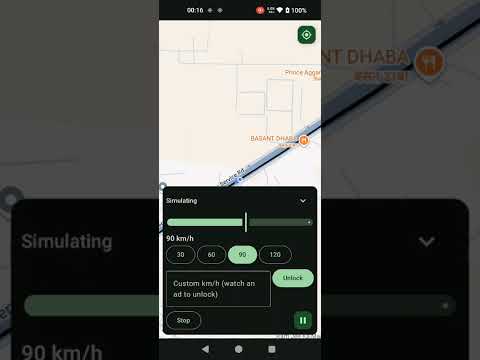
Route Simulator turns your phone into a moving GPS device. Pick a start and a destination, choose a speed, and your phone reports a simulated location that travels the real road route - so you can test location-aware apps without leaving your desk.
Built for Android developers and QA engineers who need repeatable, road-accurate location data.
WHAT IT DOES
• Simulates GPS movement along real roads, not straight lines - powered by Google Directions and Roads data
• Search any start and destination, enter coordinates manually, or import a GPX file
• Choose a speed preset or set a custom speed
• Multiple route alternatives - pick the one you want to drive
• Pause, resume, and stop a running trip straight from the notification
• Export your route as GPX to reuse or share
• History of your recent trips
WHAT YOU CAN TEST
• Navigation and turn-by-turn flows
• Delivery, ride-hailing, and fleet-tracking apps
• Geofence enter and exit triggers
• Location-based notifications and check-ins
• Speed-dependent logic and distance tracking
• Background location behaviour and foreground location services
HOW IT WORKS
Android includes a built-in mock location feature for developers, and Route Simulator uses it. You enable Developer Options, open "Select mock location app", and choose Route Simulator. From then on, apps that request your location receive the simulated position from your route instead of a reading from the GPS chip.
PLEASE READ BEFORE INSTALLING
Route Simulator cannot do anything until you select it as the mock location app in Developer Options. That is an Android requirement, not a limitation we are able to remove. If you would rather not enable Developer Options, this app will not be useful to you.
This is a testing tool for developers and QA. People often look for this kind of app as a mock GPS, mock location app, fake GPS, GPS simulator, location simulator, GPS route player, or location changer. Technically it drives Android's own mock-location provider along a route you define. It does not hide or bypass anything - the operating system flags the position as mocked, and any app is able to detect that.
PRIVACY
Your routes stay on your device. Route lookups are sent to Google's Directions, Roads, and Places APIs to compute the road path. See the privacy policy for details.
Requires Android 10 or newer.
Built for Android developers and QA engineers who need repeatable, road-accurate location data.
WHAT IT DOES
• Simulates GPS movement along real roads, not straight lines - powered by Google Directions and Roads data
• Search any start and destination, enter coordinates manually, or import a GPX file
• Choose a speed preset or set a custom speed
• Multiple route alternatives - pick the one you want to drive
• Pause, resume, and stop a running trip straight from the notification
• Export your route as GPX to reuse or share
• History of your recent trips
WHAT YOU CAN TEST
• Navigation and turn-by-turn flows
• Delivery, ride-hailing, and fleet-tracking apps
• Geofence enter and exit triggers
• Location-based notifications and check-ins
• Speed-dependent logic and distance tracking
• Background location behaviour and foreground location services
HOW IT WORKS
Android includes a built-in mock location feature for developers, and Route Simulator uses it. You enable Developer Options, open "Select mock location app", and choose Route Simulator. From then on, apps that request your location receive the simulated position from your route instead of a reading from the GPS chip.
PLEASE READ BEFORE INSTALLING
Route Simulator cannot do anything until you select it as the mock location app in Developer Options. That is an Android requirement, not a limitation we are able to remove. If you would rather not enable Developer Options, this app will not be useful to you.
This is a testing tool for developers and QA. People often look for this kind of app as a mock GPS, mock location app, fake GPS, GPS simulator, location simulator, GPS route player, or location changer. Technically it drives Android's own mock-location provider along a route you define. It does not hide or bypass anything - the operating system flags the position as mocked, and any app is able to detect that.
PRIVACY
Your routes stay on your device. Route lookups are sent to Google's Directions, Roads, and Places APIs to compute the road path. See the privacy policy for details.
Requires Android 10 or newer.
Simulate GPS movement on real road routes - mock location testing for devs/QA
Updated on
Safety starts with understanding how developers collect and share your data. Data privacy and security practices may vary based on your use, region, and age. The developer provided this information and may update it over time.
- No data shared with third partiesLearn more about how developers declare sharing
- No data collectedLearn more about how developers declare collection


What’s new
Now supports Android 10 and newer (previously Android 12+)
Simulate GPS movement along a real road route at a speed you control
Pause, resume, and stop a running trip from the notification
Built for developers and QA — select it as the mock location app in Developer Options
Simulate GPS movement along a real road route at a speed you control
Pause, resume, and stop a running trip from the notification
Built for developers and QA — select it as the mock location app in Developer Options
Everyone
Learn moreApp support
phone
Phone number
+918901111320
About the developer
DEVENDER KUMAR
erkumardevender@gmail.com
India


