
SafeTouch
Contains adsIn-app purchases

Everyone
info
10+
Downloads

Everyone
Learn more


About this app
# SafeTouch: Screen Lock - Release Notes
## Version 9.0
Welcome to SafeTouch! Here are the features currently available in the app:
### Core Features (Free)
* **Touch Blocking**: Lock your device's screen to prevent accidental touches.
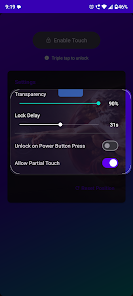
* **Adjustable Transparency**: Control the screen dimness from 0% (fully transparent) to 100% (pitch black) while locked.
* **Triple Tap Unlock**: Easily unlock your screen without fumbling for buttons.
* **Lock Delay**: Set a timer before the screen lock activates (up to 60 seconds).
* **Power Button Unlock**: Optionally unlock the screen using your device's physical power button.
* **Keep Screen On**: Prevent your display from going to sleep while SafeTouch is active.
* **Pattern Unlock**: Configure a custom swipe pattern for secure unlocking.
### Premium Features (Requires Subscription)
Unlock advanced tools and stunning visual effects with a Premium subscription:
* **Partial Touch (Square Resize)**: Create a custom "hole" on your screen where touch passes through to the app underneath, while the rest of the screen remains locked.
* **Ad Skipper**: Automatically clicks "Skip Ad" buttons for you (requires Accessibility permission).
* **Volume Key Lock**: Optionally block physical volume button presses while the screen is locked.
* **Interactive Touch Ripple**: See a beautiful water ripple effect whenever you touch the locked screen.
* **Stunning Visual Effects**: Customize your locked screen with high-quality animated backgrounds:
* ❄️ Snow Effect
* 🎆 Firecrackers
* 🌈 RGB Border
* 🍂 Autumn Leaves
* 💻 Matrix Digital Rain
### Developer Notes & Fixes
* Integrated Google AdMob for free users (Ads are completely hidden for Premium subscribers).
* General performance improvements to background service stability and touch interception layer.
### Privacy & Safety
At SafeTouch, your privacy is our top priority. Our app is designed to work entirely locally on your device:
* **No Data Collection**: We do not collect, store, or transmit any of your personal data, screen content, or touch inputs to external servers.
* **Local Processing**: The Accessibility Service (used for ad skipping) and the Overlay Service (used for screen blocking) process all events locally and are never recorded or shared.
* **Permissions**: We only request permissions absolutely necessary for the app to function (Overlay, Accessibility) and do not misuse them.
## Version 9.0
Welcome to SafeTouch! Here are the features currently available in the app:
### Core Features (Free)
* **Touch Blocking**: Lock your device's screen to prevent accidental touches.
* **Adjustable Transparency**: Control the screen dimness from 0% (fully transparent) to 100% (pitch black) while locked.
* **Triple Tap Unlock**: Easily unlock your screen without fumbling for buttons.
* **Lock Delay**: Set a timer before the screen lock activates (up to 60 seconds).
* **Power Button Unlock**: Optionally unlock the screen using your device's physical power button.
* **Keep Screen On**: Prevent your display from going to sleep while SafeTouch is active.
* **Pattern Unlock**: Configure a custom swipe pattern for secure unlocking.
### Premium Features (Requires Subscription)
Unlock advanced tools and stunning visual effects with a Premium subscription:
* **Partial Touch (Square Resize)**: Create a custom "hole" on your screen where touch passes through to the app underneath, while the rest of the screen remains locked.
* **Ad Skipper**: Automatically clicks "Skip Ad" buttons for you (requires Accessibility permission).
* **Volume Key Lock**: Optionally block physical volume button presses while the screen is locked.
* **Interactive Touch Ripple**: See a beautiful water ripple effect whenever you touch the locked screen.
* **Stunning Visual Effects**: Customize your locked screen with high-quality animated backgrounds:
* ❄️ Snow Effect
* 🎆 Firecrackers
* 🌈 RGB Border
* 🍂 Autumn Leaves
* 💻 Matrix Digital Rain
### Developer Notes & Fixes
* Integrated Google AdMob for free users (Ads are completely hidden for Premium subscribers).
* General performance improvements to background service stability and touch interception layer.
### Privacy & Safety
At SafeTouch, your privacy is our top priority. Our app is designed to work entirely locally on your device:
* **No Data Collection**: We do not collect, store, or transmit any of your personal data, screen content, or touch inputs to external servers.
* **Local Processing**: The Accessibility Service (used for ad skipping) and the Overlay Service (used for screen blocking) process all events locally and are never recorded or shared.
* **Permissions**: We only request permissions absolutely necessary for the app to function (Overlay, Accessibility) and do not misuse them.
Block accidental touches with a customizable screen overlay. Perfect for kids!
Updated on
Safety starts with understanding how developers collect and share your data. Data privacy and security practices may vary based on your use, region, and age. The developer provided this information and may update it over time.
- No data shared with third partiesLearn more about how developers declare sharing
- No data collectedLearn more about how developers declare collection
- Committed to follow the Play Families Policy


Everyone
Learn moreApp support
About the developer
RAJESHKANNAN S
smallapplabs@gmail.com
4.3/142,ward-4, Panchami kattu Valav, Maramangalathupatty
Salem, Tamil Nadu 636013
India


