
MeetNotes: AI Voice Note Taker
In-app purchases


Everyone
info
1K+
Downloads


About this app
MeetNotes is an AI note taker and voice recorder with transcription. Record a meeting, a class, a call or a quick voice memo, and MeetNotes turns the audio into text: a full transcript with speaker names, a short summary, decisions and action items, ready to share as a PDF or Word file.
Meetings come first, and MeetNotes writes the meeting minutes (MoM) for you. It works just as well for anything else you would rather not type.
RECORD, THEN GET THE NOTES
- Voice recorder: put your phone on the table and tap record. No device to buy, nothing to set up.
- Speech to text: every recording becomes a transcript, timestamped and split by speaker.
- AI notes: a summary, key takeaways, decisions, and action items with owners and due dates.
- Meeting minutes: share them as a PDF, an editable Word file, or a link that needs no account.
AUDIO TO TEXT, VIDEO TO TEXT
Already have a recording? Import audio or video files (MP3, M4A, WAV, MP4, MOV and more, up to 300 MB) and transcribe them into text and notes. On Android you can share a WhatsApp voice note straight to MeetNotes and turn the voice message into text.
VOICE MEMOS AND VOICE NOTES
Tap Self and think out loud. Your voice memo comes back as text, sorted into to-dos, reminders, ideas and decisions, in a private space only you can see. A voice to text notebook, a voice journal and a to-do list in one.
WHO SAID WHAT
MeetNotes separates speakers automatically. Rename "Speaker 1" once and the name updates everywhere, including the PDF. Regular voices are recognised in later meetings, so your team arrives already named.
YOUR LANGUAGE, OR TWO AT ONCE
There is no language to pick before you record. Voice to text follows the language actually spoken, including Hindi, Hinglish and meetings that switch language mid-sentence. Your minutes can be written in 100+ languages: record in one language and read the notes in another. Indian languages can also be shown in English letters.
ONLINE MEETINGS TOO
Paste a Zoom, Google Meet or Microsoft Teams link and the MeetNotes notetaker joins the call, records it and sends you the same transcript and minutes.
PHONE CALLS TO NOTES
Turn on Auto-process call recordings and pick the folder your phone's call recorder saves into. After each new call you get short call notes: callbacks promised, follow-ups, to-dos and decisions. MeetNotes does not record calls itself; it uses the recordings your phone already makes.
TASKS AND ANSWERS
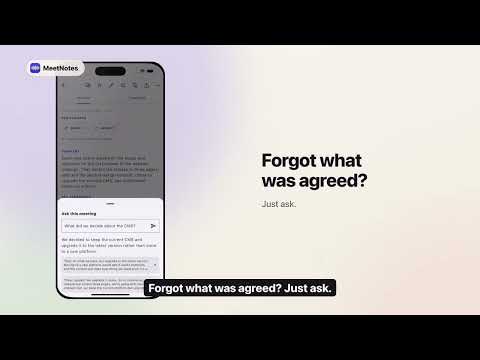
Every action item from every meeting lands in one task list, filterable by person. Search across all your meetings, or ask a question and get an answer with the exact line it came from.
PHONE, MAC AND WEB
MeetNotes runs on Android, iPhone and Mac. Read, search and export your meetings in a browser at getmeetnotes.com.
MADE FOR REAL CONVERSATIONS
Team meetings, client calls, interviews, lectures and classes, site visits, board meetings, one-on-ones, doctor consultations, and every conversation you do not want to write up by hand.
YOUR RECORDINGS ARE SAFE
Recording starts and stops only when you say so. If an upload fails, the recording stays on your phone until you are back online. Meetings are private to your account unless you share them, and deleting a meeting deletes it from our servers too.
Please be considerate: laws about recording conversations vary by place. Ask participants before you record.
PLANS
Every new account gets 100 free minutes. Minute packs never expire. Subscriptions are auto-renewable and billed through Google Play; cancel anytime in Play Store subscription settings.
Privacy Policy: https://getmeetnotes.com/privacy.html
Meetings come first, and MeetNotes writes the meeting minutes (MoM) for you. It works just as well for anything else you would rather not type.
RECORD, THEN GET THE NOTES
- Voice recorder: put your phone on the table and tap record. No device to buy, nothing to set up.
- Speech to text: every recording becomes a transcript, timestamped and split by speaker.
- AI notes: a summary, key takeaways, decisions, and action items with owners and due dates.
- Meeting minutes: share them as a PDF, an editable Word file, or a link that needs no account.
AUDIO TO TEXT, VIDEO TO TEXT
Already have a recording? Import audio or video files (MP3, M4A, WAV, MP4, MOV and more, up to 300 MB) and transcribe them into text and notes. On Android you can share a WhatsApp voice note straight to MeetNotes and turn the voice message into text.
VOICE MEMOS AND VOICE NOTES
Tap Self and think out loud. Your voice memo comes back as text, sorted into to-dos, reminders, ideas and decisions, in a private space only you can see. A voice to text notebook, a voice journal and a to-do list in one.
WHO SAID WHAT
MeetNotes separates speakers automatically. Rename "Speaker 1" once and the name updates everywhere, including the PDF. Regular voices are recognised in later meetings, so your team arrives already named.
YOUR LANGUAGE, OR TWO AT ONCE
There is no language to pick before you record. Voice to text follows the language actually spoken, including Hindi, Hinglish and meetings that switch language mid-sentence. Your minutes can be written in 100+ languages: record in one language and read the notes in another. Indian languages can also be shown in English letters.
ONLINE MEETINGS TOO
Paste a Zoom, Google Meet or Microsoft Teams link and the MeetNotes notetaker joins the call, records it and sends you the same transcript and minutes.
PHONE CALLS TO NOTES
Turn on Auto-process call recordings and pick the folder your phone's call recorder saves into. After each new call you get short call notes: callbacks promised, follow-ups, to-dos and decisions. MeetNotes does not record calls itself; it uses the recordings your phone already makes.
TASKS AND ANSWERS
Every action item from every meeting lands in one task list, filterable by person. Search across all your meetings, or ask a question and get an answer with the exact line it came from.
PHONE, MAC AND WEB
MeetNotes runs on Android, iPhone and Mac. Read, search and export your meetings in a browser at getmeetnotes.com.
MADE FOR REAL CONVERSATIONS
Team meetings, client calls, interviews, lectures and classes, site visits, board meetings, one-on-ones, doctor consultations, and every conversation you do not want to write up by hand.
YOUR RECORDINGS ARE SAFE
Recording starts and stops only when you say so. If an upload fails, the recording stays on your phone until you are back online. Meetings are private to your account unless you share them, and deleting a meeting deletes it from our servers too.
Please be considerate: laws about recording conversations vary by place. Ask participants before you record.
PLANS
Every new account gets 100 free minutes. Minute packs never expire. Subscriptions are auto-renewable and billed through Google Play; cancel anytime in Play Store subscription settings.
Privacy Policy: https://getmeetnotes.com/privacy.html
Voice recorder, audio to text & AI notes: meeting minutes, summary, tasks.
Updated on
Safety starts with understanding how developers collect and share your data. Data privacy and security practices may vary based on your use, region, and age. The developer provided this information and may update it over time.
- No data shared with third partiesLearn more about how developers declare sharing
- This app may collect these data typesLocation, Personal info and 2 others
- Data is encrypted in transit
- You can request that data be deleted


What’s new
SAVE THE AUDIO
Save any meeting's recording from its ⋯ menu. Home shows the progress, then it lands in Downloads and plays on any phone or computer.
ASK YOUR AI ASSISTANT
Connect MeetNotes to ChatGPT or Claude from Home, then ask about your meetings in plain words.
FIXES
When a meeting can't be processed, the message now says why, in your language.
Save any meeting's recording from its ⋯ menu. Home shows the progress, then it lands in Downloads and plays on any phone or computer.
ASK YOUR AI ASSISTANT
Connect MeetNotes to ChatGPT or Claude from Home, then ask about your meetings in plain words.
FIXES
When a meeting can't be processed, the message now says why, in your language.
App support
About the developer
Ultragames Entertainment Pvt. Ltd.
ultra.games1238@gmail.com
609, SHIVALIK SHILP, ISCON CROSS ROAD, AMBLI ROAD
SANIDHYA
Ahmedabad, Gujarat 380015
India
+91 98796 15091


